
No products in the cart.
AI SEO Comparison Table Generator: The Ultimate Guide to Smarter Content in 2025
10
Aug
Aug
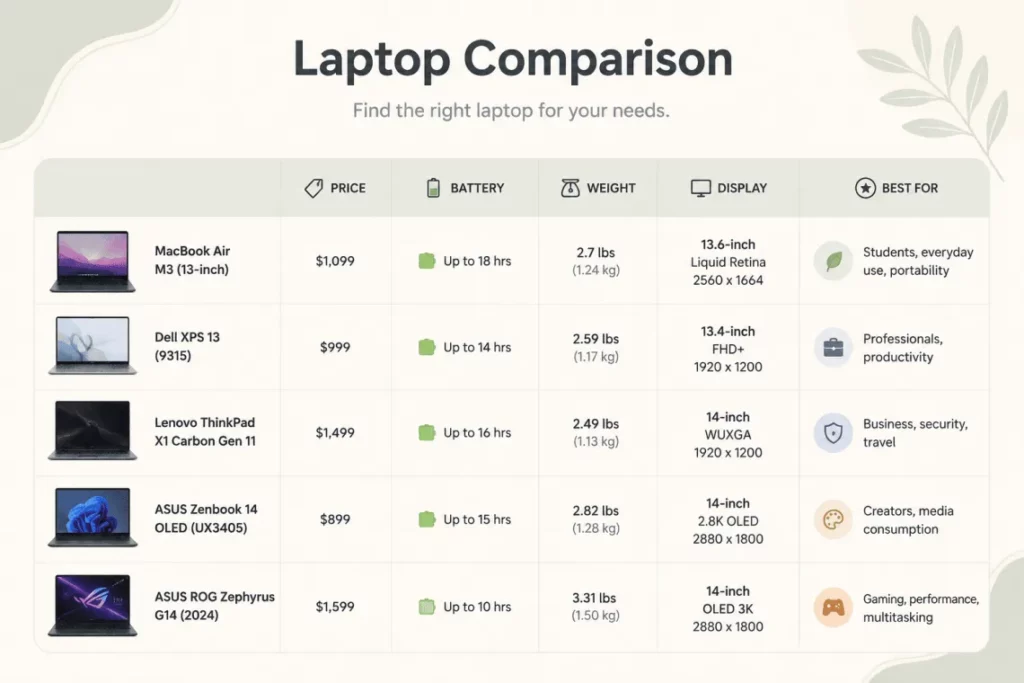
Creating side-by-side comparison content is one of the most effective ways to capture high-intent traffic, yet it remains one of the most time-consuming tasks for content teams. An AI SEO Comparison Table Generator changes this dynamic entirely, allowing marketers to produce structured, data-rich comparison tables in minutes rather than hours. These tools leverage natural language processing and machine learning to extract key differences, specifications, and pricing data from multiple sources, then format them into clean, schema-ready tables that search engines love. This guide explores how these generators work, their benefits, limitations, and how to use them for maximum SEO impact.
What Is an AI SEO Comparison Table Generator?
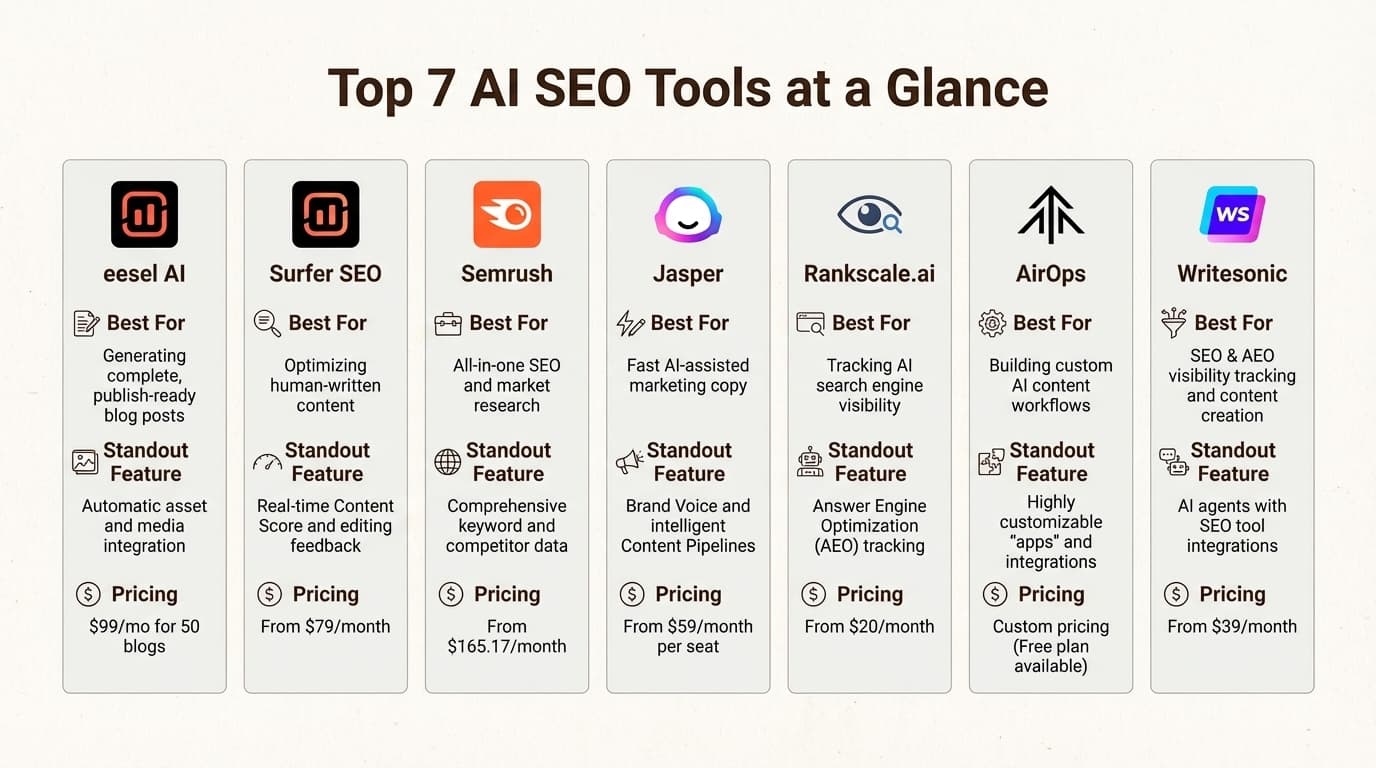
An AI SEO Comparison Table Generator is a software tool that uses artificial intelligence to automatically create comparison tables for SEO purposes. Instead of manually researching two or more products, services, or concepts and then hand-coding an HTML table, you input the entities you want to compare. The AI then scans its training data or connected web sources to identify relevant attributes, features, pricing, ratings, and other key differentiators.
The output is typically a structured table that can be directly embedded into a blog post, landing page, or product roundup. Many advanced generators also produce schema markup, specifically the “Comparison” schema or “Product” schema, which helps search engines display rich results like star ratings and price ranges directly in the search engine results pages (SERPs).
These tools are distinct from simple spreadsheet generators. They understand context, semantics, and user intent. For example, if you ask for a comparison of “Project Management Software,” the AI knows to include columns for pricing tiers, user limits, integrations, mobile apps, and customer support channels, rather than just listing random features.
Why Comparison Tables Are Critical for SEO
Before diving into the generator itself, it is essential to understand why comparison tables hold such high value in SEO strategy. Search engines prioritize content that satisfies user intent, and comparison queries are among the most commercially valuable searches.
High Purchase Intent
Users searching for “X vs Y” or “best alternatives to Z” are typically in the consideration or decision stage of the buyer’s journey. They are ready to compare options and make a choice. Capturing this traffic with a well-structured table directly influences conversion rates.
Featured Snippet Opportunities
Google frequently pulls comparison tables into featured snippets, specifically the “table” rich result format. When your table is properly marked up with schema, you have a higher chance of appearing in position zero, which dramatically increases click-through rates (CTR) and organic visibility.
Enhanced User Experience
A cluttered wall of text is difficult to scan. A comparison table provides immediate visual clarity. Users can quickly identify the winner based on their specific needs, which reduces bounce rates and increases dwell time—both positive signals for search rankings.
Link Building Potential
Comprehensive, accurate comparison tables are considered high-quality resources. Other websites, bloggers, and forums are more likely to link to a page that offers a clear, data-driven comparison than to a generic listicle. This naturally builds backlinks, which remain a core ranking factor.
How Does an AI SEO Comparison Table Generator Work?
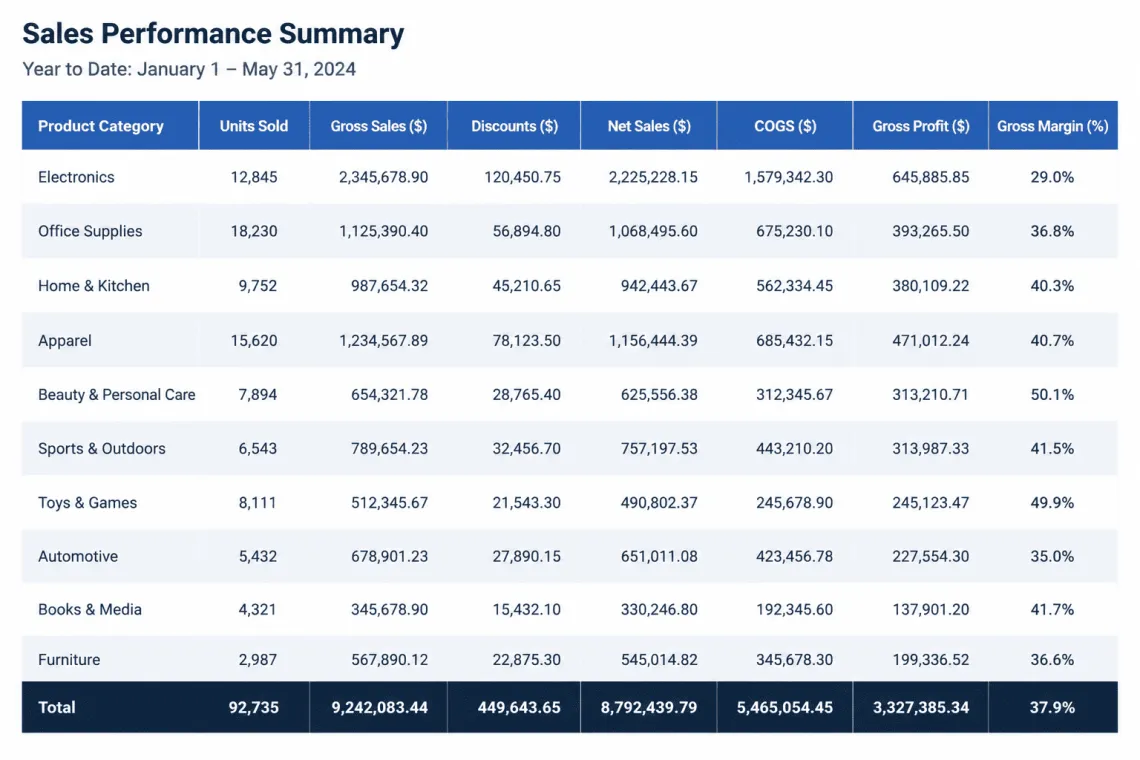
Understanding the underlying mechanics helps you choose the right tool and use it effectively. Most generators follow a similar workflow, though the sophistication varies by platform.
Step 1: Input and Entity Recognition
You provide the names of the items to compare. The AI uses named entity recognition (NER) to identify the specific products, services, or topics. It distinguishes between “Apple” the fruit and “Apple” the technology company based on context.
Step 2: Attribute Extraction
The AI searches its knowledge base or scrapes live web data to find relevant attributes. This includes technical specifications, pricing, user reviews, ratings, and unique selling points. Advanced tools use sentiment analysis to summarize user opinions into pros and cons.
Step 3: Data Normalization
Raw data is messy. One source might list “Free Trial: 14 days” while another says “Trial Period: 2 weeks.” The AI normalizes this data into a consistent format, ensuring that the table is accurate and easy to read.
Step 4: Table Generation and Formatting
The AI structures the data into a clean HTML table. It decides which attributes go into columns and which items go into rows. It also applies responsive design principles so the table works on mobile devices, often converting wide tables into card-based layouts on smaller screens.
Step 5: Schema Markup Integration
The best tools automatically generate JSON-LD schema code. This code is added to your page’s backend, telling Google exactly what the table represents. This is the critical step for earning rich snippets and structured data enhancements.
Key Features to Look For in a Generator
Not all AI SEO Comparison Table Generators are created equal. When evaluating tools, consider the following features to ensure you get the best return on investment.
- Real-Time Data Access: The tool should pull current pricing and features, not just static training data that may be outdated.
- Schema Generation: Look for automatic output of Comparison or Product schema in JSON-LD format.
- Customization Options: You should be able to add, remove, or edit columns and rows manually after generation.
- Multi-Format Export: The ability to export as HTML, Markdown, or CSV is essential for different content management systems.
- Sentiment Analysis: Tools that summarize user reviews into “Best for” or “Not ideal for” tags add significant value.
- Language Support: Ensure the tool supports the languages your target audience uses.
- API Access: For large-scale content operations, an API allows you to automate table generation within your existing content workflow.
Benefits of Using an AI Generator for Comparison Content
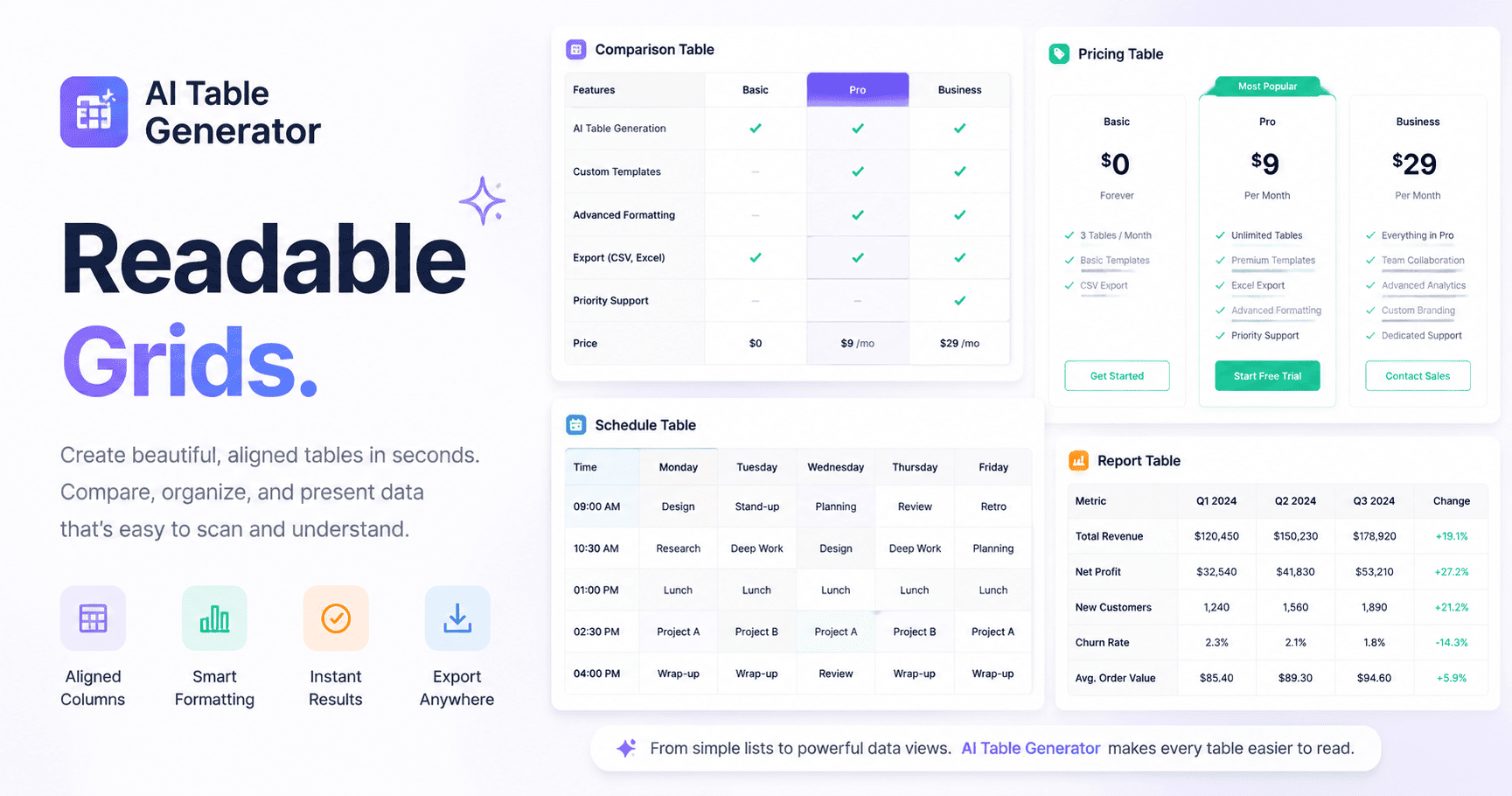
The shift from manual table creation to AI-powered generation offers several tangible benefits for SEO professionals and content marketers.
Massive Time Savings
Manually researching and building a comparison table for five products can take 4-6 hours. An AI generator can produce a draft in 60 seconds. This efficiency allows you to publish more comparison content, targeting more keywords and capturing more traffic.
Reduction of Human Error
When manually copying data from multiple sources, typos and misaligned data are common. AI reduces these errors by systematically extracting and normalizing data, ensuring that the numbers and features you present are accurate.
Scalability
If you manage a large affiliate site or a SaaS blog, you might need hundreds of comparison tables. Manual creation is not scalable. AI generators allow you to produce content at scale without sacrificing quality or accuracy.
Improved Content Consistency
AI ensures that every table follows the same structure and formatting guidelines. This consistency improves the user experience across your site and makes your content look more professional and authoritative.
Enhanced SERP Visibility
By automatically generating schema markup, these tools give you a direct path to rich results. A table with star ratings and prices in the SERP stands out from the competition and drives higher CTR.
Limitations and Challenges
While powerful, AI SEO Comparison Table Generators are not a silver bullet. Understanding their limitations is crucial for maintaining content quality and trust.
Data Accuracy Concerns
AI models can hallucinate or rely on outdated information. If a product has changed its pricing tier or discontinued a feature, the AI might not know. Always verify critical data points, especially pricing and availability, before publishing.
Lack of Nuance
AI struggles with subjective qualities like “ease of use” or “customer support quality.” These are often better assessed through hands-on testing or by reading recent user reviews. The AI can provide a baseline, but you may need to add your own expert commentary.
Generic Output
Without proper prompting, the AI may generate a generic table that looks identical to thousands of other sites. To rank well, you need to add unique insights, specific use-case scenarios, and original analysis that the AI cannot provide.
Potential for Duplicate Content
If thousands of sites use the same tool with the same inputs, the output could be very similar. Search engines may view this as thin or duplicate content. You must customize the table and surrounding text to maintain originality.
AI Generator vs. Manual Comparison Tables
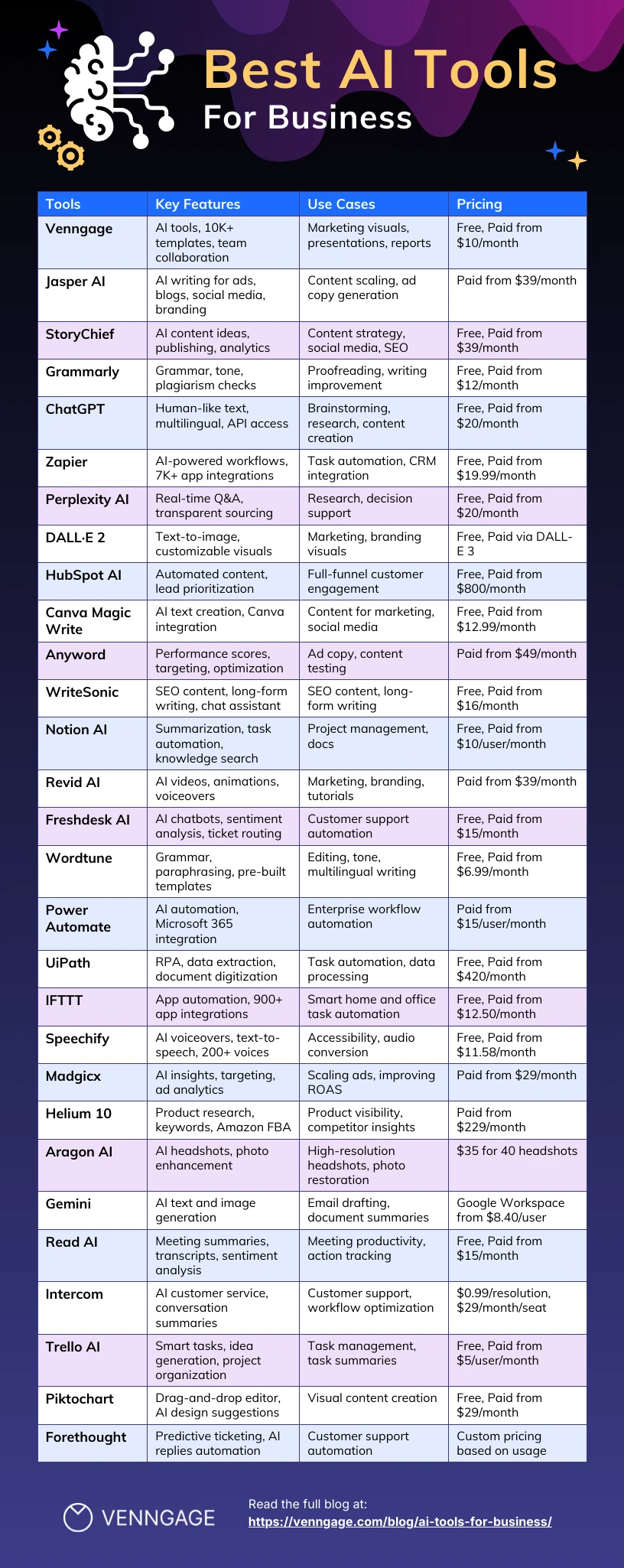
To decide which approach is right for your project, consider the trade-offs between speed and depth.
| Factor | AI Generator | Manual Creation |
|---|---|---|
| Time Required | Minutes | Hours |
| Data Accuracy | Requires verification | High if researched carefully |
| Uniqueness | Risk of generic output | High, based on personal testing |
| Schema Markup | Automatic | Manual coding required |
| Scalability | Excellent | Poor |
| Expertise Display | Low | High (shows E-E-A-T) |
| Cost | Subscription fee | Labor cost |
The best strategy often involves a hybrid approach. Use the AI to generate the initial draft and structure, then manually refine the data, add personal testing notes, and inject your unique perspective. This combines efficiency with the depth that builds authority.
Practical Guide: How to Use an AI SEO Comparison Table Generator
To get the most out of these tools, follow this step-by-step workflow. This process ensures that your final output is accurate, unique, and optimized for search engines.
Step 1: Define Your Target Keyword and Intent
Start with a clear keyword like “HubSpot vs Salesforce” or “Best CRM for small business.” Understand what the user wants. Are they looking for a quick answer, or do they need deep technical specifications? This determines the columns you will need.
Step 2: Choose Your Entities Wisely
Do not compare apples to oranges. Ensure the items you are comparing are direct competitors serving the same primary function. Comparing a free tool to an enterprise platform is only useful if you clearly segment the analysis.
Step 3: Generate the Initial Table
Input your entities into the AI tool. Provide specific instructions if the tool allows. For example, you might specify “Include pricing for the Pro tier” or “Focus on integration capabilities.” Review the generated table for obvious errors.
Step 4: Verify All Data Manually
Visit the official websites of each product. Check the current pricing page, feature list, and any recent announcements. Update the table with any changes. This step is non-negotiable for maintaining trust with your audience.
Step 5: Add Unique Value and Context
Write a detailed introduction explaining why you created the comparison. Add a “Winner” section for each use case. Include screenshots or personal experience notes. This is where you differentiate your content from the AI-generated baseline.
Step 6: Implement Schema Markup
If your tool does not automatically add schema, use Google’s Structured Data Markup Helper to add the “Comparison” or “Product” schema to your HTML. Test the markup using the Rich Results Test tool to ensure there are no errors.
Step 7: Optimize the Surrounding Content
Ensure your H1 and H2 tags include the target keyword. Write a meta description that highlights the table’s value. Use internal links to other relevant comparison posts on your site to build a topical cluster.
Common Mistakes and How to Avoid Them
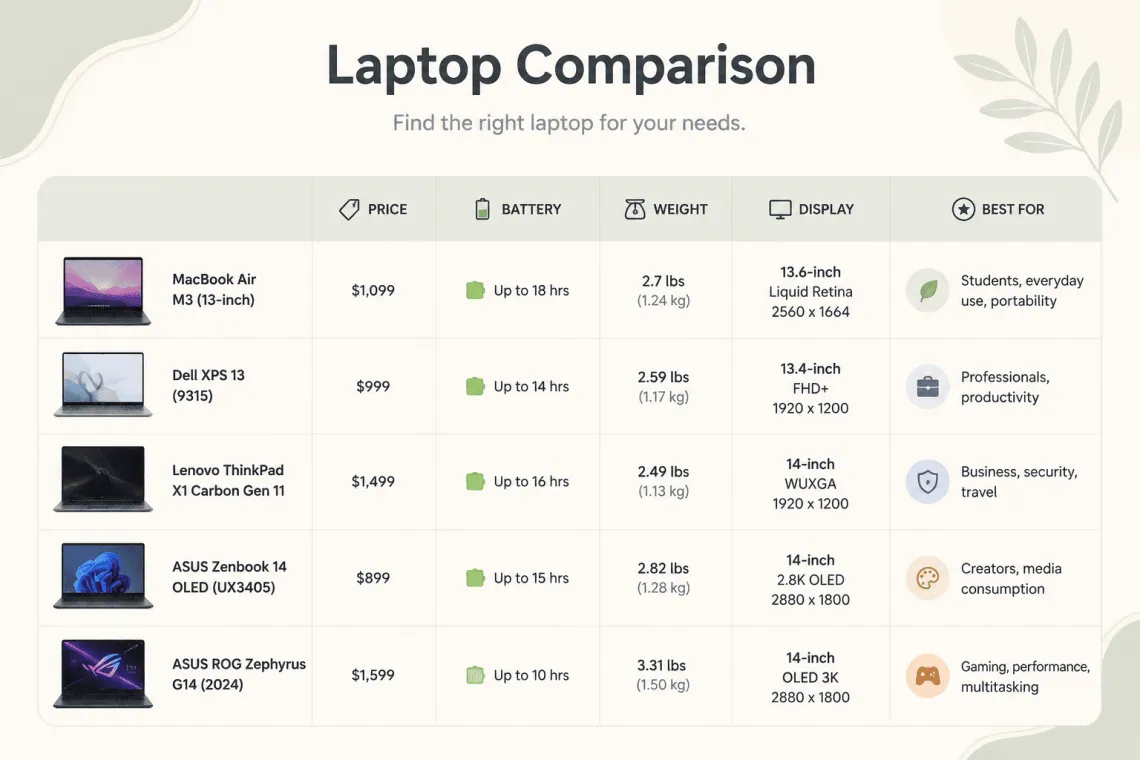
Even with AI assistance, many content creators make avoidable errors that hurt their rankings and credibility.
Mistake 1: Publishing Without Fact-Checking
Relying solely on the AI’s output is dangerous. Pricing changes frequently, and features are updated. Always verify the data on the official source. A single incorrect price can destroy your credibility and increase bounce rates.
Mistake 2: Ignoring Mobile Responsiveness
Wide tables look terrible on mobile phones. Ensure your HTML table uses responsive CSS. Many AI generators provide this, but if you are manually coding, test the table on a mobile device. Consider using a card-based layout for mobile users.
Mistake 3: Over-Optimizing with Keywords
Stuffing the keyword “AI SEO Comparison Table Generator” into every heading and paragraph will trigger spam filters. Use the keyword naturally in the H1, the first paragraph, and one or two H2s. Focus on semantic variations like “comparison table tool” or “automated comparison generator.”
Mistake 4: Forgetting to Update the Table
An outdated table is worse than no table. Set a schedule to review your comparison posts every quarter. Update pricing, features, and ratings to keep the content fresh. Google rewards regularly updated content with higher rankings.
Mistake 5: Neglecting the “Why”
A table without context is just data. Users want to know why one option is better for their specific situation. Add a “Bottom Line” or “Recommendation” section after the table to guide the user’s decision-making process.
Important Notes on E-E-A-T and AI-Generated Content
Google’s Search Quality Evaluator Guidelines emphasize Experience, Expertise, Authoritativeness, and Trustworthiness (E-E-A-T). AI-generated tables can undermine your E-E-A-T if not handled correctly.
To maintain high E-E-A-T, you must demonstrate first-hand experience. If you are comparing project management tools, mention that you tested them with your own team. Include specific examples of workflows you completed. This personal experience cannot be replicated by an AI.
Furthermore, clearly disclose your use of AI. While this is not a ranking factor, transparency builds trust with your audience. You can state that the table was generated using AI and then refined by your editorial team. This honesty positions you as a reliable source.
Finally, ensure your author bio is clear. Show that a human expert reviewed the content. Include links to your LinkedIn profile or other credentials. This signals to Google that a knowledgeable person stands behind the information.
Frequently Asked Questions
What is the best AI SEO Comparison Table Generator?
T Popular options include specialized SEO content tools that offer table generation features, as well as general-purpose AI writing assistants with table capabilities. Look for tools that offer real-time data access, schema markup generation, and easy customization. Evaluate free trials to see which interface works best for your workflow.
Can Google index AI-generated comparison tables?
Yes, Google can index AI-generated content, including tables, as long as it provides value to users and is not spammy. The key is to ensure the content is accurate, original, and enhanced with human expertise. Google’s guidelines focus on the quality of the content, not the method of production. A well-structured table with schema markup has a good chance of being indexed and featured.
How do I add schema markup to a comparison table?
You can add schema markup manually using JSON-LD format in the head of your HTML page. Use the “Comparison” schema type or the “Product” schema with “review” and “aggregateRating” properties. Alternatively, use Google’s Structured Data Markup Helper to generate the code visually. After adding it, validate the code using the Rich Results Test tool to ensure it is error-free.
Will using an AI generator result in duplicate content penalties?
Not automatically. Duplicate content penalties occur when you copy content verbatim from another source. If you use an AI generator and then add your own analysis, screenshots, and unique commentary, the final page is original. However, if you publish the raw AI output without any modifications, it may be too similar to other pages using the same tool. Always customize the output.
How often should I update my comparison tables?
You should review your comparison tables at least once per quarter. The SaaS and technology industries change rapidly. Pricing, features, and integrations are frequently updated. Set a reminder to check your top-performing comparison posts every 90 days. If a major product update occurs, update the table immediately to maintain accuracy.
Conclusion
The AI SEO Comparison Table Generator is a transformative tool for content marketers seeking to scale high-intent comparison content. It dramatically reduces the time required to produce structured, data-rich tables, and when combined with proper schema markup, it opens the door to valuable rich snippets in the SERPs. However, the technology is not a replacement for human expertise. The most successful SEO strategies will use AI to handle the heavy lifting of data extraction and formatting, while human editors focus on verification, personal experience, and unique analysis. By following the practical steps and avoiding common pitfalls outlined in this guide, you can leverage these generators to build authoritative, high-ranking comparison content that drives conversions and establishes your site as a trusted resource in your niche.
Xem thêm:
- AI SEO Ranking Opportunities: The Complete Playbook for 2025
- WP Trove AI WordPress: The Complete Guide to AI-Powered Site Management
- AI SEO Natural Language SEO: The Complete Guide to Search in 2025
- AI SEO Traffic Prediction: The Complete Guide to Forecasting Organic Growth
- AI SEO for Affiliate Marketing: The 2025 Playbook for Dominating Search and Commissions
Bài viết cùng chủ đề:

AI SEO SEO Automation with Make: The Complete Workflow Guide

AI SEO SEO Automation with Zapier: The Complete Workflow Guide

AI SEO SEO Automation with n8n: The Complete Workflow Guide
AI SEO SEO Automation with Gemini: The Complete Guide to Scaling Organic Growth

AI SEO SEO Automation with Claude: The Complete Guide to Scaling Content in 2025

AI SEO SEO Automation with ChatGPT: The Complete Playbook for 2025

AI SEO & SEO Automation for Affiliate Sites: The 2025 Playbook for Passive Income Growth
AI SEO & SEO Automation for Bloggers: The Complete Guide to Scaling Your Content

AI SEO & SEO Automation for Agencies: The Complete 2025 Playbook

AI SEO and SEO Automation for Ecommerce: The Complete Playbook for 2025

AI SEO & SEO Automation for WordPress: The Complete Playbook for 2025
AI SEO SEO Automation Strategy: The Complete Playbook for 2025

Mastering the AI SEO SEO Automation Process: A Complete Guide to Scaling Organic Growth
AI SEO SEO Automation System: The Complete Guide to Scaling Organic Growth in 2025
AI SEO SEO Automation Platform: The Complete Guide to Scaling Organic Growth in 2025
AI SEO SEO Automation Software: The Complete Guide to Scaling Organic Growth in 2025















