No products in the cart.
AI SEO & SEO Automation for WordPress: The Complete Playbook for 2025

10
Aug
Aug
Search engine optimization has entered a new era where manual audits and repetitive tasks no longer cut it. The integration of AI SEO SEO Automation for WordPress is transforming how websites rank, shifting the focus from tedious guesswork to data-driven precision. For site owners, marketers, and agencies, leveraging artificial intelligence within the WordPress ecosystem is no longer a luxury but a necessity to stay competitive. This comprehensive guide explores the tools, strategies, and practical steps to fully automate your SEO workflow, ensuring your content reaches the right audience at the right time.
Understanding AI SEO and Automation in the WordPress Ecosystem
AI SEO refers to the application of machine learning algorithms and natural language processing to optimize website content and technical infrastructure for search engines. When combined with automation, it creates a system that continuously monitors, analyzes, and adjusts your SEO strategy without constant human intervention. In the context of WordPress, this means plugins and external services that integrate directly with your dashboard to handle everything from keyword research to internal linking.
Automation in this space is not about setting and forgetting. It is about creating intelligent workflows that learn from performance data. For instance, an AI tool can analyze which headlines generate the most clicks and automatically suggest similar patterns for future posts. This dynamic approach ensures that your SEO strategy evolves alongside search engine algorithm updates, which now occur thousands of times per year.
The Core Components of an Automated SEO System
To build a robust automated SEO framework, you need to understand its fundamental building blocks. These components work in synergy to create a self-optimizing website.
- Content Optimization Engines: Tools that analyze readability, keyword density, and semantic relevance in real-time.
- Technical Audit Bots: Automated crawlers that scan for broken links, missing meta tags, and schema markup errors.
- Performance Monitors: Systems that track Core Web Vitals and page speed metrics, triggering alerts when thresholds are breached.
- Link Analysis Modules: AI that evaluates backlink profiles and identifies toxic links for disavowal.
- Rank Tracking Suites: Automated daily checks on keyword positions across different geographies and devices.
- Track Time Savings: Use time tracking software to measure how many hours your team spends on SEO tasks before and after automation.
- Monitor Organic Revenue: Set up e-commerce tracking in Google Analytics to attribute revenue to organic search traffic.
- Analyze Content Efficiency: Compare the time to produce a piece of content with the traffic it generates. AI should reduce production time while maintaining or improving traffic quality.
- Evaluate Tool Costs: Calculate the total subscription cost of your AI tools and compare it to the value of the time saved and the additional revenue generated.
Why WordPress is the Ideal Platform for AI SEO Automation
WordPress powers over 43% of all websites on the internet, and its open-source architecture makes it uniquely suited for AI integration. The platform’s extensive REST API allows AI services to communicate directly with your database, enabling real-time updates to content and metadata. Furthermore, the plugin ecosystem provides a low-barrier entry point for implementing complex machine learning models without writing a single line of code.
The flexibility of WordPress also means that automation can be granular. You can automate SEO for a single product page, a category archive, or the entire site. This scalability is crucial for e-commerce stores with thousands of SKUs, where manual optimization is simply impossible. The ability to schedule AI-driven content updates during low-traffic periods also minimizes the risk of user experience disruption.
Key Benefits of Implementing AI SEO Automation
The shift towards automation yields tangible, measurable benefits that go beyond simple time savings. Understanding these advantages helps justify the investment in premium tools and services.
| Benefit | Impact on Website | Time Saved (Weekly) |
|---|---|---|
| Automated Keyword Clustering | Higher topical authority and relevance | 4-6 hours |
| Dynamic Meta Tag Generation | Improved CTR from search results | 2-3 hours |
| Real-time Schema Markup | Eligibility for rich snippets and featured positions | 3-4 hours |
| Automated Internal Linking | Better crawlability and page authority distribution | 5-7 hours |
| Predictive Content Gap Analysis | Proactive creation of high-demand content | 6-8 hours |
Top AI SEO Plugins and Tools for WordPress
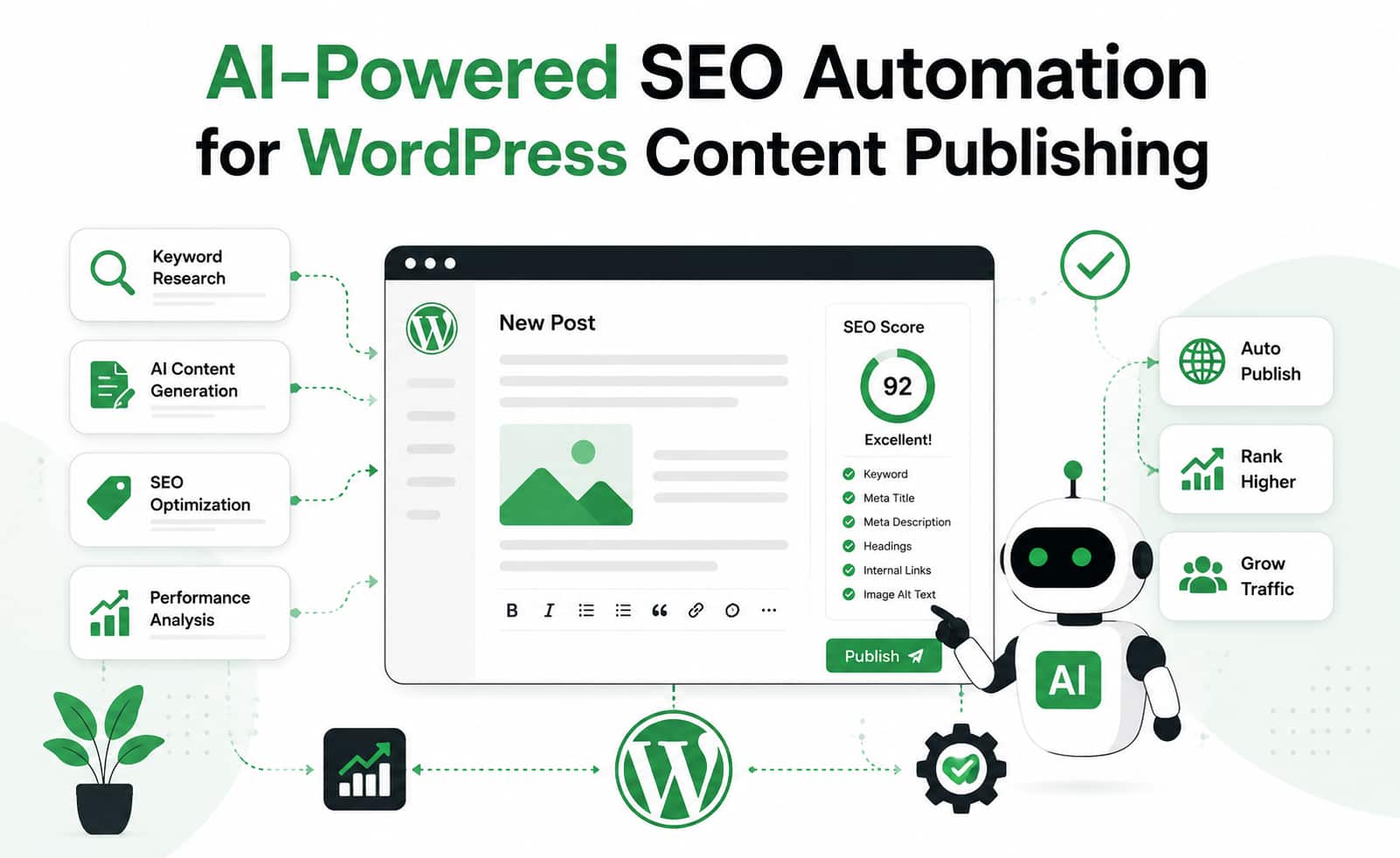
The market is flooded with tools claiming to leverage AI, but only a few deliver genuine automation that impacts rankings. Selecting the right stack depends on your specific needs, budget, and technical expertise. Below is a breakdown of the most effective solutions currently available.
Rank Math with AI Module
Rank Math has evolved from a simple on-page optimizer to a comprehensive SEO suite. Its AI module analyzes your content against top-ranking pages and provides actionable recommendations. The plugin automates the generation of SEO titles and meta descriptions based on your target keyword, and it can even suggest content improvements based on the search intent of the query. Its integration with Google Search Console provides automated insights directly within your WordPress dashboard.
Yoast SEO Premium with AI Title Generator
Yoast remains a staple for many site owners. The premium version includes an AI-powered title generator that creates multiple variations of your headline, testing for emotional impact and keyword inclusion. The plugin also automates the creation of XML sitemaps and schema markup, ensuring that technical SEO is handled without manual intervention. Its readability analysis uses AI to suggest simpler sentence structures for better user engagement.
Surfer SEO with WordPress Integration
Surfer SEO takes a data-driven approach by analyzing the top 20 search results for your target keyword. It provides a content score that predicts your ability to rank. The WordPress integration allows you to optimize your content in real-time within the Gutenberg editor. The tool automates the process of adding related keywords, calculating the ideal word count, and structuring your headings for maximum semantic relevance.
Internal Link Juicer with AI Suggestions
Internal linking is a tedious but critical SEO task. This plugin automates the process by analyzing your content and automatically inserting relevant links to other posts on your site. The AI component learns from your linking patterns and suggests anchor text that improves context for search engines. This not only saves hours of manual work but also ensures that link equity is distributed evenly across your site.
Step-by-Step Guide to Setting Up SEO Automation
Implementing automation requires a structured approach to avoid conflicts between tools and to ensure data accuracy. Follow this practical guide to transform your WordPress site into an automated SEO powerhouse.
Step 1: Audit Your Current SEO Baseline
Before automating, you need to know where you stand. Use a tool like Screaming Frog or Sitebulb to crawl your entire site and export a list of current issues. This includes missing titles, duplicate content, and slow-loading pages. This baseline will help you measure the effectiveness of your automation efforts later. Document your current organic traffic and keyword rankings for comparison.
Step 2: Install and Configure Core Plugins
Start with a primary SEO plugin like Rank Math or Yoast. Configure the basic settings, including your preferred URL structure and default meta templates. Next, install a dedicated AI content tool like Surfer SEO or Frase. Connect these tools via API keys to ensure they can communicate. Finally, add a performance plugin like WP Rocket or LiteSpeed Cache to handle the technical speed aspects that AI tools will monitor.
Step 3: Set Up Automated Reporting
Automation is useless without visibility. Configure your SEO plugin to send weekly email reports summarizing key metrics. Use Google Analytics 4 and Search Console integrations to pull data into a centralized dashboard. Tools like Looker Studio can automate the creation of visual reports that track your progress against the baseline you established in Step 1. Set up alerts for significant drops in traffic or rankings.
Step 4: Automate Content Creation Workflows
For content teams, automation can streamline the entire production pipeline. Use AI writing assistants to generate first drafts based on your target keywords. Then, run those drafts through your SEO plugin’s analysis tool to ensure they meet optimization standards. Automate the publishing process by scheduling posts during peak traffic times. Use plugins like PublishPress to create approval workflows that don’t require manual email chains.
Common Mistakes to Avoid with AI SEO Automation
While automation offers immense power, it also introduces new risks. Many site owners fall into traps that can harm their rankings or result in penalties. Being aware of these pitfalls is the first step to avoiding them.
Over-Optimization and Keyword Stuffing
AI tools can sometimes go overboard with keyword insertion. If you blindly follow every suggestion, your content may become unreadable and trigger search engine spam filters. Always review AI-generated content for natural flow. The goal is to satisfy user intent, not just to match a keyword density algorithm. Use AI suggestions as a guide, not as a final draft.
Ignoring User Experience Metrics
Automation focuses heavily on technical and on-page factors, but search engines prioritize user experience. If your automated internal linking creates confusing navigation, or if your AI-generated meta descriptions are misleading, your bounce rate will skyrocket. Monitor your engagement metrics closely. If you see a decline in time-on-page or an increase in exit rates, your automation strategy may be harming your UX.
Neglecting Regular Manual Audits
Automation handles repetitive tasks, but it cannot replace strategic thinking. Search engine algorithms are constantly evolving, and what works today may not work tomorrow. Schedule a monthly manual audit where you review your automated workflows, check for new algorithm updates, and adjust your AI tool settings accordingly. This human oversight ensures that your automation remains aligned with your business goals.
Advanced Strategies for Scaling with AI Automation
Once you have mastered the basics, you can explore advanced techniques that give you a competitive edge. These strategies leverage AI’s predictive capabilities to stay ahead of trends and user demands.
Predictive Analytics for Content Planning
Use AI tools that analyze search trend data to predict which topics will gain traction in the coming months. Tools like Google Trends and Exploding Topics can be integrated with your WordPress dashboard via APIs. This allows you to automate the creation of content briefs for upcoming trends, ensuring you publish before the competition. This proactive approach positions your site as an authority in your niche.
Dynamic Content Personalization
AI can personalize the content a user sees based on their search history and on-site behavior. Plugins like OptinMonster or If-So use AI to display different headlines, images, or calls-to-action to different segments of your audience. While this is primarily a conversion tool, it also impacts SEO by reducing bounce rates and increasing dwell time, both of which are positive ranking signals.
Automated Schema Markup for Rich Results
Structured data is critical for appearing in rich snippets, but it is complex to implement manually. AI-powered schema generators can automatically add the appropriate markup for articles, products, reviews, and FAQs. This automation ensures that your site is always eligible for enhanced search features without requiring a developer to update code every time you publish new content.
Measuring the ROI of Your Automation Efforts
To justify the cost of premium AI tools, you must track the return on investment. This goes beyond just looking at keyword rankings. A comprehensive ROI analysis includes time saved, increased organic traffic, and conversion rate improvements.
Important Notes on Data Privacy and Compliance
When using AI tools, you are often sending your content data to third-party servers for analysis. This raises privacy concerns, especially with the enforcement of GDPR and CCPA. Ensure that the tools you use are compliant with these regulations. Review their data processing agreements to understand how your data is stored and used. For sites with a global audience, consider using tools that offer data residency options in specific regions.
Additionally, be transparent with your users about your use of AI. If you are generating content with AI, some jurisdictions require disclosure. While this is not strictly an SEO issue, it affects trust and brand reputation, which indirectly impacts your search rankings through user behavior signals.
Frequently Asked Questions About AI SEO Automation for WordPress
Will AI SEO automation completely replace human SEO experts?
No, AI automation handles repetitive tasks and data analysis, but strategic direction, creative content development, and nuanced judgment still require human expertise. The most effective approach is a hybrid model where AI handles the heavy lifting and humans focus on strategy and quality control.
How much does it cost to implement AI SEO automation on WordPress?
The cost varies widely depending on the tools you choose. Basic automation can start with a free plugin like Rank Math, while premium AI content tools like Surfer SEO cost around $99 per month. A full stack of tools for a professional agency could cost over $500 per month. The investment is typically offset by the time saved and the increase in organic traffic.
Can AI SEO automation help with local SEO for small businesses?
Yes, many AI tools can automate local SEO tasks such as managing Google Business Profile citations, generating location-specific content, and monitoring local keyword rankings. This is particularly useful for businesses with multiple physical locations, as it ensures consistency across all local search listings.
Is it safe to use AI-generated content on my WordPress site?
It is safe as long as the content is high-quality, accurate, and provides value to the reader. Search engines penalize low-quality, spammy content regardless of whether it is written by a human or an AI. Always review and edit AI-generated content to ensure it meets your editorial standards and includes unique insights or data that cannot be found elsewhere.
How do I choose the right AI SEO plugin for my WordPress site?
Start by identifying your biggest SEO pain points. If you struggle with content optimization, choose a tool like Surfer SEO. If you need help with technical audits, Rank Math or Yoast are excellent choices. Consider the size of your site, your budget, and your team’s technical skill level. Most tools offer free trials, so test a few options before committing to a long-term subscription.
Conclusion: The Future of WordPress SEO is Automated and Intelligent
The convergence of AI and SEO automation within WordPress represents a fundamental shift in how digital marketing operates. The days of manually updating meta tags and guessing at keyword strategies are fading. By embracing AI SEO SEO Automation for WordPress, you equip your website with the ability to adapt, learn, and grow in an increasingly competitive digital landscape. The tools and strategies outlined in this guide provide a roadmap for implementation, but the key to success lies in continuous monitoring and refinement. Start small, measure your results, and scale your automation efforts as you gain confidence. The websites that thrive in the coming years will be those that leverage artificial intelligence not just as a tool, but as an integral part of their growth strategy.
Xem thêm:
- Mastering the AI Content Calendar: Automate, Optimize, and Scale Your Publishing Strategy
- AI SEO Content Accuracy: The Complete Guide to Verifying Machine-Generated Copy
- AI SEO Long Tail Keyword Research: The Complete Guide to Smarter Rankings
- AI SEO DNS Optimization: The Complete Guide to Boosting Search Rankings in 2025
- WP Trove Content Automation: The Complete Guide to Scaling Your WordPress Content Workflow
Bài viết cùng chủ đề:

AI SEO SEO Automation with Make: The Complete Workflow Guide

AI SEO SEO Automation with Zapier: The Complete Workflow Guide

AI SEO SEO Automation with n8n: The Complete Workflow Guide
AI SEO SEO Automation with Gemini: The Complete Guide to Scaling Organic Growth

AI SEO SEO Automation with Claude: The Complete Guide to Scaling Content in 2025

AI SEO SEO Automation with ChatGPT: The Complete Playbook for 2025

AI SEO & SEO Automation for Affiliate Sites: The 2025 Playbook for Passive Income Growth
AI SEO & SEO Automation for Bloggers: The Complete Guide to Scaling Your Content

AI SEO & SEO Automation for Agencies: The Complete 2025 Playbook

AI SEO and SEO Automation for Ecommerce: The Complete Playbook for 2025
AI SEO SEO Automation Strategy: The Complete Playbook for 2025

Mastering the AI SEO SEO Automation Process: A Complete Guide to Scaling Organic Growth
AI SEO SEO Automation System: The Complete Guide to Scaling Organic Growth in 2025
AI SEO SEO Automation Platform: The Complete Guide to Scaling Organic Growth in 2025
AI SEO SEO Automation Software: The Complete Guide to Scaling Organic Growth in 2025
AI SEO SEO Automation Workflow: The Complete Guide to Scaling Organic Growth in 2025