No products in the cart.
AI SEO SEO Automation with n8n: The Complete Workflow Guide

10
Aug
Aug
AI SEO SEO automation with n8n is transforming how digital marketing teams handle repetitive tasks. Instead of manually checking rankings, generating meta descriptions, or updating internal links, marketers now build automated workflows that run around the clock. n8n, a fair-code workflow automation tool, sits at the center of this shift because it connects AI models, search APIs, and content management systems without requiring a single line of custom backend code. This guide breaks down exactly how to build these systems, what they can do, and where they fall short.
What Is AI SEO Automation with n8n?

AI SEO SEO automation with n8n refers to the practice of using n8n’s visual node-based editor to create workflows that combine artificial intelligence (typically OpenAI, Anthropic, or local models) with SEO data sources. These workflows handle tasks like keyword clustering, content brief generation, on-page optimization checks, and rank tracking updates. The core value proposition is speed: a workflow can process 500 URLs for missing title tags in minutes, while a human would need days.
n8n differs from Zapier or Make because it offers granular control over data flow, supports complex branching logic, and can run self-hosted. For SEO teams handling sensitive client data or large datasets, self-hosting n8n means no per-task costs and full data privacy. The platform uses a JSON-based workflow structure, but the visual editor means you rarely touch raw code unless you need custom JavaScript functions.
The Anatomy of an n8n SEO Workflow
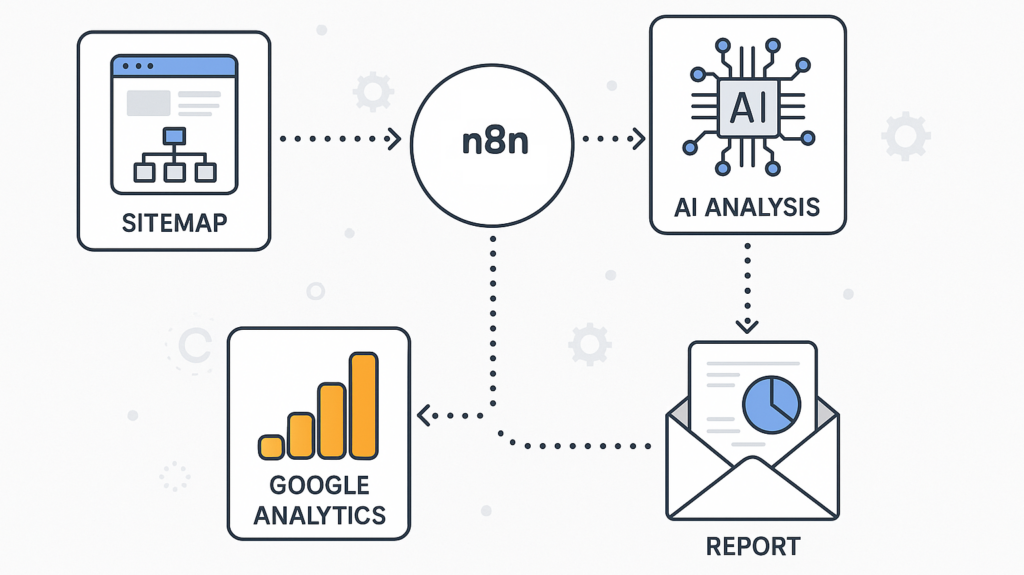
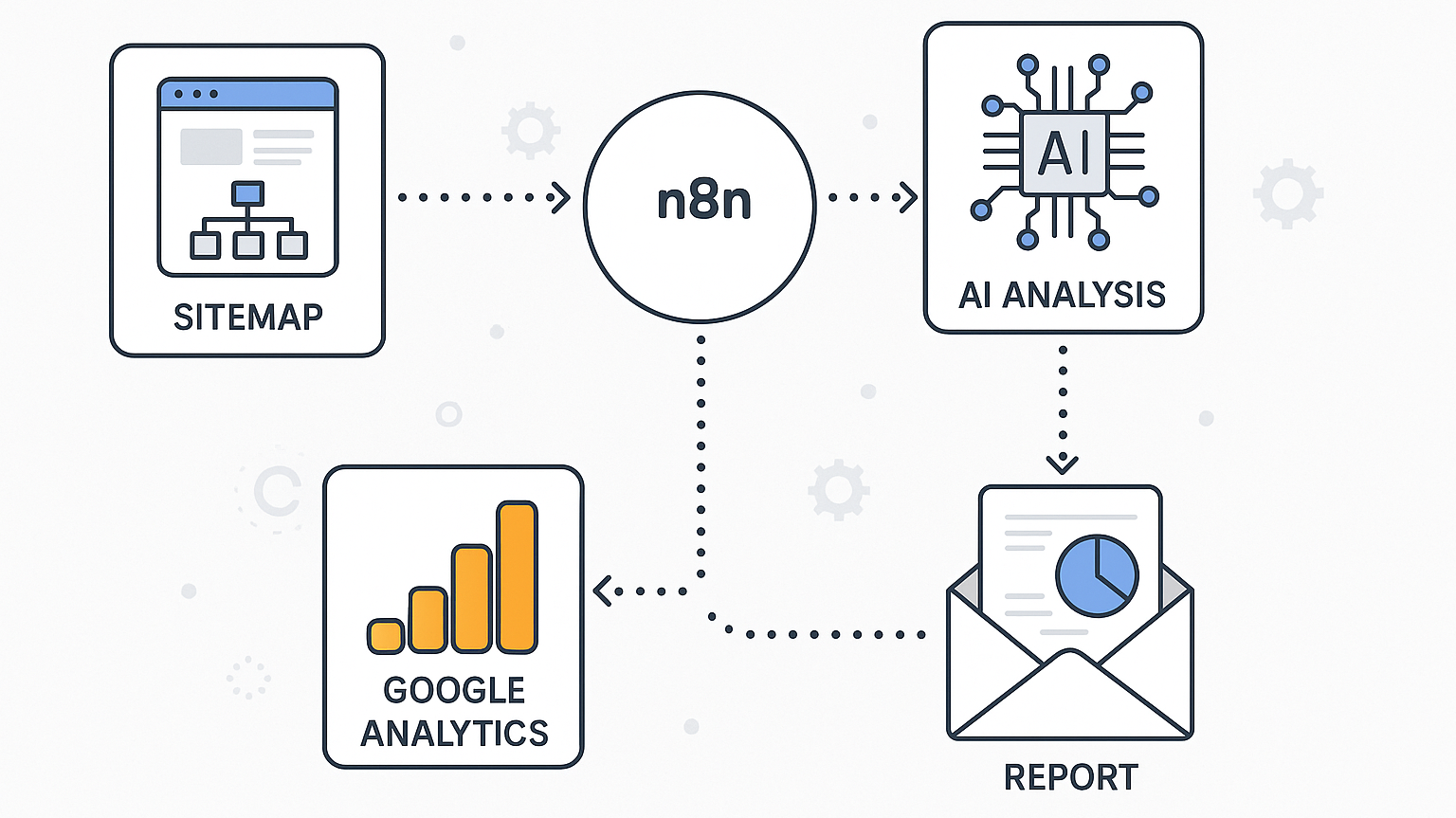
Every AI SEO automation workflow in n8n follows a similar pattern. First, a trigger node starts the process—this could be a cron schedule, a webhook from Google Sheets, or a manual execution. Second, data collection nodes pull information from sources like Google Search Console, Ahrefs, or a website’s sitemap. Third, AI processing nodes analyze this data, generate content, or classify keywords. Finally, action nodes push results to a CMS, send emails, or update a database.
For example, a typical workflow might start with a cron trigger every Monday at 9 AM. It then fetches the top 50 underperforming pages from Google Search Console, sends each URL to an AI model with a prompt asking for three new content suggestions, and finally writes those suggestions into a Notion database for the editorial team. This entire sequence runs without human intervention.
Core Use Cases for AI SEO Automation with n8n
The practical applications of AI SEO SEO automation with n8n span the entire SEO lifecycle. Below are the most impactful workflows that teams deploy today.
Automated Keyword Clustering and Mapping
Keyword research produces hundreds of long-tail variations that need grouping by search intent. An n8n workflow can pull keywords from SEMrush or Google Keyword Planner, send the list to an AI model with a clustering prompt, and receive back a structured JSON file with groups. The workflow then maps each cluster to existing pages or flags gaps for new content.
This process eliminates the manual spreadsheet work that consumes hours. A mid-sized SEO agency handling 20 clients can reduce keyword mapping time from 15 hours per week to under one hour of review time.
AI-Powered Content Brief Generation
Creating detailed content briefs requires analyzing top-ranking pages, extracting their headings, and identifying entity gaps. n8n automates this by fetching the top 10 results for a target keyword from a SERP API, sending the HTML content to an AI model, and generating a comprehensive brief that includes suggested H2s, semantic keywords, and questions to answer.
The workflow can also check the target keyword’s search volume and difficulty score from an SEO API, then adjust the brief’s complexity accordingly. Writers receive a consistent, data-backed brief every time, which improves content quality across the board.
Automated On-Page SEO Audits
Running a full-site audit for title tags, meta descriptions, heading structure, and image alt text is tedious. An n8n workflow can crawl a sitemap, fetch each page’s HTML, and use AI to evaluate whether the on-page elements match the target keyword. The output is a prioritized list of fixes, complete with suggested new title tags and meta descriptions generated by the AI.
This use case shines for e-commerce sites with thousands of product pages. Instead of auditing 50 pages per day manually, the workflow processes the entire catalog overnight and delivers a clean report by morning.
Internal Link Building Suggestions
Internal linking remains a high-impact SEO tactic, but identifying link opportunities across a large site is complex. An n8n workflow can extract all URLs and their content, use AI to compute semantic similarity between pages, and generate a link map that suggests which pages should link to which. The workflow then creates tasks in a project management tool for editors to implement the links.
Automated Rank Tracking and Reporting
Instead of logging into multiple rank tracking tools, an n8n workflow can pull daily ranking data from an API, compare it against the previous day’s snapshot, and generate a plain-language summary using AI. The summary highlights significant movements, algorithm volatility, and pages that need immediate attention. This report gets sent to stakeholders via email or Slack every morning.
How to Build Your First AI SEO Automation Workflow in n8n
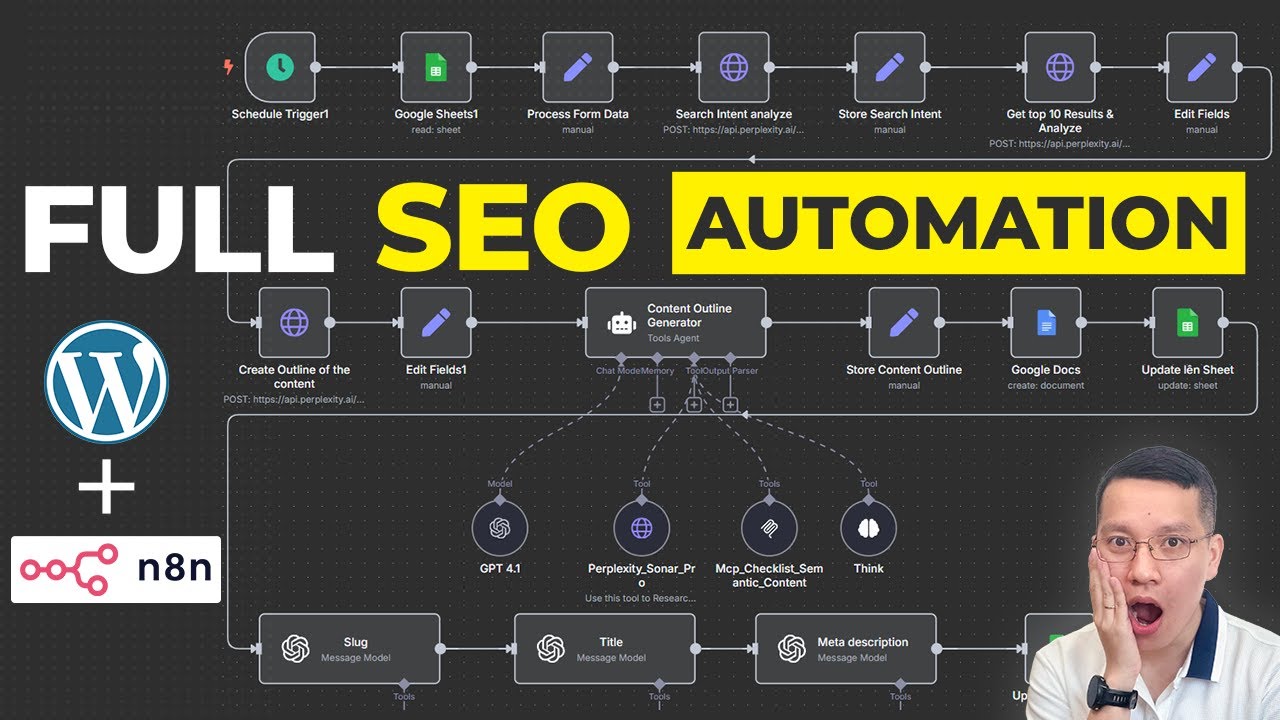
Building AI SEO SEO automation with n8n requires a clear plan. Below is a step-by-step guide to creating a functional workflow that generates meta descriptions for blog posts.
Step 1: Set Up Your n8n Environment
You can use n8n Cloud or self-host it via Docker. For SEO work involving client data, self-hosting is recommended. Install n8n on a small VPS or use the desktop app for testing. Once installed, create a new workflow and give it a descriptive name like “Meta Description Generator.”
Step 2: Configure the Trigger Node
Add a “Schedule Trigger” node to run the workflow daily. Set the trigger to execute at a specific time, such as 6 AM. Alternatively, use a “Webhook” node if you want to trigger the workflow from a Google Sheet button or a CMS event.
Step 3: Pull Data from Your CMS
Add a node that connects to your content management system. For WordPress, use the “WordPress” node to fetch posts that lack meta descriptions. Configure the node to retrieve the post ID, title, and excerpt. For other CMS platforms, use an HTTP Request node to call the relevant API endpoint.
Step 4: Add the AI Processing Node
Add an “OpenAI” node (or Anthropic, or a local Ollama model) and connect it to the previous node. In the node configuration, select “Chat Message” as the operation. Write a prompt that instructs the AI to generate a meta description under 155 characters, including the primary keyword naturally. Map the incoming data fields (post title, excerpt) to the prompt variables.
Example prompt: “You are an SEO expert. Write a compelling meta description for the following blog post. Title: {{$json.title}}. Excerpt: {{$json.excerpt}}. The meta description must be under 155 characters and include the keyword ‘AI SEO automation’.”
Step 5: Update the CMS with the Output
Add another WordPress node (or HTTP Request) to update the post with the generated meta description. Map the AI output field to the meta description input field in the update call. Ensure the node is set to update, not create.
Step 6: Add Error Handling and Logging
Connect an “IF” node after the AI node to check if the response contains a valid string. If the AI returns an error or empty text, route the data to a “Send Email” node to alert the team. Also, add a “Spreadsheet” node to log all successful updates with timestamps for auditing.
Step 7: Test and Activate
Execute the workflow manually with sample data to verify each step. Check that the AI prompt produces good results and that the CMS update works. Once validated, activate the workflow and let it run on schedule.
Comparing n8n with Other Automation Tools for SEO
Understanding where n8n fits in the automation landscape helps teams choose the right tool. The table below compares n8n with Zapier and custom scripts.
| Feature | n8n | Zapier | Custom Python Scripts |
|---|---|---|---|
| Pricing Model | Free self-hosted; paid cloud | Per-task pricing tiers | Infrastructure costs only |
| AI Integration | Native nodes for OpenAI, Anthropic, etc. | Requires API calls via Webhooks | Full flexibility via SDKs |
| Data Privacy | Full control if self-hosted | Data passes through Zapier servers | Full control |
| Complexity | Visual builder with code options | Simple but limited logic | Requires developer skills |
| Error Handling | Advanced branching and retry logic | Basic error paths | Custom implementation |
| Speed for Large Datasets | High (runs on your server) | Moderate (cloud latency) | Highest |
For teams that need a balance of control and ease, n8n wins. Zapier is fine for simple one-to-one integrations but struggles with the complex data transformations that SEO requires. Custom scripts offer maximum power but require ongoing maintenance and developer time.
Benefits and Limitations of AI SEO Automation with n8n
Every automation strategy has trade-offs. Knowing them prevents unrealistic expectations.
Key Benefits
- Massive time savings: Tasks that take hours are completed in minutes.
- Consistency: AI follows the same prompt every time, reducing human error.
- Scalability: Workflows handle 1 page or 100,000 pages with the same effort.
- Cost efficiency: Self-hosted n8n has no per-run costs, only server fees.
- Rapid iteration: Changing a prompt or adding a new data source takes minutes.
- AI hallucination: Generated content may contain factual errors or irrelevant suggestions.
- Data quality dependency: Garbage in, garbage out—poor source data ruins outputs.
- Setup complexity: Initial workflow design requires technical understanding.
- Maintenance burden: APIs change, nodes break, and prompts need tuning.
- Lack of strategic judgment: AI cannot understand brand nuance or long-term SEO strategy.
Limitations and Risks
Common Mistakes and How to Avoid Them
Teams often stumble when first implementing AI SEO SEO automation with n8n. Here are the most frequent pitfalls and their solutions.
Mistake 1: Over-Automating Content Creation
Publishing fully AI-generated articles without human review damages credibility. Avoid this by using automation for research, briefs, and meta data, but keep human writers for the final draft. Use the AI to outline and gather data, not to write the final prose.
Mistake 2: Ignoring API Rate Limits
SEO APIs and AI models have rate limits. Sending 10,000 requests in one minute triggers errors. Add “Wait” nodes in n8n to throttle requests, or use batch processing to stay within limits.
Mistake 3: Not Monitoring Output Quality
AI models degrade or change behavior after updates. Set up a weekly review workflow that samples 10% of AI outputs and sends them to a human for quality scoring. Track the scores over time to catch issues early.
Mistake 4: Storing Sensitive Data in Logs
n8n execution logs can contain client URLs, search queries, and other sensitive data. Configure log retention policies and avoid logging full API responses. Use data pinning only when necessary.
Mistake 5: Building Without a Backup Plan
If the AI API goes down, your workflow fails. Add fallback nodes that use a different AI provider or a simple rule-based system. This ensures critical tasks still run during outages.
Important Notes for Production Use
Before deploying AI SEO automation with n8n at scale, consider these operational factors.
Prompt engineering is an ongoing task. The initial prompt you write will not be the final one. Track performance metrics like click-through rate on generated meta descriptions and refine prompts based on what works. Store prompts in a version-controlled system.
Respect search engine guidelines. Google’s spam policies prohibit scaled content abuse, which includes mass-producing unhelpful content regardless of how it is generated. Use automation to enhance quality, not to flood the index with thin pages. Always ensure a human reviews content before publication.
Budget for AI costs. While n8n itself is free, the AI API calls are not. A workflow that processes 1,000 pages per day with a large language model can cost hundreds of dollars monthly. Monitor token usage and optimize prompts to reduce costs.
Keep human oversight in the loop. Automation handles the repetitive work, but strategic decisions—like which keywords to target or which pages to prune—still require human expertise. Set up approval steps in workflows for any action that changes a live website.
Frequently Asked Questions
Do I need coding skills to use n8n for SEO automation?
No, the visual builder handles most tasks. However, basic understanding of JSON data structures and API concepts helps when debugging workflows. For advanced logic, you can add JavaScript nodes without being a full-stack developer.
Which AI model works best for SEO tasks in n8n?
OpenAI’s GPT-4o and Anthropic’s Claude 3.5 Sonnet are popular choices for content generation and analysis. For cost-sensitive tasks, GPT-4o mini or a local model like Llama 3 provides good results. Test multiple models on your specific prompts to find the best balance of quality and cost.
Can n8n replace my SEO tool subscription?
No. n8n is an automation layer, not a data provider. You still need tools like Ahrefs, SEMrush, or Google Search Console for raw data. n8n connects to these tools’ APIs to automate the workflows around them.
How often should I run automated SEO workflows?
It depends on the task. Rank tracking can run daily. Content brief generation can run on demand. Full-site audits are effective weekly or monthly. Set schedules based on how frequently the underlying data changes and how quickly you can act on the outputs.
Is AI SEO automation with n8n safe for enterprise websites?
Yes, when configured correctly. Self-hosted n8n keeps data on your infrastructure. Use environment variables for API keys, restrict workflow access to authorized users, and implement audit logging. Start with low-risk tasks like internal link suggestions before automating content publishing.
Conclusion
AI SEO SEO automation with n8n represents a significant shift in how SEO professionals manage their daily workload. The ability to connect AI reasoning with structured SEO data unlocks efficiency that manual processes cannot match. From generating meta descriptions at scale to clustering thousands of keywords overnight, n8n workflows handle the heavy lifting while humans focus on strategy and creative direction.
The key to success lies in thoughtful implementation. Start with one workflow, measure its impact, and iterate on the prompts and logic. Maintain strict quality control and always keep a human in the review loop for anything that affects a live website. When deployed correctly, this automation stack becomes a force multiplier for any SEO team, enabling them to achieve more with fewer resources and respond to algorithm changes faster than competitors who still rely on manual processes.
Xem thêm:
- AI SEO Keyword Strategy: The Complete Guide to Future-Proof Search Rankings
- AI SEO Performance Monitoring: The Complete Guide to Data-Driven Search Optimization
- AI SEO Product Review Generator: The Complete Guide to Automated Review Content
- Free AI SEO Tools: Supercharge Your Rankings Without Paying a Cent
- How AI Affects SEO: The New Era of Search Intelligence
Bài viết cùng chủ đề:

AI SEO SEO Automation with Make: The Complete Workflow Guide

AI SEO SEO Automation with Zapier: The Complete Workflow Guide
AI SEO SEO Automation with Gemini: The Complete Guide to Scaling Organic Growth

AI SEO SEO Automation with Claude: The Complete Guide to Scaling Content in 2025

AI SEO SEO Automation with ChatGPT: The Complete Playbook for 2025

AI SEO & SEO Automation for Affiliate Sites: The 2025 Playbook for Passive Income Growth
AI SEO & SEO Automation for Bloggers: The Complete Guide to Scaling Your Content

AI SEO & SEO Automation for Agencies: The Complete 2025 Playbook

AI SEO and SEO Automation for Ecommerce: The Complete Playbook for 2025

AI SEO & SEO Automation for WordPress: The Complete Playbook for 2025
AI SEO SEO Automation Strategy: The Complete Playbook for 2025

Mastering the AI SEO SEO Automation Process: A Complete Guide to Scaling Organic Growth
AI SEO SEO Automation System: The Complete Guide to Scaling Organic Growth in 2025
AI SEO SEO Automation Platform: The Complete Guide to Scaling Organic Growth in 2025
AI SEO SEO Automation Software: The Complete Guide to Scaling Organic Growth in 2025

AI SEO SEO Automation Workflow: The Complete Guide to Scaling Organic Growth in 2025