
No products in the cart.
AI SEO Bing Webmaster Tools: The Complete Guide to Smarter Search Optimization
31
Jul
Jul
Search engine optimization has entered a new era where artificial intelligence shapes how content is discovered, ranked, and evaluated. For website owners and digital marketers, understanding the intersection of AI SEO Bing Webmaster Tools is no longer optional—it is essential for maintaining visibility in Microsoft’s search ecosystem. Bing now powers significant portions of search traffic through partnerships with ChatGPT, Copilot, and other AI-driven platforms, making its webmaster suite more relevant than ever. This guide explores how to leverage Bing’s free tools alongside AI-powered strategies to improve rankings, analyze performance, and future-proof your SEO approach.
What Is AI SEO Bing Webmaster Tools?
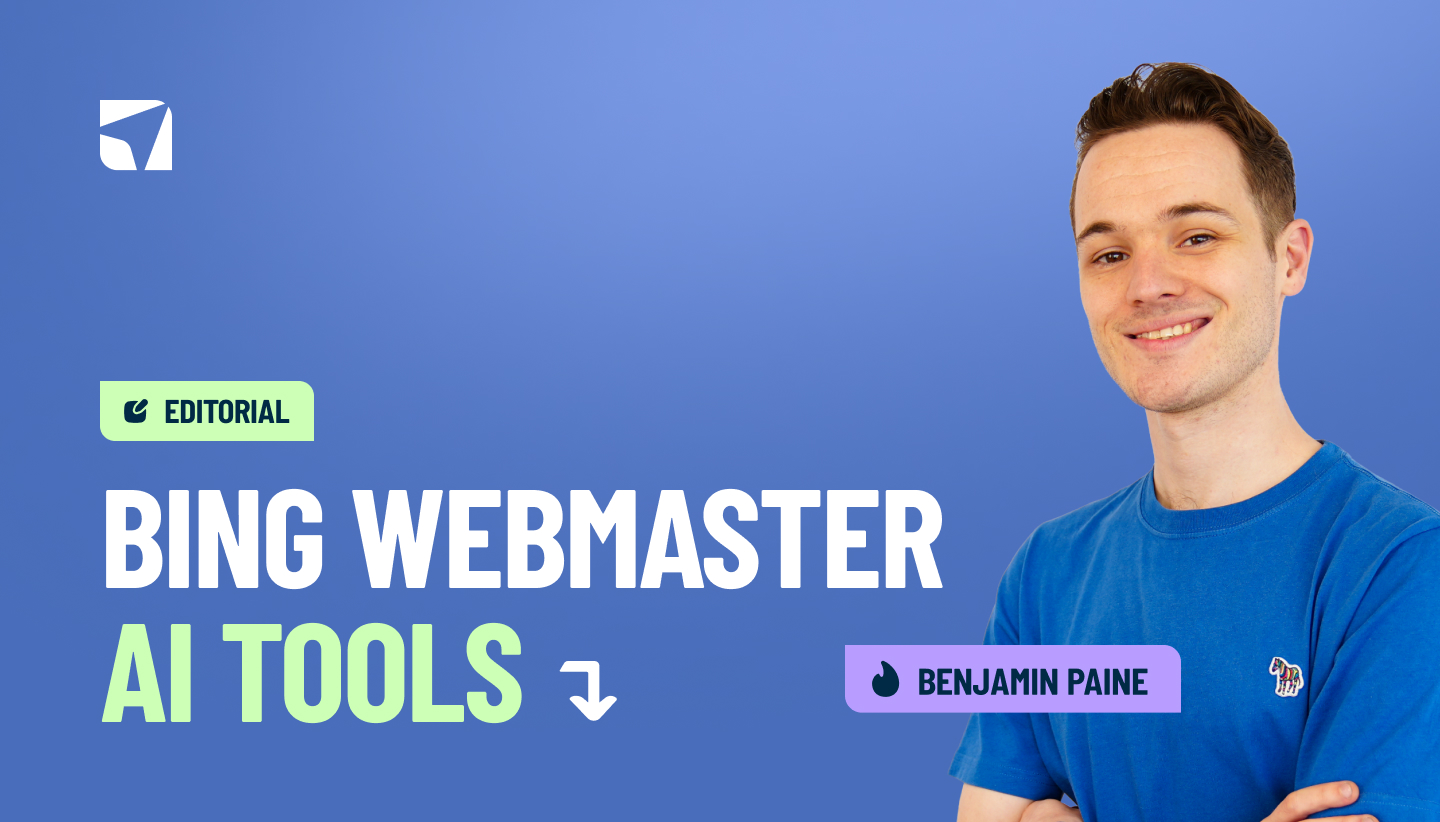
AI SEO Bing Webmaster Tools refers to the integration of artificial intelligence capabilities within Microsoft’s free search console platform, combined with AI-driven optimization strategies applied to your website. The platform itself provides data on indexing, search performance, keyword rankings, and technical health, but the AI component transforms how you interpret and act on that data. Bing has invested heavily in machine learning models that understand search intent, content relevance, and user engagement signals.
Traditional SEO relied on manual analysis of backlinks, keyword density, and meta tags. AI-enhanced SEO using Bing Webmaster Tools goes deeper—it analyzes semantic relationships between words, predicts user behavior, and identifies content gaps that human editors might miss. The platform’s URL Inspection tool now incorporates machine learning to suggest why specific pages underperform and what adjustments could improve visibility.
Why Bing Webmaster Tools Matters in the AI Era
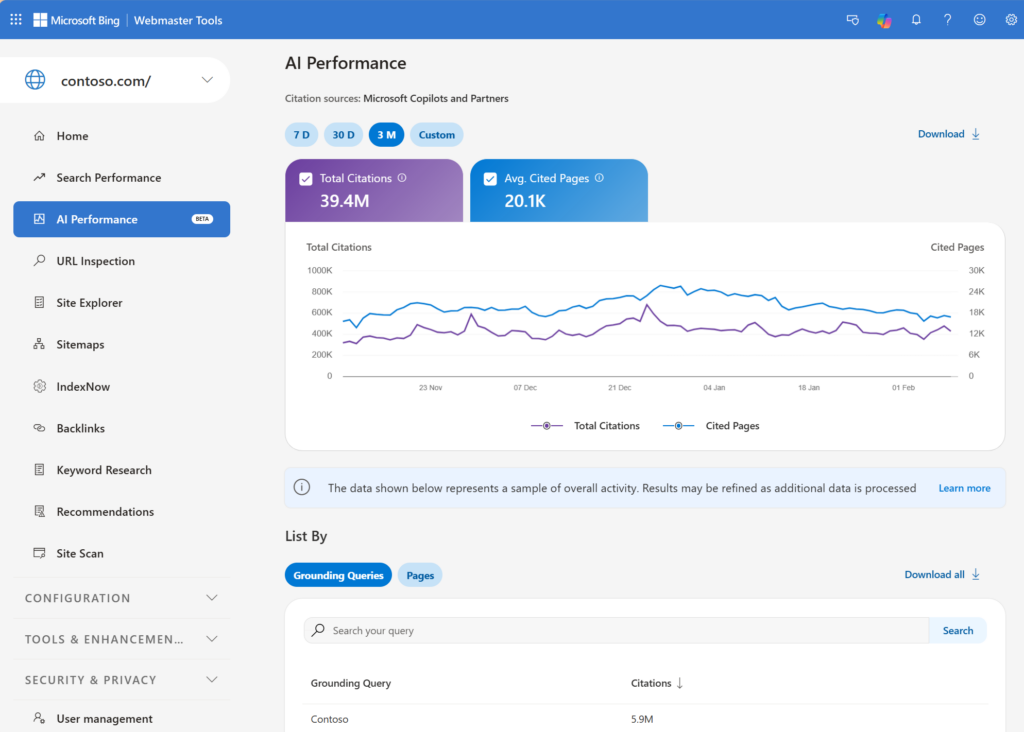
Microsoft’s partnership with OpenAI has positioned Bing as the default search engine for ChatGPT users. When millions of people ask ChatGPT a question and receive answers with cited sources, those citations often come from Bing’s index. This means appearing in Bing’s search results directly impacts your visibility in AI-generated responses. The data within Bing Webmaster Tools reveals how your pages perform not just in traditional search results but also in AI-assisted discovery.
Bing’s market share has grown steadily, particularly on desktop and through Windows ecosystems. For businesses targeting professional audiences, older demographics, or users in North America and Europe, Bing traffic can represent a substantial portion of overall organic visits. Ignoring this platform while focusing exclusively on Google means leaving measurable traffic on the table.
Core Features of Bing Webmaster Tools for AI-Driven SEO
IndexNow Protocol Integration
IndexNow is a protocol that allows website owners to instantly notify search engines about new or updated content. Bing Webmaster Tools fully supports this feature, and it represents a significant advantage for AI-driven SEO workflows. When your content management system or SEO tool automatically pings IndexNow after publishing, Bing crawls and indexes your pages within hours rather than days. This speed matters because AI models and search engines prioritize fresh content for time-sensitive queries.
Keyword Research with AI Insights
The Keyword Research tool within Bing Webmaster Tools provides search volume data, trend analysis, and related keyword suggestions. What makes it AI-relevant is the integration with Microsoft’s semantic understanding. The tool groups keywords by search intent—informational, navigational, transactional—and shows which queries your competitors rank for but you do not. This competitive gap analysis is a core component of AI SEO strategy.
Site Explorer and Backlink Analysis
Understanding your backlink profile is crucial for establishing authority, and Bing’s Site Explorer provides a comprehensive view of who links to you and your competitors. The AI layer here identifies link patterns that correlate with ranking improvements. It flags unnatural link velocity, highlights high-quality referring domains, and suggests link-building opportunities based on semantic relevance rather than just domain authority.
URL Inspection and Indexing Reports
The URL Inspection tool shows exactly how Bing’s crawler views your page. It displays the rendered HTML, detected structured data, and any crawl errors. With AI enhancements, this tool now predicts whether a page will rank well based on content completeness, internal linking structure, and user engagement metrics from similar pages. This predictive capability allows you to fix issues before they impact rankings.
Performance Reports with Machine Learning Anomaly Detection
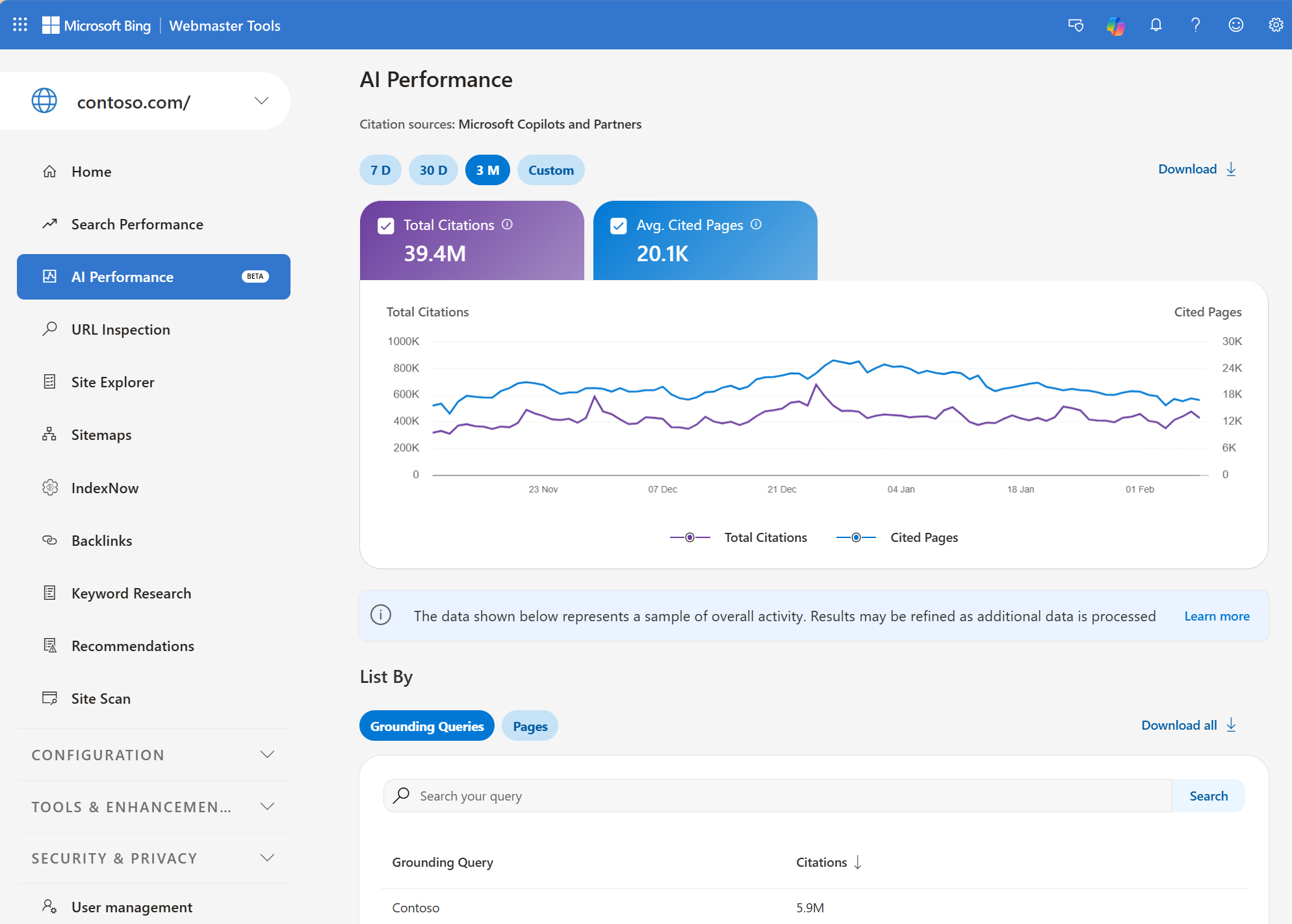
Bing’s performance reports track impressions, clicks, and average position over time. The AI component automatically detects anomalies—sudden drops or spikes in traffic—and correlates them with algorithm updates, technical changes, or competitor actions. Instead of manually analyzing charts, you receive actionable alerts that explain what changed and suggest likely causes.
How to Set Up Bing Webmaster Tools for AI SEO Success
Step 1: Verify Your Website
Start by creating a Microsoft account and adding your site to Bing Webmaster Tools. You can verify ownership through three methods: adding a meta tag to your homepage, uploading an XML file to your server, or using DNS record verification. The DNS method is recommended because it works across all subdomains and does not require modifying your website code. Verification takes less than five minutes and grants immediate access to the dashboard.
Step 2: Submit Your Sitemap
Navigate to the Sitemaps section and submit your XML sitemap. If you use WordPress, plugins like Yoast SEO or RankMath automatically generate and update your sitemap. For custom websites, ensure your sitemap includes only canonical URLs and excludes parameters that create duplicate content. Bing also supports image and video sitemaps, which help with visual search optimization.
Step 3: Configure IndexNow
Enable IndexNow by generating an API key within Bing Webmaster Tools and adding it to your website’s header or using a plugin. Many SEO plugins now support IndexNow natively. Once configured, every time you publish or update content, Bing receives an instant notification. This reduces crawl latency and ensures your freshest content appears in search results quickly.
Step 4: Connect Google Search Console Data
Bing Webmaster Tools allows you to import your verified Google Search Console properties. This one-click import brings in your existing sitemap, URL submission history, and performance data. It saves time and ensures consistency across both search engines. The import does not replace Bing’s own data collection—it simply accelerates the initial setup.
AI-Powered SEO Strategies Using Bing Webmaster Tools
Optimizing for Copilot and ChatGPT Visibility
When ChatGPT references a source, it typically pulls from Bing’s index. To increase your chances of being cited, focus on creating content that answers specific questions with clear, structured data. Use FAQ schema, HowTo schema, and Article schema to help AI models parse your content. Bing Webmaster Tools’ Structured Data report shows which schema types are detected and whether they contain errors.
Content that ranks in Bing’s top three positions for a query is more likely to be selected by AI models as a citation source. Therefore, your AI SEO strategy should prioritize ranking for long-tail, conversational queries that mirror how people speak to AI assistants. The Keyword Research tool helps identify these natural language phrases.
Leveraging Click Depth and Internal Linking
Bing’s crawler assigns importance based on how many clicks a page is from the homepage. Pages buried deep in your site architecture receive less crawl frequency and lower perceived authority. Use Bing Webmaster Tools’ Indexing report to identify pages that are not being crawled. Then, restructure your internal linking to bring important pages closer to the root domain. AI-driven SEO tools can suggest optimal anchor text and link placement based on semantic relevance.
Improving Core Web Vitals with Bing Insights
Bing uses Core Web Vitals—Largest Contentful Paint, First Input Delay, and Cumulative Layout Shift—as ranking signals. The Performance report in Bing Webmaster Tools shows field data from real users, not just lab tests. If your pages have poor LCP scores, the AI insights suggest specific optimizations like preloading hero images, eliminating render-blocking JavaScript, or upgrading hosting. These recommendations are prioritized by their estimated impact on ranking.
Content Refresh and Stale Content Detection
Bing’s crawler tracks the last modified date of your pages. The Indexing report flags pages that have not been updated in over a year, especially for queries where freshness matters. Use this data to build a content refresh calendar. Update statistics, add new examples, improve readability, and re-optimize meta descriptions. The AI layer in Bing Webmaster Tools can predict which refreshed pages will gain the most traffic based on historical performance and query trends.
Comparing Bing Webmaster Tools with Google Search Console
| Feature | Bing Webmaster Tools | Google Search Console |
|---|---|---|
| IndexNow Support | Native and fully integrated | Not supported |
| AI-Powered Insights | Deep integration with Microsoft Copilot | Limited to Performance and Search Console Insights |
| Keyword Research | Integrated with volume and trends | Requires linking to Google Ads |
| Backlink Data | Comprehensive and free | Limited to sample data |
| URL Inspection | Predictive AI recommendations | Manual testing and indexing requests |
| Market Share | Growing via ChatGPT and Windows | Dominant globally |
Both tools are free and should be used together. Google Search Console provides superior data for Google-specific issues, while Bing Webmaster Tools offers unique AI features and IndexNow. The overlap in data helps validate your SEO assumptions. If both tools show a page losing impressions, the problem is likely technical. If only one shows a decline, the issue may be algorithm-specific.
Common Mistakes in AI SEO Bing Webmaster Tools
Ignoring Bing’s Unique Ranking Factors
Many SEO professionals apply Google-centric strategies to Bing without adjustment. Bing places more weight on exact-match domains, social signals from Facebook and Twitter, and older domain age. It also rewards clear, descriptive meta descriptions more heavily than Google does. Review your Bing Webmaster Tools data separately from Google data to identify these differences.
Neglecting the IndexNow Implementation
Failing to implement IndexNow means your content waits for Bing’s regular crawl cycle, which can take days or weeks. This delay is especially harmful for news sites, e-commerce product pages, and time-sensitive content. The setup takes minutes but provides a continuous competitive advantage.
Overlooking the International Targeting Report
Bing Webmaster Tools includes a geo-targeting feature that tells Microsoft which country or region your site targets. If this is set incorrectly, Bing may show your site to the wrong audience, hurting click-through rates and engagement. Verify this setting matches your actual target market.
Using Only Exact-Match Keywords
AI-driven search understands synonyms, related concepts, and user intent. If you optimize only for exact-match keywords, you miss out on the semantic breadth that Bing’s AI models recognize. Use the Keyword Research tool to find related terms and naturally incorporate them into your content.
Important Notes for Maximizing Bing Webmaster Tools
Bing rewards websites that provide a clear user experience. Ensure your site has a logical navigation structure, descriptive anchor text, and a privacy policy. Bing also considers social media engagement as a trust signal—maintain active profiles and share your content regularly.
Structured data is not just for rich snippets. Bing uses schema markup to understand the entity relationships on your page. Implement Organization, Person, Product, and FAQ schema where applicable. The Structured Data report in Bing Webmaster Tools validates your markup and shows any errors that could prevent rich results.
Monitor your crawl budget. Bing assigns a crawl rate based on your site’s health and update frequency. If you have thousands of low-value pages, Bing may waste crawl budget on them, delaying indexing of your important content. Use the Crawl Control feature to adjust the rate and prioritize high-value sections.
Frequently Asked Questions
Is Bing Webmaster Tools free to use?
Yes, Bing Webmaster Tools is completely free. You only need a Microsoft account to access all features, including keyword research, backlink analysis, URL inspection, and performance reports. There are no premium tiers or hidden costs.
How does AI SEO differ from traditional SEO in Bing?
AI SEO focuses on semantic understanding, user intent, and content relevance rather than just keyword matching. In Bing, AI models analyze the context of your content, its relationship to other entities, and how users interact with it. Traditional SEO relied on manual optimization of meta tags and backlinks, while AI SEO uses machine learning to predict ranking outcomes and automate adjustments.
Can Bing Webmaster Tools help with ChatGPT visibility?
Yes. ChatGPT uses Bing’s search index to retrieve information and cite sources. By optimizing your site in Bing Webmaster Tools—improving indexing, using structured data, and ranking for conversational queries—you increase the likelihood that ChatGPT references your content in its answers.
How long does it take for Bing to index a new page?
With IndexNow enabled, indexing typically happens within minutes to a few hours. Without IndexNow, it can take anywhere from a few days to several weeks, depending on your site’s crawl frequency and authority. Submitting a sitemap and requesting indexing through URL Inspection speeds up the process.
Does Bing Webmaster Tools show Google search data?
No, Bing Webmaster Tools only shows data from Microsoft’s Bing search engine. However, you can import your Google Search Console data into Bing Webmaster Tools for reference, but the performance metrics remain Bing-specific.
What is the best way to find keywords in Bing Webmaster Tools?
Use the Keyword Research tool under the Research section. Enter a seed keyword, and the tool returns related queries with search volume, trend data, and competition level. Filter by country and language to match your target audience. The tool also shows which of your pages rank for each keyword.
Conclusion
AI SEO Bing Webmaster Tools represents a powerful convergence of Microsoft’s search infrastructure and artificial intelligence capabilities. The platform offers unique features like IndexNow, predictive URL inspection, and AI-driven anomaly detection that go beyond traditional search console functionality. As Bing continues to power AI assistants like ChatGPT and Microsoft Copilot, the importance of appearing in Bing’s index will only grow.
Success requires a deliberate approach: verify your site, submit sitemaps, enable IndexNow, and regularly review the performance and indexing reports. Treat Bing Webmaster Tools as a strategic partner rather than an afterthought. The data it provides—combined with AI-driven content strategies—will help you capture traffic from a search engine that is quietly expanding its influence across the digital landscape.
Start today by claiming your website in Bing Webmaster Tools and exploring the AI-powered insights available. The effort you invest now will pay dividends as AI-assisted search becomes the primary way users discover information online.
Xem thêm:
- AI Grammar Checker: Transform Your Writing with Intelligent Error Detection
- AI SEO Schema Markup Generator: The Complete Guide to Automated Structured Data
- AI SEO Hosting Optimization: The Complete Guide to Faster Rankings in 2025
- AI SEO Entity Salience: The Complete Guide to Dominating Search Rankings in 2025
- AI SEO Digital Authority: The Complete Playbook for Dominating Search in 2025
Bài viết cùng chủ đề:

AI SEO SEO Automation with Make: The Complete Workflow Guide

AI SEO SEO Automation with Zapier: The Complete Workflow Guide

AI SEO SEO Automation with n8n: The Complete Workflow Guide
AI SEO SEO Automation with Gemini: The Complete Guide to Scaling Organic Growth

AI SEO SEO Automation with Claude: The Complete Guide to Scaling Content in 2025

AI SEO SEO Automation with ChatGPT: The Complete Playbook for 2025

AI SEO & SEO Automation for Affiliate Sites: The 2025 Playbook for Passive Income Growth
AI SEO & SEO Automation for Bloggers: The Complete Guide to Scaling Your Content

AI SEO & SEO Automation for Agencies: The Complete 2025 Playbook

AI SEO and SEO Automation for Ecommerce: The Complete Playbook for 2025

AI SEO & SEO Automation for WordPress: The Complete Playbook for 2025
AI SEO SEO Automation Strategy: The Complete Playbook for 2025

Mastering the AI SEO SEO Automation Process: A Complete Guide to Scaling Organic Growth
AI SEO SEO Automation System: The Complete Guide to Scaling Organic Growth in 2025
AI SEO SEO Automation Platform: The Complete Guide to Scaling Organic Growth in 2025
AI SEO SEO Automation Software: The Complete Guide to Scaling Organic Growth in 2025















