
No products in the cart.
AI SEO Caching: The Complete Guide to Accelerating AI Search Visibility
31
Jul
Jul
The intersection of artificial intelligence and search engine optimization has created a new technical discipline: AI SEO Caching. As AI-powered search engines like Google’s Search Generative Experience (SGE), Perplexity, and ChatGPT increasingly rely on pre-computed data, the way websites are crawled, indexed, and served to users is undergoing a fundamental shift. AI SEO Caching is the practice of strategically storing and serving content in a format that AI crawlers can parse instantly, ensuring your site appears in AI-generated answers without the latency penalties that plague traditional dynamic pages. This guide breaks down everything you need to know about this emerging field, from core concepts to advanced implementation strategies.
What Is AI SEO Caching and Why Does It Matter?
AI SEO Caching refers to the deliberate process of creating, storing, and delivering static versions of your web content specifically optimized for AI crawlers and large language model (LLM) training pipelines. Unlike traditional browser caching, which focuses on reducing load times for human visitors, AI SEO Caching targets the unique behavior of AI agents that scrape websites at high frequency, often with limited JavaScript rendering capabilities.
The importance of AI SEO Caching stems from how modern AI search engines operate. When a user asks a question, the AI doesn’t crawl the live web in real-time. Instead, it queries an index of pre-fetched, cached content that has been processed and ranked. If your site’s content isn’t in that cache, or if it’s stored in a format that the AI’s extraction algorithms struggle to parse, you effectively become invisible to AI-driven search results.
The Shift from Crawl Budget to Cache Budget
Traditional SEO focuses on crawl budget—how often search engine spiders visit your site. AI SEO introduces the concept of cache budget: how much of your content is stored, how fresh it is, and how efficiently it can be retrieved. Google’s DeepCrawl and OpenAI’s GPTBot both maintain extensive caches of web content. These caches are not infinite; they prioritize pages that are technically accessible, semantically clear, and frequently updated.
For example, a typical e-commerce product page with dynamic pricing loaded via JavaScript might take 3-5 seconds for a human browser to render. An AI crawler might give up after 2 seconds, leaving your page uncached. By implementing AI SEO Caching, you serve a static HTML snapshot instantly, ensuring the AI captures your product descriptions, prices, and reviews without delay.
How AI Crawlers Differ from Traditional Search Engine Bots
To master AI SEO Caching, you must first understand the distinct behaviors of AI crawlers compared to classic bots like Googlebot. Traditional bots are designed to index pages for a keyword-based ranking algorithm. AI crawlers, however, are trained to extract entities, relationships, and factual claims to build knowledge graphs.
| Characteristic | Traditional Bots (Googlebot) | AI Crawlers (GPTBot, ClaudeBot, PerplexityBot) |
|---|---|---|
| JavaScript Rendering | Full rendering after initial crawl | Often skip or timeout on heavy JS |
| Content Preference | HTML with structured data | Clean, semantic HTML with clear entity definitions |
| Request Frequency | Moderate, based on PageRank | High frequency, often multiple times per day |
| Data Storage | Indexed for keyword retrieval | Cached as training data or for retrieval-augmented generation (RAG) |
| Response to Robots.txt | Respects directives | Varies; some ignore certain rules |
This table illustrates a critical point: AI crawlers are less patient and more literal. They want the answer in the first 100 words of your HTML, not buried in a JavaScript-rendered accordion. AI SEO Caching addresses this by providing a simplified, high-signal version of your page that these crawlers can consume without friction.
Core Components of an AI SEO Caching Strategy
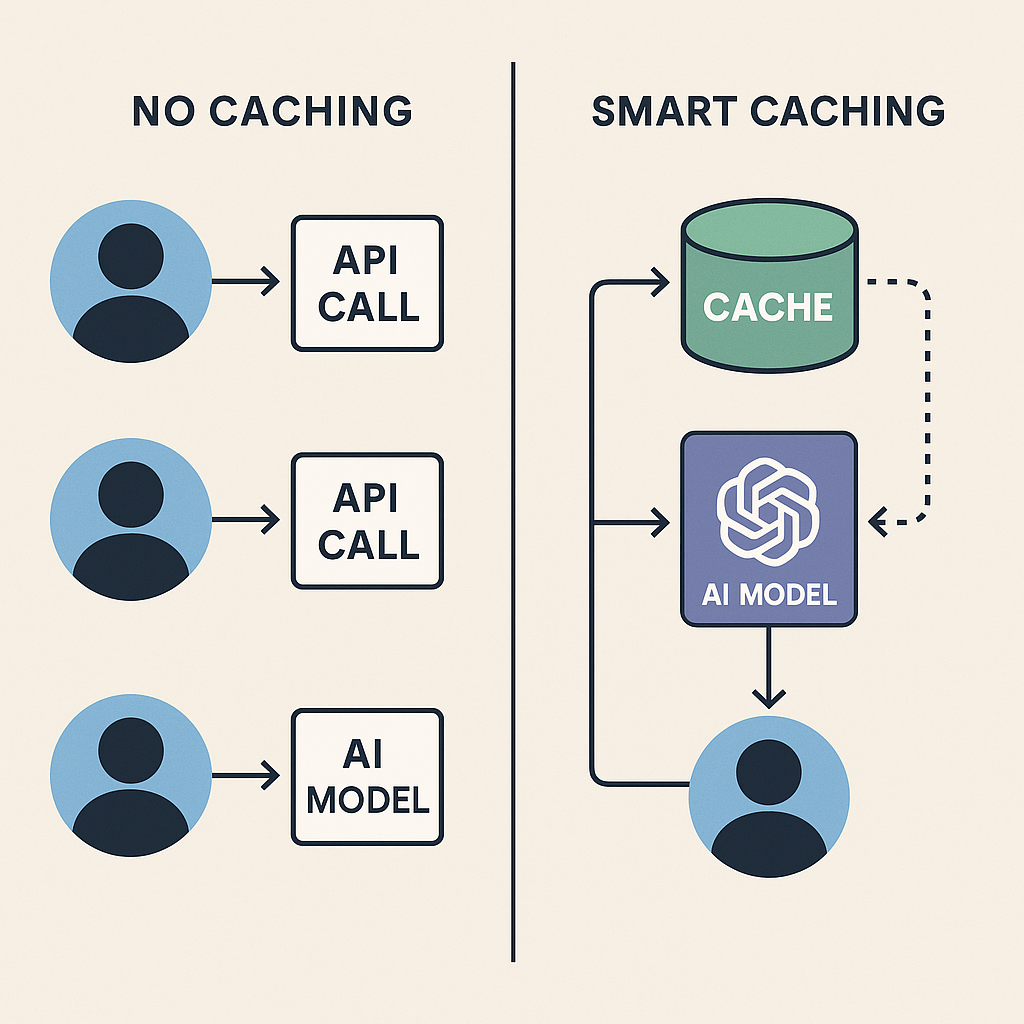
Implementing AI SEO Caching is not a single action but a layered approach involving several technical and content-based components. Each component works together to ensure your content is both cacheable and valuable to AI systems.
1. Static HTML Snapshots for AI Agents
The foundation of AI SEO Caching is generating static HTML versions of your dynamic pages. This can be achieved through headless browsers that pre-render pages at build time or through edge-side includes that serve cached versions to known AI user agents. The key is to detect the user agent (e.g., GPTBot, ClaudeBot) and serve a pre-rendered, clean HTML file that contains the full content without requiring client-side JavaScript execution.
For instance, a news website using React can configure its server to detect GPTBot and respond with a static HTML file that includes the full article text, publication date, author bio, and schema markup. This ensures the AI caches the complete story, not just the empty shell of the application.
2. Semantic HTML and Entity Markup
AI models rely heavily on semantic HTML tags to understand content hierarchy. Using proper <article>, <section>, and <header> tags helps AI extractors identify the main content versus navigation or ads. Additionally, implementing schema.org vocabulary—especially Article, Product, FAQPage, and HowTo—provides explicit signals about the entities on your page.
In the context of AI SEO Caching, this markup must be present in the cached version. If your dynamic page injects JSON-LD via JavaScript, the AI crawler will never see it. Therefore, the cached static version must include all structured data inline.
3. Content Chunking and Summarization
AI systems often truncate long pages or only extract the first few paragraphs. AI SEO Caching involves pre-chunking your content into logical, self-contained sections. Each section should answer a specific question or cover a distinct subtopic. This makes it easier for AI to pull a relevant snippet from your cache without needing to parse the entire document.
Consider a comprehensive guide on “dog nutrition.” Instead of one massive page, you might create cached chunks for “protein requirements,” “fatty acids,” and “feeding schedules.” Each chunk is a separate HTML file with its own heading and summary, linked together via a table of contents. This increases the likelihood that an A
4. Cache Control Headers for AI Bots
HTTP cache headers like Cache-Control and Expires are not just for browsers. You can set specific rules for AI crawlers using the Vary header or by targeting user agents in your server configuration. For example, you might set a longer cache lifetime for GPTBot (e.g., 7 days) because AI training data doesn’t need real-time freshness, while setting a shorter lifetime for Googlebot (e.g., 1 hour) to capture breaking news.
This granular control prevents your server from being overwhelmed by frequent AI requests while ensuring your content remains in the AI cache for a sufficient duration. A well-configured cache header strategy reduces server load and improves the freshness of your AI-visible content.
Benefits of Implementing AI SEO Caching
The advantages of AI SEO Caching extend beyond just appearing in AI search results. It creates a more robust, efficient web infrastructure that benefits both machines and humans.
- Faster AI Answer Inclusion: Cached content is retrieved in milliseconds, making it more likely to be selected as the source for an AI-generated answer.
- Reduced Server Load: Serving static files to AI crawlers consumes significantly fewer resources than rendering dynamic pages, protecting your origin server from spikes.
- Improved Crawl Efficiency: AI bots can parse your cached HTML in seconds, allowing them to index more of your site within their request limits.
- Consistent Content Versioning: You control exactly what the AI sees, preventing issues where a JavaScript error or A/B test variation gets cached incorrectly.
- Enhanced Data Quality for RAG: Retrieval-augmented generation systems pull from caches; clean, structured cached content leads to more accurate AI citations.
Limitations and Challenges of AI SEO Caching
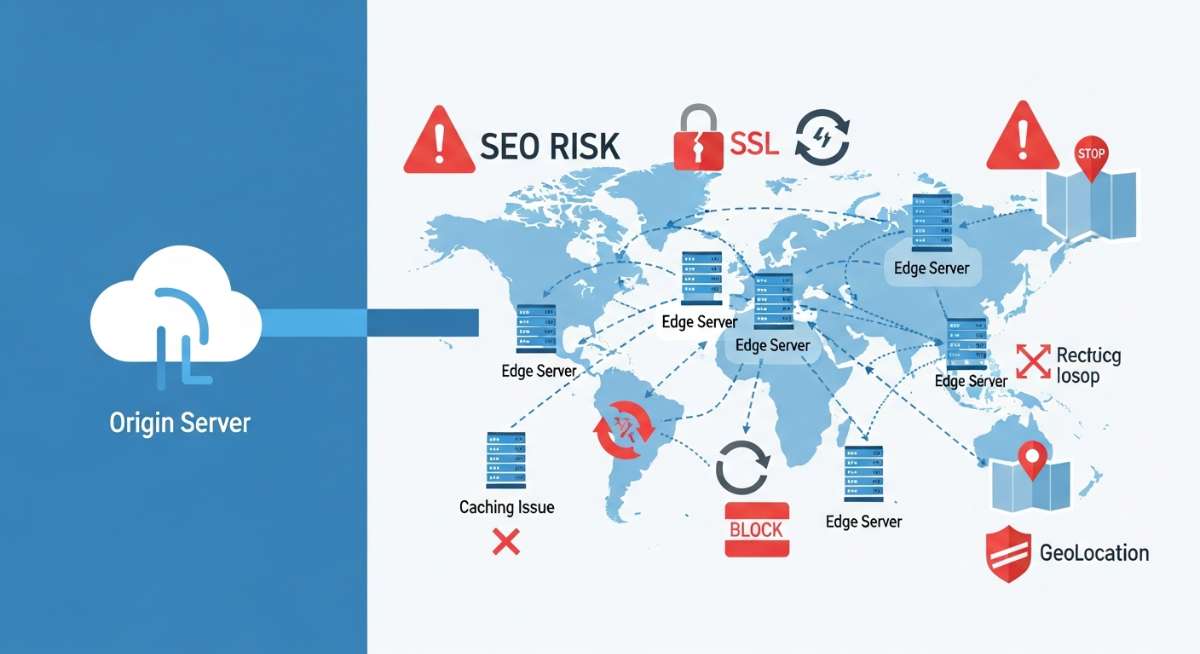
While powerful, AI SEO Caching is not a silver bullet. It comes with technical and strategic limitations that require careful management.
First, maintaining multiple versions of content (dynamic, browser-cached, AI-cached) creates a synchronization burden. If your team updates a product price, you must ensure the AI cached version is also updated, or you risk serving stale information to AI systems, which can damage your brand’s credibility.
Second, AI crawlers are evolving rapidly. A strategy that works for GPTBot today might not work for a future crawler from a new AI startup. The landscape requires constant monitoring of user agent lists and behavior patterns.
Third, t If your AI cached version differs significantly from what human users see, you could face penalties for cloaking—a practice search engines explicitly prohibit. The cached version must be a faithful representation of the live content, just delivered more efficiently.
AI SEO Caching vs. Traditional Caching: A Detailed Comparison
Understanding the distinction between standard web caching and AI-specific caching is crucial for resource allocation. They serve different purposes and require different configurations.
| Aspect | Traditional Caching (CDN, Browser) | AI SEO Caching |
|---|---|---|
| Primary Audience | Human users with browsers | AI crawlers and LLM APIs |
| Content Format | Full page with all assets (CSS, JS, images) | Minimal HTML, often without external resources |
| Update Frequency | Seconds to minutes | Hours to days |
| Key Metric | Time to First Byte (TTFB) | Parseability and entity extraction accuracy |
| Failure Consequence | Slow user experience, higher bounce rate | Missing from AI-generated answers, loss of referral traffic |
| Implementation Tools | Varnish, Cloudflare, browser cache headers | Static site generators, edge functions with user-agent detection |
This comparison highlights that AI SEO Caching is not about speed for humans; it’s about accessibility and clarity for machines. A page can load in 0.5 seconds for a human but still be invisible to AI if the content is rendered via JavaScript.
Practical Implementation: A Step-by-Step Guide
Implementing AI SEO Caching on your website requires a systematic approach.
Step 1: Identify Your AI Traffic
Begin by analyzing your server logs to identify AI crawler user agents. Common ones include GPTBot, ChatGPT-User, ClaudeBot, PerplexityBot, Google-Extended, and Bytespider. Create a list of these agents and monitor their request patterns. You can use analytics tools or custom log parsing to see which pages they request most frequently and how often they encounter errors.
Step 2: Generate Static Snapshots
For your most important pages—typically your homepage, cornerstone articles, and product pages—generate static HTML snapshots. Use a headless browser tool like Puppeteer or Playwright to render the page and save the resulting HTML. Ensure this snapshot includes all critical content, schema markup, and meta tags. Store these snapshots in a dedicated directory or a separate storage bucket.
Step 3: Configure User-Agent Detection
Set up your server or edge function to detect AI user agents. When a request comes in from GPTBot or another listed agent, redirect it to the static snapshot instead of the dynamic application. This can be done via middleware in Next.js, a custom nginx configuration, or a Cloudflare Worker script. The response should include appropriate Cache-Control headers, such as public, max-age=86400 for daily updates.
Step 4: Optimize the Snapshot Content
Review the static snapshot to ensure it is optimized for AI parsing. Remove any unnecessary navigation menus or sidebar widgets that might confuse entity extraction. Ensure the main content is wrapped in a single <article> tag. Add a concise summary paragraph at the top of the article, as AI models often use the first 50-100 words for context. Include explicit answers to common questions related to the page topic.
Step 5: Monitor and Refresh
AI SEO Caching is not a set-and-forget task. Set up a scheduled job to regenerate static snapshots whenever your underlying content changes. Use a webhook or a CI/CD pipeline to trigger snapshot regeneration on content updates. Monitor the freshness of your cached content by checking the Last-Modified header or using a service that tracks AI cache visibility.
Common Mistakes in AI SEO Caching and How to Avoid Them
Many early adopters make avoidable errors that undermine their AI SEO efforts. Recognizing these pitfalls is the first step to building a robust strategy.
Mistake 1: Serving Different Content to AI and Humans
This is the most dangerous mistake. If your AI cached version omits key information that human users see, or if it contains different text, you risk being flagged for cloaking. Search engines and AI companies are actively developing detection methods for this. The solution is to ensure your static snapshot is a complete, faithful representation of the live page, just without the JavaScript wrapper.
Mistake 2: Ignoring Cache Invalidation
Failing to update your AI cache after a content change leads to outdated information being cited by AI. This is particularly harmful for news sites or pages with time-sensitive data. Implement a robust cache invalidation strategy. Use short cache lifetimes for frequently updated pages and longer lifetimes for evergreen content. Consider using a versioning system where each content update generates a new snapshot with a unique URL.
Mistake 3: Over-Optimizing for AI at the Expense of UX
While AI SEO Caching focuses on machine readability, you cannot neglect human visitors. If your static snapshot is stripped of all styling and interactive elements, and you accidentally serve it to human users, your bounce rate will skyrocket. Always test your user-agent detection rules to ensure only AI bots receive the simplified version.
Mistake 4: Forgetting About Mobile-First Indexing
AI crawlers often use a mobile user agent to fetch pages. If your AI SEO Caching rules only target desktop user agents, you might miss a significant portion of AI traffic. Ensure your detection logic covers both mobile and desktop variants of AI crawlers.
Important Notes for Advanced AI SEO Caching
As you scale your AI SEO Caching efforts, keep these advanced considerations in mind to stay ahead of the curve.
First, consider the role of edge computing. Platforms like Cloudflare Workers and Fastly Compute@Edge allow you to run user-agent detection and content transformation at the network edge, reducing latency for AI crawlers to near zero. This is particularly effective for global audiences where your origin server might be geographically distant from the AI’s data center.
Second, pay attention to the robots.txt file and meta tags. While you want to allow AI crawlers to access your cached content, you might want to disallow them from crawling your dynamic application paths to save resources. Use directives like Disallow: /dynamic/ for AI bots while allowing them to access /ai-cache/.
Third, explore the use of content delivery networks (CDNs) that offer AI-specific features. Some CDNs now provide pre-built integrations that automatically generate AI-friendly versions of your pages, complete with schema markup and entity extraction. These managed services can significantly reduce the engineering effort required.
Frequently Asked Questions About AI SEO Caching
What is the difference between AI SEO Caching and regular page caching?
Regular page caching stores rendered HTML to speed up delivery to human browsers. AI SEO Caching specifically optimizes content for AI crawlers by providing clean, semantic, JavaScript-free HTML that is easy for language models to parse and store in their knowledge bases. Regular caching focuses on reducing TTFB, while AI SEO Caching focuses on improving content extractability and entity recognition.
Does AI SEO Caching affect my ranking on traditional search engines like Google?
Yes, indirectly. While AI SEO Caching primarily targets AI crawlers, the underlying improvements—such as cleaner HTML, better schema markup, and faster server response times—also benefit traditional SEO. Google’s crawler appreciates fast, well-structured content. However, you must ensure that your AI cached version does not conflict with Google’s rendering requirements, as Googlebot does execute JavaScript.
How often should I update my AI SEO cache?
The update frequency depends on the nature of your content. For news articles or product pages with fluctuating prices, update the cache every few hours. For evergreen blog posts or informational pages, a daily or weekly update is sufficient. Monitor your AI referral traffic and the freshness of AI citations to determine the optimal interval.
Can AI SEO Caching help with voice search optimization?
Absolutely. Voice search assistants like Siri, Alexa, and Google Assistant increasingly rely on AI-generated answers. When your content is properly cached and structured for AI, it becomes a prime candidate for being read aloud in response to voice queries. The concise, direct answers you provide in your cached content align perfectly with the conversational format of voice search.
Is AI SEO Caching a replacement for traditional SEO practices?
No, it is a complementary layer. Traditional SEO—keyword research, backlink building, on-page optimization—remains essential for establishing authority and relevance. AI SEO Caching ensures that your already-optimized content is accessible to the new generation of AI search tools. Think of it as the technical delivery mechanism for your content strategy.
Conclusion: The Future of Search Visibility Depends on AI SEO Caching
AI SEO Caching is no longer an experimental tactic; it is a necessary component of any forward-thinking digital marketing strategy. As AI-powered search interfaces become the default way users access information, the ability to serve your content in a machine-readable, instantly cacheable format will determine your brand’s visibility in this new landscape. The shift from keyword matching to semantic understanding demands that you not only create high-quality content but also package it in a way that AI systems can effortlessly consume.
By implementing the strategies outlined in this guide—static snapshots, semantic markup, user-agent detection, and strategic cache headers—you position your website at the forefront of this transformation. The technical effort required is significant, but the payoff is substantial: a direct line to the AI-generated answers that are shaping the future of online discovery. Start auditing your current caching setup today, and take the first step toward dominating AI search results tomorrow.
Xem thêm:
- AI SEO Growth Strategy: The Complete Blueprint for Sustainable Organic Traffic in 2025
- AI SEO Platform: The Definitive Guide to Automating Search Dominance
- AI SEO Experience Optimization: The Complete Guide to Boosting Engagement and Rankings
- AI SEO Question Generator: The Complete Guide to Dominating Google’s People Also Ask
- AI SEO HTTP Status Codes: The Complete Guide to Automated Crawl Management
Bài viết cùng chủ đề:

AI SEO SEO Automation with Make: The Complete Workflow Guide

AI SEO SEO Automation with Zapier: The Complete Workflow Guide

AI SEO SEO Automation with n8n: The Complete Workflow Guide
AI SEO SEO Automation with Gemini: The Complete Guide to Scaling Organic Growth

AI SEO SEO Automation with Claude: The Complete Guide to Scaling Content in 2025

AI SEO SEO Automation with ChatGPT: The Complete Playbook for 2025

AI SEO & SEO Automation for Affiliate Sites: The 2025 Playbook for Passive Income Growth
AI SEO & SEO Automation for Bloggers: The Complete Guide to Scaling Your Content

AI SEO & SEO Automation for Agencies: The Complete 2025 Playbook

AI SEO and SEO Automation for Ecommerce: The Complete Playbook for 2025

AI SEO & SEO Automation for WordPress: The Complete Playbook for 2025
AI SEO SEO Automation Strategy: The Complete Playbook for 2025

Mastering the AI SEO SEO Automation Process: A Complete Guide to Scaling Organic Growth
AI SEO SEO Automation System: The Complete Guide to Scaling Organic Growth in 2025
AI SEO SEO Automation Platform: The Complete Guide to Scaling Organic Growth in 2025
AI SEO SEO Automation Software: The Complete Guide to Scaling Organic Growth in 2025















