
No products in the cart.
The Ultimate AI SEO Checklist for WordPress: Boost Your Rankings with Smart Automation
29
Jul
Jul
An AI SEO checklist for WordPress transforms the way site owners approach search engine optimization. Instead of manually auditing dozens of ranking factors, you can now rely on artificial intelligence to scan your pages, suggest improvements, and even implement changes automatically. This comprehensive guide lays out a practical, step-by-step AI SEO checklist for WordPress that covers everything from keyword discovery to technical fixes, helping you climb the SERPs faster while reducing routine workload.
What Is an AI SEO Checklist for WordPress?
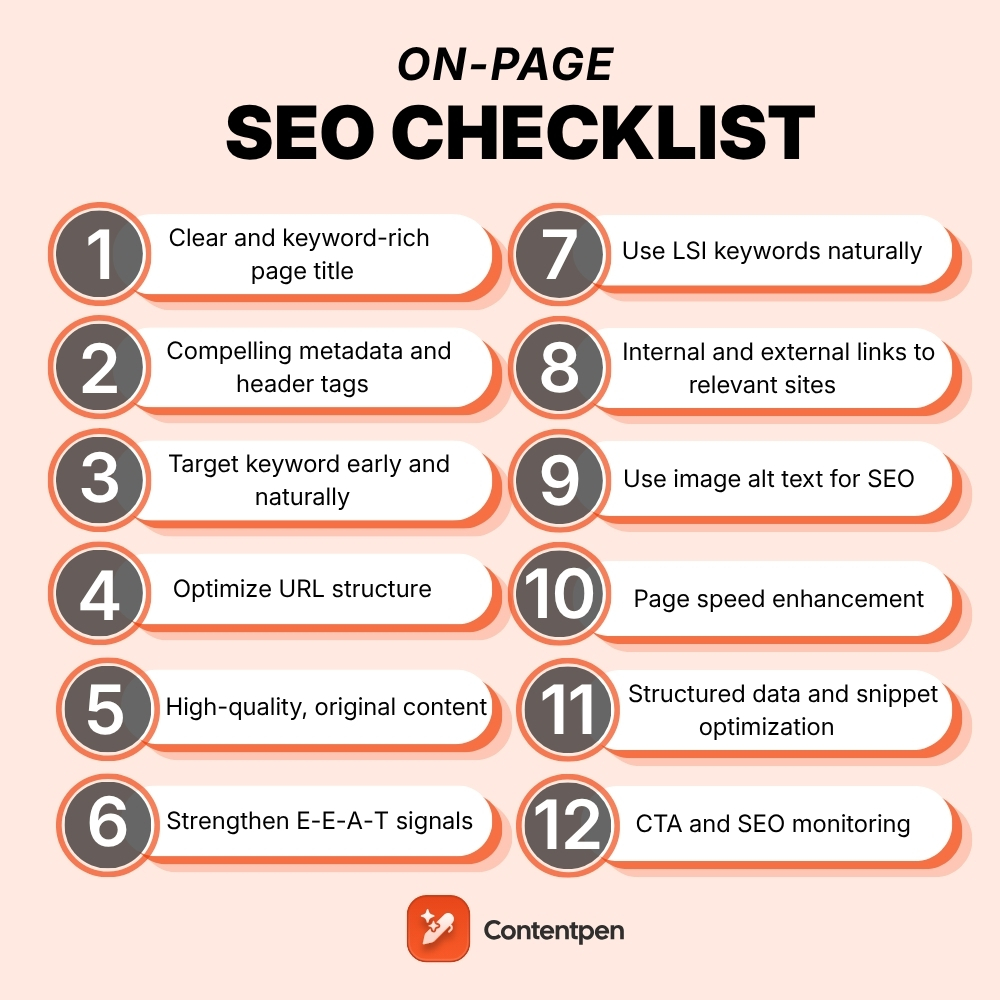
An AI SEO checklist for WordPress is a structured set of optimization tasks powered by machine learning algorithms and natural language processing. It goes beyond traditional static lists by analyzing your content in real time, comparing it against top-performing competitors, and generating actionable recommendations. The checklist can be executed through dedicated WordPress plugins, cloud-based AI platforms, or a combination of both.
Rather than guessing which keywords to target or whether your headings are structured correctly, the AI scans search engine results pages, user behavior data, and on-page elements. It then presents a prioritized list of fixes — from missing alt tags to underperforming paragraphs. Many AI SEO tools for WordPress now handle schema markup generation, internal linking suggestions, and even content briefs based on semantic topic clusters.
In essence, this checklist merges the strategic oversight of a human SEO specialist with the data-crunching speed of artificial intelligence. The result is a dynamic, always-updated blueprint that keeps your WordPress site aligned with Google’s evolving algorithms.
Why You Need an AI-Powered SEO Checklist for Your WordPress Site
Manual SEO checklists still work, but they require constant updating and deep technical knowledge. An AI-driven approach fills those gaps by automatically detecting issues that a human might overlook — thin content, keyword cannibalization, slow-loading elements, or missing structured data. For WordPress site owners managing dozens or hundreds of pages, this becomes an irreplaceable time-saver.
Another compelling reason is the increasing complexity of search engines. Google’s Helpful Content System and core updates reward pages that demonstrate real expertise and user satisfaction. AI tools analyze sentiment, readability, entity relationships, and topical depth in ways that simple plugin scores cannot. By following an AI SEO checklist for WordPress, you align your content strategy with the very signals that modern algorithms prioritize.
Moreover, AI helps bridge the gap between content creation and technical SEO. A WordPress blog post written with AI assistance can seamlessly incorporate optimized headings, internal links to relevant pages, proper image compression, and FAQ schema — all without switching between five different dashboards.
Core Components of an AI SEO Checklist for WordPress
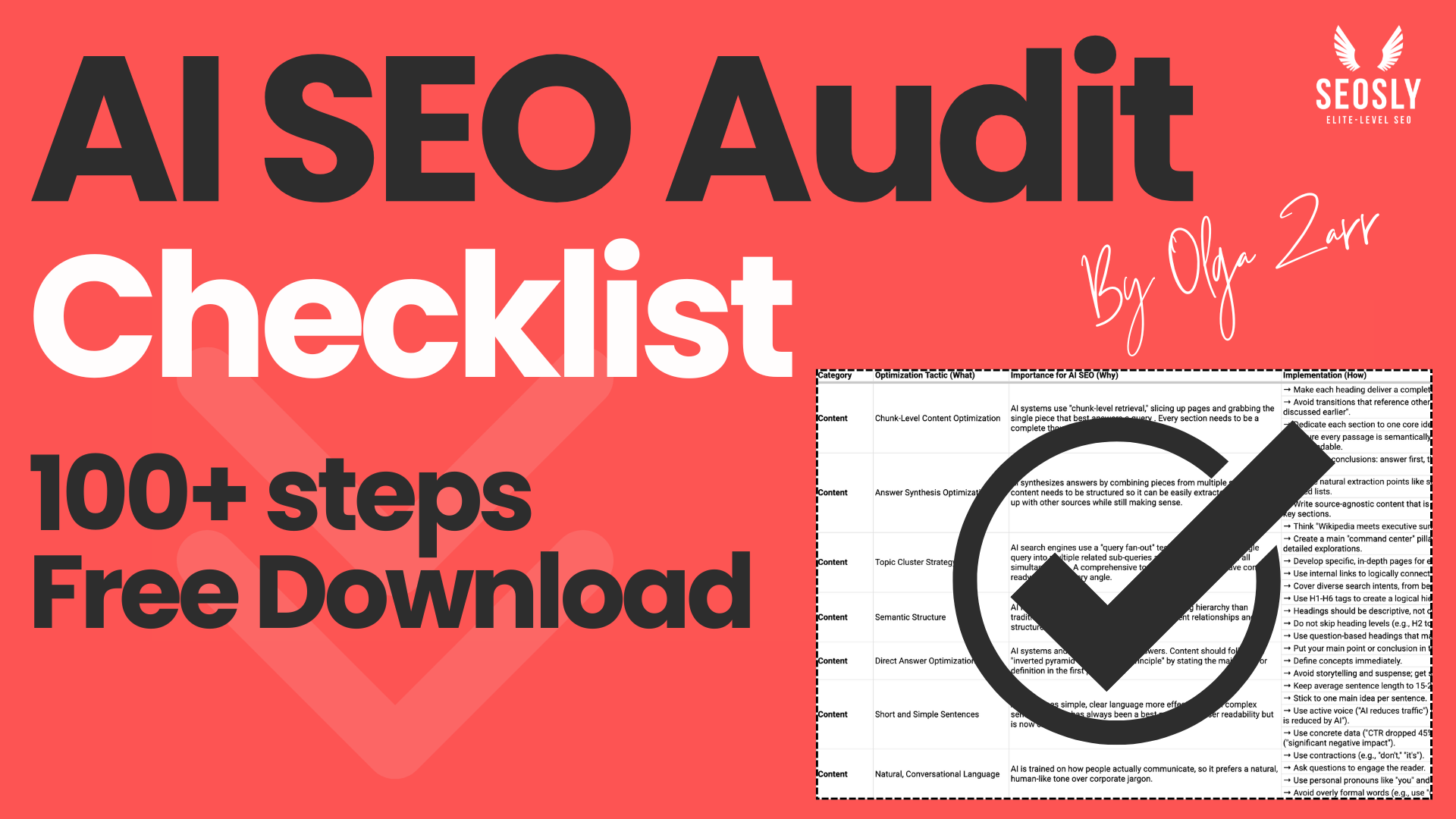
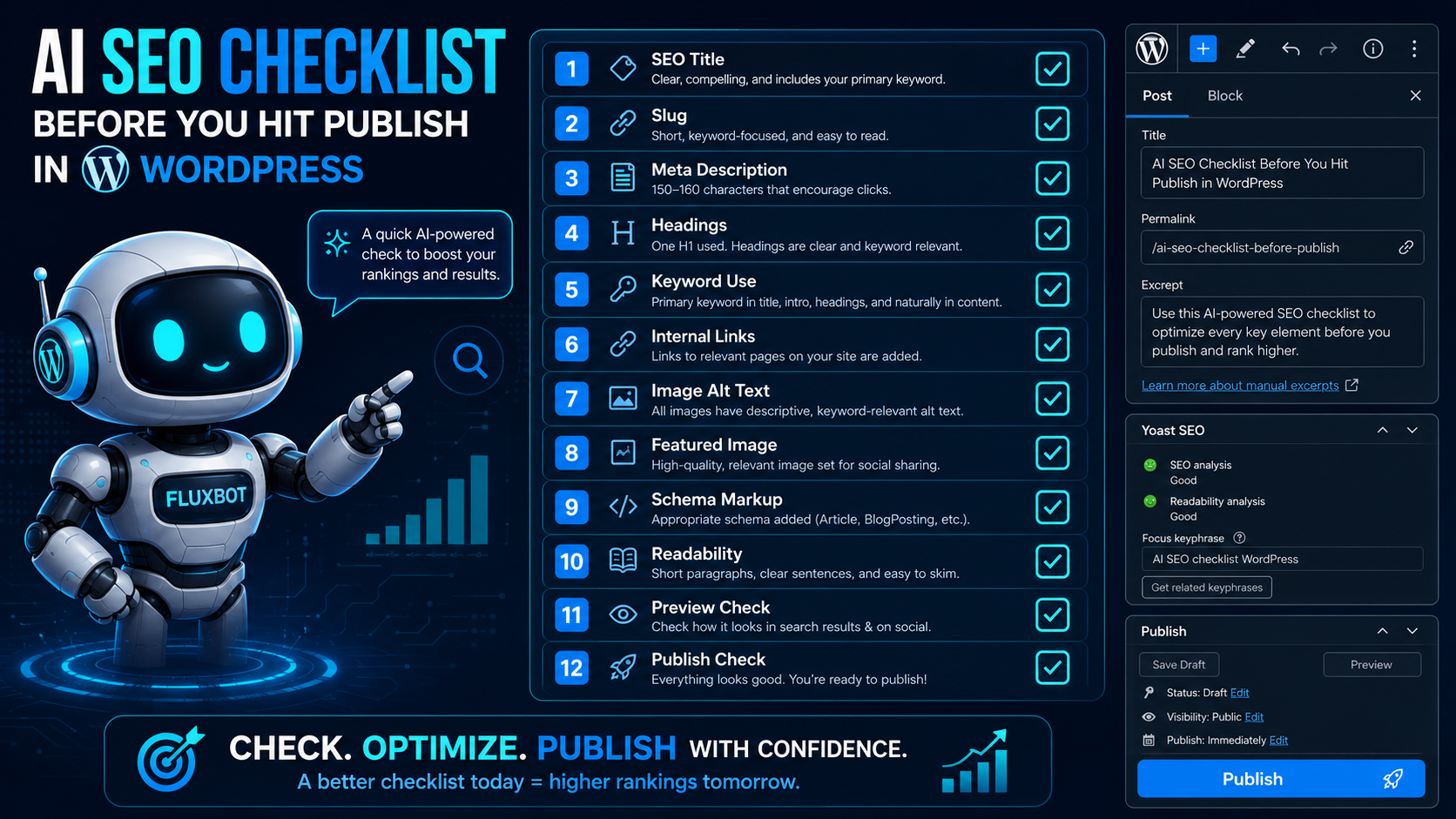
An effective AI SEO checklist for WordPress is not a single plugin feature. It spans multiple areas of optimization, each using different AI models. Below are the fundamental building blocks, broken down into actionable categories.
AI-Driven Keyword Research and Clustering
Before writing, AI tools analyze search intent, volume, and competition. They group related terms into topic clusters so you can build pillar pages and supporting content hubs. WordPress plugins like Rank Math PRO integrate with AI content assistants to suggest primary, secondary, and LSI keywords directly inside the editor. You can even see real-time keyword difficulty scores and “content scores” that predict how well your draft matches search intent.
Content Optimization and On-Page Scoring
Once your draft is ready, the AI SEO checklist evaluates elements such as title tag length, meta description relevance, heading hierarchy, keyword density, image alt attributes, and outbound link quality. Tools like AIOSEO’s smart analysis or the Surfer SEO integration for WordPress pinpoint exactly which sentences need improvement, where to add semantically related phrases, and how to enrich the text with entities that Google’s Knowledge Graph recognizes.
Automated Technical SEO Audits
AI crawlers simulate how search engine bots navigate your WordPress site. They detect broken links, orphan pages, slow server response times, duplicate content, and mobile usability issues. Plugins such as SEOPress or Slim SEO now employ lightweight AI modules to categorize these problems by severity and offer one-click fixes — for example, generating redirects or noindex directives where appropriate.
Schema Markup Generation
Structured data is critical for rich snippets, yet manual coding is error-prone. An AI SEO checklist for WordPress includes automated schema markup for articles, products, FAQs, reviews, and local businesses. WordLift uses artificial intelligence to annotate your content with linked open data entities, while Yoast SEO Premium dynamically builds JSON-LD based on post type and custom fields. The result is clean, validated schema that enhances your appearance in search results.
Internal Linking and Content Siloing
Smart internal linking distributes authority across your WordPress site. AI algorithms parse your entire content library to recommend relevant interlinks, identify pages that need more support, and even create internal link structures for new posts. Link Whisper is a popular AI-powered internal linking tool that suggests contextual links as you write, turning internal linking from a manual chore into an automated part of the checklist.
Benefits and Limitations of Using AI for WordPress SEO
Adopting an AI SEO checklist for WordPress brings clear advantages, but understanding its boundaries ensures you use it as an assistant rather than a replacement for strategic thinking.
- Benefits: Drastically reduced time on repetitive tasks, data-backed content recommendations, improved consistency across large sites, better alignment with semantic search, and the ability to uncover hidden content gaps through competitor content analysis.
- Limitations: Over-reliance on AI can produce generic or formulaic content that lacks genuine human experience. AI does not fully grasp nuanced brand voice or highly specialized industry jargon without extensive customization. Some tools also demand monthly subscriptions that may strain smaller budgets.
- Choose an AI-Powered SEO Plugin or Stack: Install a comprehensive WordPress SEO plugin that supports AI features, such as Rank Math PRO (with Content AI), AIOSEO, or an integration with external platforms like Surfer SEO via REST API. Ensure the plugin can access your site’s database and communicate with remote AI models.
- Connect to AI Services: Most plugins require an API key or a connected account. For example, Rank Math’s Content AI pulls data from its own servers, while other tools connect to OpenAI or Google NLP. Follow the plugin’s wizard to activate the module.
- Run a Full Site Audit: Initiate an AI-driven crawl from the WordPress dashboard. The audit will scan for broken links, duplicate titles, missing meta descriptions, schema errors, and core web vital indicators. Save the report and sort issues by “High Priority.”
- Conduct AI-Enhanced Keyword Research: Use the built-in keyword tool or an external AI platform (like NeuronWriter) to generate a list of primary and secondary keywords for each existing URL. Map those keywords to a content calendar. The AI may suggest clustering pages that already rank on page two into a single in-depth guide.
- Optimize On-Page Elements: For each page, follow the AI’s content score. Adjust title tags to include power words, rewrite meta descriptions to improve CTR, add missing image alt text, and tighten heading structure. If the tool flags thin sections, expand them with original data, expert quotes, or step-by-step explanations.
- Generate and Validate Schema Markup: Enable automatic schema generation. For articles, ensure Article schema includes Proper author and date fields. For FAQ sections, implement FAQPage schema through blocks or shortcodes. Run the rich results test inside the plugin to confirm validity.
- Build Internal Links Intelligently: Use an AI-based internal linking tool to inject contextual links into old posts while you create new content. Aim for at least 3–5 relevant internal links per page. The A
- Optimize Images Using AI: Many AI SEO checklists for WordPress now include automatic image compression, WebP conversion, and AI-generated alt text. ShortPixel AI and EWWW Image Optimizer integrate with WordPress media libraries to rename files with relevant keywords and describe images for screen readers.
- Monitor and Refresh Decaying Content: Set up an AI content decay monitor. The system flags articles that have lost traffic over the last 30, 60, or 90 days. Review the AI’s suggested revisions — often adding new data, updated statistics, or an entirely new section — and schedule republishing.
- Track Performance and Iterate: Connect Google Search Console and Analytics to your dashboard. The A If a particular type of optimization (e.g., improved readability, more entity mentions) consistently moves pages from position 8 to position 3, replicate that pattern across your site.
- Blindly Following AI Content Scores: Achieving a perfect “100” score does not guarantee ranking success if the content lacks originality. Avoid stuffing the AI-suggested terms in an unnatural rhythm. Always read the final version aloud and ensure it flows like human conversation.
- Neglecting E-E-A-T Signals: AI cannot create genuine author credentials or firsthand experience. For your WordPress site, display clear author bios, link to professional profiles, and cite original research. Do not let the AI checklist overshadow the trust signals Google demands.
- Automating Schema Without Testing: Automated schema is powerful but can occasionally produce errors — missing author images or invalid list formats. Regularly run Google’s Rich Results Test on at least one page from each template. Fix errors manually if the plugin’s AI cannot handle edge cases.
- Ignoring Site Speed Impact: Some AI tools add extra JavaScript calls or heavy data processing that slows down your WordPress backend. Choose lightweight integrations and enable caching. Monitor core web vitals after installing any new AI module.
- Over-Optimizing Anchor Text for Internal Links: AI internal linking tools might generate too many exact-match anchors, which can look spammy. Review the suggested anchors and vary them with partial matches, branded phrases, and natural language.
The best results come from blending the AI SEO checklist with human editorial oversight. Let the AI handle pattern recognition and data aggregation while you inject original insights, case studies, and authentic expertise that algorithms cannot replicate.
AI SEO Tools vs. Traditional SEO Checklist: A Comparison
| Factor | Traditional SEO Checklist | AI SEO Checklist for WordPress |
|---|---|---|
| Keyword Research | Manual spreadsheets, static volume data | Real-time intent analysis, semantic grouping, trend prediction |
| On-Page Optimization | Predefined rules (e.g., exact keyword in H1) | Dynamic scoring against top-ranking pages, NLP-based content improvement |
| Technical Audits | Periodic manual crawls with Screaming Frog | Continuous AI crawling with severity classification and auto-fixes |
| Schema Markup | Manual JSON-LD coding or basic plugin templates | Automated, entity-aware schema generation and validation |
| Content Refresh Suggestions | Guessing based on age or traffic drops | AI identifies exact decaying content, suggests updates with targeted keywords |
| Scalability | Labor-intensive for sites over 100 pages | Effortlessly scales to thousands of posts with consistent quality |
Step-by-Step Guide: How to Implement Your AI SEO Checklist on WordPress
Turning theory into practice requires a structured workflow. Below is an actionable sequence that any WordPress site owner can follow, from initial setup to ongoing maintenance.
Common Mistakes When Using AI for WordPress SEO (And How to Avoid Them)

Relying on artificial intelligence does not make you immune to errors. Knowing the pitfalls keeps your AI SEO checklist for WordPress productive rather than destructive.
Important Notes for Maximizing AI SEO on WordPress
Even the most advanced AI SEO checklist for WordPress functions best within a well-managed environment. Keep your WordPress core, themes, and plugins updated to prevent conflicts. Use a staging site to test new AI-driven changes before pushing them live — especially bulk schema updates or mass internal link injections.
Data privacy is another critical point. When you connect your WordPress site to external AI services, you share content and metadata with third-party servers. Review each provider’s terms and confirm that your content is not used to train their public models without permission. For sensitive industries, consider self-hosted AI solutions that operate on your own server infrastructure.
Finally, remember that AI models reflect the data they were trained on. Biases in training datasets can lead to recommendations that favor certain writing styles or overlook niche audiences. Regular manual spot-checks ensure your AI SEO checklist remains inclusive and accurately represents your brand’s voice.
Frequently Asked Questions
What is an AI SEO checklist for WordPress?
An AI SEO checklist for WordPress is a set of automated optimization tasks that use machine learning to analyze your website, suggest improvements for on-page SEO, technical health, content quality, and link structure, and help you implement those changes directly within WordPress.
Which AI SEO plugin works best for a WordPress checklist?
Popular options include Rank Math PRO with Content AI, AIOSEO with smart analysis, and SEOPress. For content-focused AI, Surfer SEO integrates deeply with WordPress, while Link Whisper excels at AI-powered internal linking. The best choice depends on whether you prioritize all-in-one automation or specialized features.
Can AI fully automate SEO for WordPress sites?
No. AI can handle data analysis, pattern recognition, and routine optimizations with impressive speed, but it still requires human oversight for strategy, brand voice, and experience-based content creation. An AI SEO checklist for WordPress is a powerful assistant, not a complete replacement for an SEO specialist.
How does AI improve keyword research for WordPress?
AI analyzes massive datasets from search engines, social media, and competitor sites to identify keyword clusters, search intent, and content gaps. It then recommends semantically related terms and predicts which topics will perform well, making your WordPress content more comprehensive and relevant.
Is AI-generated schema markup safe for SEO?
Yes, when validated properly. Most AI-powered WordPress plugins generate JSON-LD schema following Google’s guidelines. Always test with Google’s Rich Results Tool to catch any formatting errors, and customize auto-generated fields like product availability or review ratings to match exact page content.
How often should I run the AI SEO checklist on my WordPress site?
Run a full technical audit monthly. For content optimization, follow the checklist each time you publish a new post or update an existing page. Set up automated monitoring for critical issues like broken links or schema errors to receive real-time alerts.
Conclusion
The AI SEO checklist for WordPress represents a fundamental shift from guesswork to data-driven precision. By integrating artificial intelligence into keyword research, on-page analysis, technical audits, schema generation, and content refreshing, you create a living optimization framework that evolves with search algorithms. WordPress site owners who adopt this approach scale their SEO efforts without sacrificing quality, freeing up time to focus on what truly matters — creating valuable content that serves real users. Start small with a trusted AI-powered plugin, follow the step-by-step checklist outlined above, and gradually expand your use of AI as your confidence grows. The combination of human creativity and machine intelligence is not just the future of WordPress SEO; it is the standard that top-performing sites already follow today.
Xem thêm:
- AI SEO Smart Search: The Complete Guide to Future-Proofing Your Organic Traffic
- AI SEO Question Generator: The Complete Guide to Dominating Google’s People Also Ask
- AI SEO Generative Search Content: The Complete Playbook for Ranking in the Age of SGE
- How to Improve EEAT with AI: A Strategic Roadmap for Lasting Search Visibility
- AI SEO Unlinked Mentions: The Complete Guide to Turning Brand Mentions into Backlinks
Bài viết cùng chủ đề:

AI SEO SEO Automation with Make: The Complete Workflow Guide

AI SEO SEO Automation with Zapier: The Complete Workflow Guide

AI SEO SEO Automation with n8n: The Complete Workflow Guide
AI SEO SEO Automation with Gemini: The Complete Guide to Scaling Organic Growth

AI SEO SEO Automation with Claude: The Complete Guide to Scaling Content in 2025

AI SEO SEO Automation with ChatGPT: The Complete Playbook for 2025

AI SEO & SEO Automation for Affiliate Sites: The 2025 Playbook for Passive Income Growth
AI SEO & SEO Automation for Bloggers: The Complete Guide to Scaling Your Content

AI SEO & SEO Automation for Agencies: The Complete 2025 Playbook

AI SEO and SEO Automation for Ecommerce: The Complete Playbook for 2025

AI SEO & SEO Automation for WordPress: The Complete Playbook for 2025
AI SEO SEO Automation Strategy: The Complete Playbook for 2025

Mastering the AI SEO SEO Automation Process: A Complete Guide to Scaling Organic Growth
AI SEO SEO Automation System: The Complete Guide to Scaling Organic Growth in 2025
AI SEO SEO Automation Platform: The Complete Guide to Scaling Organic Growth in 2025
AI SEO SEO Automation Software: The Complete Guide to Scaling Organic Growth in 2025















