
No products in the cart.
AI SEO NeuronWriter: The Complete Guide to Data-Driven Content Optimization

31
Jul
Jul
AI SEO NeuronWriter has emerged as a powerful tool for content teams and SEO professionals who want to move beyond guesswork. This platform combines semantic analysis, real-time SERP comparison, and AI-assisted writing to help you create content that ranks. In this comprehensive guide, you will learn exactly how AI SEO NeuronWriter works, why it stands out in a crowded market, and how to use it for measurable results.
What Is AI SEO NeuronWriter?

AI SEO NeuronWriter is a content optimization platform that uses natural language processing and semantic analysis to guide writers. Instead of simply counting keywords, the tool analyzes the top-ranking pages for your target query. It then provides a visual map of concepts, entities, and terms that Google associates with that topic. This approach helps you build topical authority within a single article.
The core idea behind NeuronWriter is to mirror the semantic structure of pages that already rank well. By understanding the relationships between words and concepts, you can craft content that satisfies both users and search engine algorithms. The platform integrates with Google Search Console, supports multiple languages, and offers an AI assistant for drafting and rewriting.
How Does NeuronWriter Differ from Traditional SEO Tools?
Traditional SEO tools often focus on keyword volume, difficulty scores, and backlink analysis. NeuronWriter shifts the focus to content itself. It looks at what your competitors are saying and how they structure their information. This is a fundamental difference in philosophy.
Most keyword tools tell you what to include. NeuronWriter tells you how to structure it. It analyzes the frequency of terms, the presence of related entities, and the readability patterns of top-ranking content. This makes it a hybrid between a writing assistant and a competitive analysis tool.
Key Components of the NeuronWriter Interface
The platform is divided into several distinct modules. The Content Editor is the main workspace where you write and see real-time optimization scores. The Semantic Analysis panel shows you the terms and entities found in your competitors’ content. The SERP Analyzer provides a detailed breakdown of the top 10 results for your keyword, including word count, readability, and image usage.
T This score is based on how well your draft matches the semantic profile of the top-ranking pages. A score above 70 is generally considered good, while scores above 85 indicate strong topical alignment.
The Science Behind NeuronWriter’s Semantic Analysis
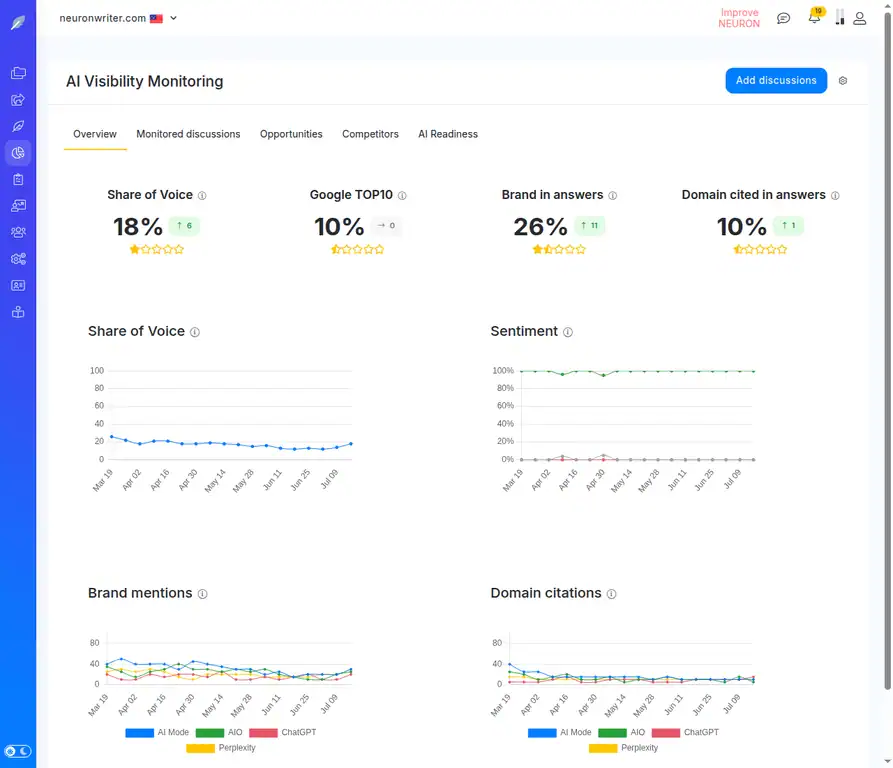
NeuronWriter uses a combination of TF-IDF (Term Frequency-Inverse Document Frequency) and more advanced entity recognition. TF-IDF helps identify words that are important in a specific document relative to a larger corpus. However, the tool goes further by identifying named entities, such as brands, people, and places, as well as conceptual relationships.
For example, if you are writing about “content marketing,” the tool might identify related concepts like “audience persona,” “content calendar,” and “ROI measurement.” These are not just keywords; they are topics that Google expects to see in a comprehensive article. The tool then helps you naturally incorporate these concepts into your writing.
Real-Time SERP Comparison
One of the most powerful features is the ability to compare your draft directly against the top 10 results. The tool highlights which semantic terms you have covered and which ones you are missing. This is not a simple keyword checklist. It shows you the density and placement of these terms in your competitors’ content.
This real-time feedback loop is invaluable. You can see exactly where your content is thin and where it is over-optimized. This prevents the common mistake of keyword stuffing while ensuring you cover all relevant subtopics.
Benefits of Using AI SEO NeuronWriter for Content Creation
The primary benefit is efficiency. Researching a topic manually can take hours. NeuronWriter condenses this research into a few seconds. You get a clear roadmap for your article before you write the first sentence.
Another benefit is consistency. When you have a team of writers, maintaining a consistent level of topical depth is challenging. NeuronWriter provides a standardized framework that every writer can follow. This leads to more uniform quality across your content library.
The tool also helps with content refresh. If you have an old article that is losing rankings, you can run it through NeuronWriter to see what new terms and concepts you need to add. This is often faster than writing a new piece from scratch.
Limitations and Considerations
No tool is perfect. NeuronWriter relies on the current SERP as its baseline. If the top-ranking pages are outdated or poorly written, the tool will guide you toward that same structure. You still need human judgment to determine if the existing content is actually good.
Another limitation is that the tool focuses on on-page factors. It does not analyze backlinks, domain authority, or user engagement metrics. You will still need other tools for a complete SEO strategy.
Finally, the AI writing assistant can sometimes produce generic prose. It is best used for generating ideas, outlines, and first drafts, not for final polished copy. You must edit and refine the output to add your unique voice and expertise.
Practical Guide: How to Use NeuronWriter Step by Step
Getting started with NeuronWriter is straightforward.
Step 1: Set Up Your Project
Create a new project and enter your target keyword. You can also paste a competitor URL if you want to analyze a specific page. The tool will then fetch the top 10 results from Google and begin its analysis.
Step 2: Analyze the Semantic Map
Take a few minutes to review the semantic map. Look at the terms and entities that are highlighted. Pay attention to the ones with high relevance scores. These are the concepts you must cover in your article.
You will see a list of “Recommended Terms” on the right side of the editor. These are not mandatory, but they represent the vocabulary used by your competitors. Aim to include most of them naturally in your text.
Step 3: Write Your Draft
Start writing your article in the editor. As you type, the Content Score will update in real time. You will see which terms you have used and which ones are still missing. Do not try to force every term in. Focus on writing naturally while keeping the semantic map in mind.
Use the AI assistant to help with writer’s block. You can ask it to generate an introduction, expand on a point, or rewrite a sentence. This is a great way to speed up the drafting process.
Step 4: Optimize for Readability
NeuronWriter provides readability scores based on the Flesch-Kincaid reading ease test. Your goal should be to match the readability level of your target audience. For most B2B topics, a score between 60 and 70 is appropriate. For consumer topics, aim for 70 to 80.
Short paragraphs, bullet points, and subheadings all help improve readability. The tool will flag sentences that are too long or complex.
Step 5: Export and Publish
Once your Content Score is above 80 and you are satisfied with the quality, export the article. NeuronWriter integrates with WordPress, Shopify, and other CMS platforms. You can also export as HTML or Markdown.
After publishing, monitor your rankings. Use the data to refine your approach for the next article.
Common Mistakes to Avoid When Using NeuronWriter
Many users make the mistake of trying to achieve a 100% Content Score. This often leads to unnatural writing and keyword stuffing. A score of 80 to 90 is usually sufficient. The last 10 points often require adding terms that do not fit naturally into your narrative.
Another common error is ignoring the search intent. NeuronWriter tells you what terms to include, but it does not tell you what type of content to create. If the top results are listicles, you should write a listicle. If they are in-depth guides, you need a long-form guide. Always analyze the SERP yourself before starting.
Some users also neglect to update their content. The SERP changes over time. What worked six months ago may not work today. Run your top articles through NeuronWriter every quarter to see if you need to add new terms or sections.
Mistake: Copying Competitor Structure Too Closely
While it is smart to mirror the semantic structure of top-ranking pages, you should not copy their exact outline. Google is good at detecting duplicate content patterns. Use the semantic map as a guide, but create your own unique structure and add your own insights.
Add original data, personal experiences, and unique examples. This is what sets your content apart from the competition. The tool helps you cover the necessary ground, but your expertise makes the content valuable.
Important Notes for Maximizing Results

NeuronWriter works best when combined with a solid keyword research process. Use the tool to optimize content for keywords that have commercial intent or high search volume. Do not waste time optimizing for keywords that nobody searches for.
Always combine NeuronWriter with manual SERP analysis. Look at the featured snippets, “People Also Ask” boxes, and image results. These elements give you clues about what users want to see.
Remember that the tool is a guide, not a dictator. Your editorial judgment is still the most important factor. If a recommended term does not make sense in your context, skip it. The goal is to create content for humans, not for algorithms.
Integration with Other SEO Tools
NeuronWriter does not replace your existing SEO stack. You still need tools for keyword research (like Ahrefs or SEMrush), rank tracking, and backlink analysis. Use NeuronWriter as a specialized tool for the content creation phase.
Many users pair NeuronWriter with Surfer SEO or Frase. While these tools have overlapping features, they have different strengths. NeuronWriter is often praised for its user-friendly interface and visual semantic maps. Surfer is known for its detailed content guidelines. Frase is strong for content briefs and AI writing.
Comparison: NeuronWriter vs. Surfer SEO vs. Frase
| Feature | NeuronWriter | Surfer SEO | Frase |
|---|---|---|---|
| Semantic Analysis | Visual map, entity recognition | Keyword density, NLP terms | Topic research, Q&A extraction |
| AI Writing Assistant | Yes, integrated | Yes, via Jasper integration | Yes, built-in |
| Real-time Content Score | Yes | Yes | Yes |
| SERP Comparison | Detailed, visual | Detailed, numeric | Basic |
| Pricing (Entry Level) | Approx. $19/month | Approx. $59/month | Approx. $45/month |
| Best For | Visual learners, solo creators | Data-driven teams | Content briefs, research |
As the table shows, NeuronWriter offers a competitive price point and a unique visual approach. It is particularly well-suited for writers who want to understand the “why” behind content optimization, not just the “what.”
Who Should Use AI SEO NeuronWriter?
Freelance writers can benefit from the tool by producing higher-quality content in less time. The semantic map helps them understand a new niche quickly. Content managers can use it to standardize quality across a team of writers. SEO agencies can use it to scale their content production without sacrificing depth.
Small business owners who manage their own content will find the tool intuitive. The learning curve is shorter than many competitors. You do not need a deep technical background to understand the interface.
However, if you are a beginner who has not yet mastered basic SEO principles, this tool may be overwhelming. It is best to have a foundational understanding of keywords, search intent, and on-page optimization before using NeuronWriter.
Frequently Asked Questions (FAQ)
Is NeuronWriter better than Surfer SEO?
NeuronWriter offers a more visual and intuitive interface with a lower price point. Surfer SEO provides more granular data and is often preferred by large teams. The best choice depends on your budget and workflow preferences. Both tools are effective for improving content relevance.
Does NeuronWriter support languages other than English?
Yes, NeuronWriter supports over 40 languages, including Spanish, German, French, and Portuguese. The semantic analysis works for any language that Google indexes. This makes it a viable option for international SEO campaigns.
Can I use NeuronWriter for free?
NeuronWriter offers a free trial with limited credits. This allows you to test the tool on a few articles before committing to a paid plan. The trial is useful for evaluating the interface and the quality of the semantic analysis.
Does NeuronWriter integrate with WordPress?
Yes, t You can export your optimized article directly to your WordPress site with a single click. This saves time and reduces the risk of formatting errors during copy-paste.
How often should I update my content using NeuronWriter?
It is recommended to refresh your cornerstone content every 3 to 6 months. Search trends and competitor content change frequently. Running your top pages through NeuronWriter quarterly helps you stay ahead of the curve.
Will NeuronWriter guarantee a #1 ranking on Google?
No tool can guarantee rankings. NeuronWriter helps you optimize your content for relevance, but rankings depend on many factors, including backlinks, domain authority, and user engagement. Use the tool to improve your chances, but maintain realistic expectations.
Conclusion
AI SEO NeuronWriter represents a significant shift in how content is optimized. By focusing on semantic relevance and real-time SERP analysis, it empowers writers to create content that aligns with Google’s understanding of a topic. The tool is not a magic bullet, but it is a powerful ally in the fight for organic visibility.
To get the most out of NeuronWriter, combine it with solid keyword research, a clear content strategy, and your own unique expertise. Use the semantic maps to guide your writing, but always prioritize the reader’s experience. When used correctly, this tool can help you produce content that ranks higher, attracts more traffic, and converts better.
Start with a single article. Run it through the tool, analyze the results, and refine your process. Over time, you will develop a workflow that consistently produces top-tier content. The investment in learning this tool will pay off in improved search performance and a stronger content marketing program.
Xem thêm:
- OpenAI SEO: The Ultimate Guide to AI-Powered Search Optimization
- AI SEO Caching: The Complete Guide to Accelerating AI Search Visibility
- Startup AI SEO: The Complete Playbook for Scaling Organic Growth in 2025
- AI SEO Long Form Article Generator: The Complete Guide to Scaling Content Production
- AI Multilingual SEO: The Complete Guide to Dominating Global Search in the Age of Machine Translation
Bài viết cùng chủ đề:

AI SEO SEO Automation with Make: The Complete Workflow Guide

AI SEO SEO Automation with Zapier: The Complete Workflow Guide

AI SEO SEO Automation with n8n: The Complete Workflow Guide
AI SEO SEO Automation with Gemini: The Complete Guide to Scaling Organic Growth

AI SEO SEO Automation with Claude: The Complete Guide to Scaling Content in 2025

AI SEO SEO Automation with ChatGPT: The Complete Playbook for 2025

AI SEO & SEO Automation for Affiliate Sites: The 2025 Playbook for Passive Income Growth
AI SEO & SEO Automation for Bloggers: The Complete Guide to Scaling Your Content

AI SEO & SEO Automation for Agencies: The Complete 2025 Playbook

AI SEO and SEO Automation for Ecommerce: The Complete Playbook for 2025

AI SEO & SEO Automation for WordPress: The Complete Playbook for 2025
AI SEO SEO Automation Strategy: The Complete Playbook for 2025

Mastering the AI SEO SEO Automation Process: A Complete Guide to Scaling Organic Growth
AI SEO SEO Automation System: The Complete Guide to Scaling Organic Growth in 2025
AI SEO SEO Automation Platform: The Complete Guide to Scaling Organic Growth in 2025
AI SEO SEO Automation Software: The Complete Guide to Scaling Organic Growth in 2025















