
No products in the cart.
AI SEO Rendering: The Complete Guide to Modern Search Visibility
31
Jul
Jul
Search engines have evolved far beyond simple keyword matching. Today, Google and other platforms use sophisticated machine learning models to understand and rank content. At the heart of this evolution lies AI SEO rendering, a critical process that determines how search engines see, interpret, and evaluate your web pages. This guide explores everything you need to know about AI SEO rendering, from its technical foundations to practical implementation strategies that can transform your search performance.
What Is AI SEO Rendering?

AI SEO rendering refers to the process where search engine crawlers use artificial intelligence and machine learning algorithms to render, parse, and understand web pages in a way that mimics human browsing behavior. Unlike traditional crawling that only reads raw HTML, AI SEO rendering executes JavaScript, processes CSS, and interprets dynamic content to build a complete picture of what a user actually sees.
This approach allows search engines to index content that was previously invisible, such as single-page applications, client-side rendered frameworks, and interactive elements. The AI component analyzes visual layout, content hierarchy, and user experience signals to determine relevance and quality. For website owners, understanding AI SEO rendering is no longer optional—it is essential for maintaining and improving search rankings.
How AI SEO Rendering Works: The Technical Process
To grasp the full scope of AI SEO rendering, it helps to break down the process into its core stages. Each stage relies on different AI capabilities and serves a distinct purpose in the indexing pipeline.
1. Crawling and Resource Discovery
The process begins when search engine bots discover your URL through sitemaps, internal links, or backlinks. Traditional crawlers request the raw HTML file. However, modern AI-powered crawlers go further. They analyze the page structure, identify JavaScript files, CSS stylesheets, and image resources that need to be fetched to render the page fully.
Google’s rendering infrastructure uses a headless Chromium browser to execute these resources. The AI component decides which pages need full rendering versus lightweight processing based on signals like page importance, crawl budget, and historical data about the site’s update frequency.
2. JavaScript Execution and DOM Construction
Once resources are fetched, the rendering engine executes JavaScript code. This step is where many websites fail. If your content is loaded dynamically via JavaScript, the AI must wait for the scripts to run and the Document Object Model (DOM) to be constructed. The AI evaluates the final DOM, not the original source code, to determine what content exists on the page.
For example, an e-commerce site that loads product descriptions via AJAX calls will only have that content indexed if the AI successfully executes the JavaScript. If the script fails or times out, the page appears empty to search engines, resulting in lost rankings and traffic.
3. Visual Rendering and Layout Analysis
After the DOM is built, the AI renders the page visually. This step goes beyond text extraction. The AI analyzes the visual layout, including font sizes, color contrast, element positioning, and whitespace distribution. This visual analysis helps search engines understand content hierarchy and importance.
For instance, if your main heading is styled smaller than your sidebar text, the AI may misinterpret your content structure. Similarly, content hidden behind tabs or accordions receives less weight than visible content. The AI uses computer vision algorithms to assess these visual cues and adjust ranking signals accordingly.
4. Semantic Understanding and Entity Extraction
The final stage involves natural language processing (NLP) models like BERT and MUM. These AI systems analyze the rendered text to extract entities, understand relationships between concepts, and determine the overall topic of the page. This semantic understanding goes beyond keyword matching—it captures the intent and context behind the content.
For example, a page about “apple” could refer to the fruit or the technology company. The AI uses surrounding content, visual elements, and user behavior data to disambiguate the meaning. This understanding directly impacts which search queries your page ranks for and how it appears in featured snippets.
Why AI SEO Rendering Matters for Your Website

The shift to AI-driven rendering has profound implications for website owners. Ignoring this process means leaving your search visibility to chance. Here are the key reasons why AI SEO rendering should be a priority in your digital strategy.
JavaScript Frameworks and Indexing Challenges
Modern web development increasingly relies on JavaScript frameworks like React, Angular, and Vue.js. These frameworks offer superior user experiences but create indexing challenges. Without proper AI SEO rendering optimization, search engines may see blank pages or incomplete content.
Consider a React-based site where all content is rendered client-side. When a crawler requests the page, it receives a minimal HTML shell with JavaScript bundles. The AI must execute these bundles to generate the actual content. If your JavaScript is heavy or slow, the rendering process may time out, leaving your content unindexed.
Core Web Vitals and User Experience Signals
AI SEO rendering also evaluates performance metrics like Largest Contentful Paint (LCP), First Input Delay (FID), and Cumulative Layout Shift (CLS). These Core Web Vitals are direct ranking factors. The AI measures how quickly the rendered page becomes interactive and stable, using this data to assess user experience quality.
Websites that render slowly or shift layout during loading receive lower quality scores. The AI may also reduce crawl frequency for sites with poor performance, further limiting indexing opportunities. Optimizing for AI SEO rendering means optimizing for speed and stability, which benefits both users and search rankings.
AI SEO Rendering vs. Traditional SEO Rendering
Understanding the differences between traditional and AI-driven rendering helps clarify why the industry has shifted. The table below highlights the key distinctions.
| Aspect | Traditional SEO Rendering | AI SEO Rendering |
|---|---|---|
| Content Processing | Raw HTML parsing only | Full JavaScript execution and DOM construction |
| Visual Analysis | Limited or none | Computer vision for layout and hierarchy |
| Semantic Understanding | Keyword matching | NLP models for entity and intent extraction |
| Performance Evaluation | Basic page speed metrics | Core Web Vitals and user interaction signals |
| Dynamic Content | Often missed | Fully indexed when properly configured |
| Update Frequency | Fixed schedules | Adaptive crawling based on content changes |
Traditional rendering treated web pages as static documents. AI SEO rendering treats them as interactive applications. This fundamental shift requires a new approach to technical SEO, content strategy, and performance optimization.
Practical Applications: How to Optimize for AI SEO Rendering

Optimizing for AI SEO rendering involves technical adjustments, content strategy changes, and ongoing monitoring. The following steps provide a practical roadmap for ensuring your website is fully visible to AI-powered search engines.
1. Implement Server-Side Rendering (SSR) or Static Site Generation (SSG)
Server-side rendering delivers fully rendered HTML to the crawler, eliminating the need for JavaScript execution. Static site generation goes further by pre-building all pages at deploy time. Both approaches ensure that content is immediately available to AI crawlers without waiting for client-side scripts.
For existing JavaScript-heavy sites, consider hybrid approaches. Next.js and Nuxt.js offer both SSR and SSG capabilities, allowing you to choose the best strategy for each page type. Product pages, blog posts, and landing pages benefit most from pre-rendered HTML, while highly interactive dashboards can remain client-side.
2. Use Dynamic Rendering as a Fallback
Dynamic rendering serves different content to crawlers and users. When a bot requests a page, the server returns a pre-rendered HTML version. When a user requests the same page, they receive the full JavaScript application. This approach bridges the gap between modern web development and search engine compatibility.
However, dynamic rendering requires careful implementation. You must detect crawler user agents accurately and maintain two versions of your content. Google has stated that dynamic rendering is a workaround, not a long-term solution. Use it as a temporary measure while migrating to SSR or SSG.
3. Optimize JavaScript for Faster Execution
If you must rely on client-side rendering, optimize your JavaScript to reduce execution time. Minimize bundle sizes, eliminate render-blocking scripts, and defer non-critical JavaScript. The faster your scripts execute, the more likely the AI crawler will successfully render and index your content.
Code splitting is particularly effective. Break your JavaScript into smaller chunks that load only when needed. This reduces initial load time and ensures that critical content appears quickly. Also, remove unused dependencies and consider using modern formats like ES modules for better performance.
4. Ensure Content Is Visible Without Interaction
AI crawlers may not interact with your page beyond initial rendering. Content hidden behind clicks, hovers, or scrolls may not receive full indexing weight. Ensure that your most important content is visible in the initial viewport or accessible through standard HTML elements.
For tabs and accordions, consider using progressive enhancement. Provide the full content in the HTML and use JavaScript to hide it visually. This way, the AI sees all content in the DOM, even if users must interact to view it. Avoid lazy-loading critical content unless you have a robust fallback.
5. Monitor Rendering with Search Console
Google Search Console provides a URL Inspection tool that shows exactly how Google renders your pages. Use this tool to compare the fetched HTML with the rendered HTML. If they differ significantly, your JavaScript is not executing properly for crawlers.
Regularly check the coverage report for indexing errors. Pages that fail to render will appear as “Crawled – currently not indexed” or “Discovered – currently not indexed.” Address these issues promptly by fixing JavaScript errors, improving server response times, or implementing SSR.
Common Mistakes in AI SEO Rendering Optimization
Many website owners make avoidable errors when trying to optimize for AI SEO rendering. Recognizing these mistakes can save you time, resources, and lost rankings.
Blocking JavaScript Resources in Robots.txt
Some developers block JavaScript, CSS, or image files in robots.txt to reduce crawl load. This practice is counterproductive. When the AI cannot access these resources, it cannot render the page correctly. The result is an incomplete or blank page in the index.
Always allow search engine bots to access all render-critical resources. Use robots.txt only for files that genuinely should not be indexed, such as admin panels or duplicate content. Test your robots.txt rules regularly to ensure they do not inadvertently block essential assets.
Relying Solely on Client-Side Rendering
Building a single-page application without any SSR or SSG is a common mistake. While modern search engines handle JavaScript better than before, client-side rendering still carries risks. Slow execution, network issues, and bot limitations can all prevent successful indexing.
If you must use client-side rendering, implement a fallback. Provide a noscript version of your content or use a prerendering service. The goal is to ensure that every page has a crawlable HTML version, regardless of how the user-facing experience is built.
Ignoring Mobile Rendering Differences
Google primarily uses mobile user agents for crawling and indexing. If your mobile experience differs significantly from desktop, the A Ensure that your mobile pages contain the same content and structured data as desktop versions.
Test your pages using Google’s mobile-friendly test tool. Check that all content is accessible on mobile viewports and that touch elements are properly sized. The AI evaluates mobile usability as a ranking factor, so a poor mobile rendering directly harms your SEO.
Important Notes for AI SEO Rendering Success
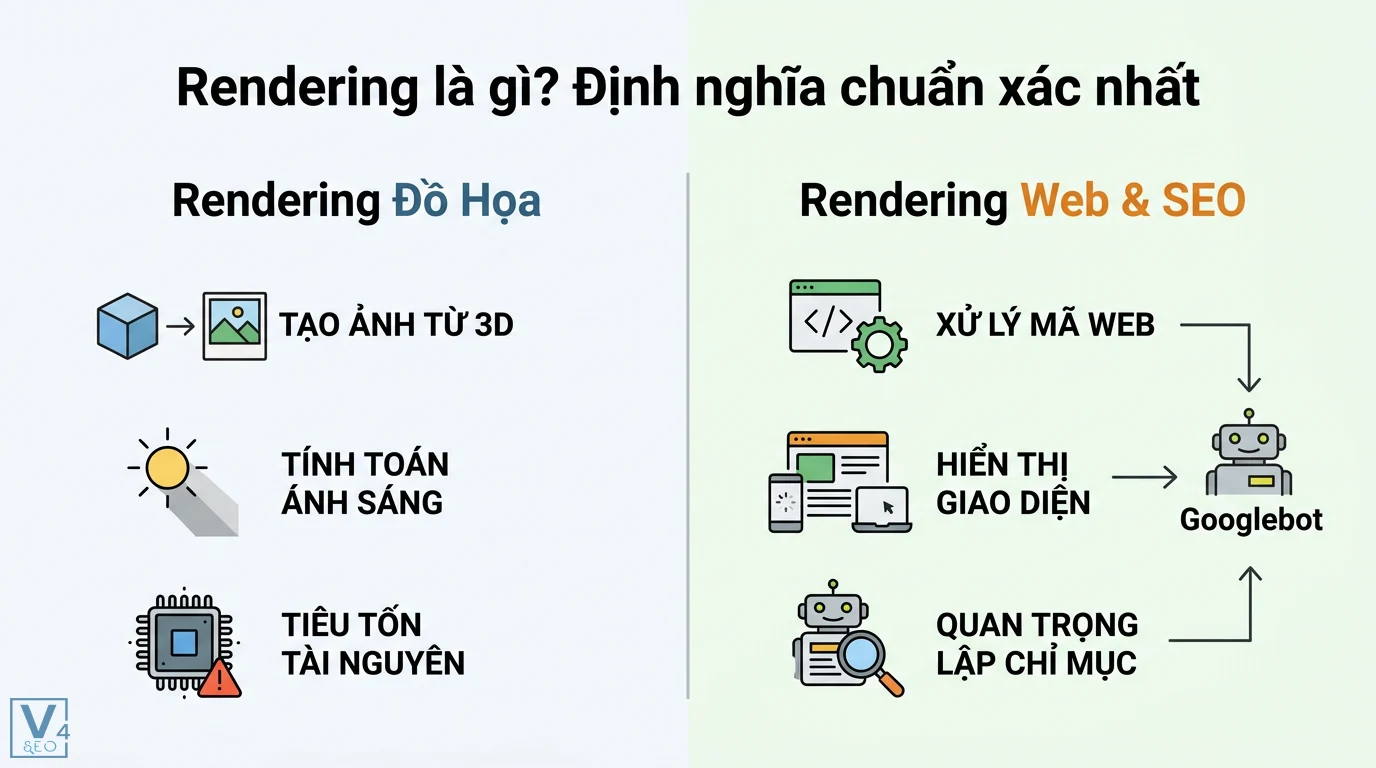
Beyond technical fixes, several strategic considerations influence how well your site performs under AI SEO rendering. These notes reflect industry best practices and observed search engine behavior.
- Content freshness: AI systems prioritize recently updated content. Regularly refresh your pages with new information, updated statistics, and current examples to signal relevance.
- Structured data: Implement schema markup to help AI understand your content’s context. Rich snippets, product information, and FAQ schemas provide explicit signals that enhance rendering interpretation.
- Internal linking: Strong internal links help AI crawlers discover and render more pages. Use descriptive anchor text and ensure that important pages are within a few clicks of your homepage.
- Canonical tags: Prevent duplicate content issues by using canonical tags correctly. The AI uses these signals to consolidate ranking signals to your preferred URL.
- XML sitemaps: Submit clean, up-to-date XML sitemaps. This helps AI crawlers prioritize pages for rendering and reduces wasted crawl budget on low-value URLs.
Frequently Asked Questions About AI SEO Rendering
Does Google use AI for rendering web pages?
Yes, Google uses machine learning models throughout its rendering pipeline. The search engine employs neural networks to understand page layout, extract entities, and evaluate content quality. Google’s rendering infrastructure uses a headless Chromium browser combined with AI algorithms to process JavaScript and assess visual elements. This AI-driven approach allows Google to understand modern web applications that rely heavily on client-side rendering.
What is the difference between crawling and rendering in SEO?
Crawling is the process of discovering and fetching web pages through links and sitemaps. Rendering is the subsequent process of executing JavaScript, building the DOM, and generating the visual representation of the page. Crawling only retrieves raw HTML, while rendering produces the final content that search engines index. AI SEO rendering specifically refers to the intelligent execution and interpretation of this rendering process using machine learning.
How long does it take for Google to render a page?
Google’s rendering time varies based on page complexity, server speed, and crawl priority. Simple HTML pages may render within seconds, while JavaScript-heavy pages can take minutes or even hours. Google maintains a rendering queue, and pages with higher authority or frequent updates are processed faster. The AI prioritizes rendering based on signals like page importance, historical crawl data, and user engagement metrics.
Can AI SEO rendering improve my rankings?
Yes, optimizing for AI SEO rendering can directly improve rankings. When search engines can fully render and understand your content, they can index it correctly and match it to relevant queries. Proper rendering also improves Core Web Vitals scores, which are confirmed ranking factors. Additionally, AI-rendered pages are more likely to appear in featured snippets and other rich results because the AI can extract structured information more accurately.
What are the best tools for testing AI SEO rendering?
Google Search Console’s URL Inspection tool is the most reliable free option. It shows exactly what Google sees when rendering your page. Other useful tools include Screaming Frog SEO Spider, which can simulate JavaScript rendering, and Puppeteer, a Node.js library that controls headless Chrome. For visual comparison, use Google’s Mobile-Friendly Test and PageSpeed Insights to evaluate rendering performance and user experience signals.
Conclusion: Embrace AI SEO Rendering for Future-Proof SEO
AI SEO rendering is not a passing trend—it is the new standard for how search engines evaluate websites. The days of simple HTML crawling are over. Modern search engines use sophisticated AI models to render, understand, and rank content in ways that closely mimic human perception. Websites that adapt to this reality will thrive, while those that ignore it will see declining visibility and traffic.
The key takeaway is that AI SEO rendering demands a holistic approach. You must ensure your technical infrastructure supports full JavaScript execution, your content is semantically rich and well-structured, and your performance metrics meet modern standards. Regular monitoring and testing are essential to catch rendering issues before they impact your rankings.
Start by auditing your current rendering setup. Use Google Search Console to identify pages that are not being indexed correctly. Implement server-side rendering or static site generation where possible. Optimize your JavaScript for speed and reliability. And always keep user experience at the forefront—the AI is ultimately trying to determine what real users will experience when they visit your site.
By mastering AI SEO rendering, you position your website for sustained search success in an increasingly competitive digital landscape. The effort you invest today in understanding and optimizing this process will pay dividends through higher rankings, more organic traffic, and better engagement from your target audience.
Xem thêm:
- AI SEO Edge SEO: The Complete Guide to Gaining a Competitive Advantage in 2025
- AI SEO Competitor Traffic: The Complete Playbook for Outranking Rivals in 2025
- AI SEO LLM Brand Mentions: The Complete Guide to Dominating AI Search Results
- AI SEO Content Inventory: The Complete Guide to Automating Your Content Asset Management
- AI SEO AlsoAsked: The Complete Guide to Smarter Content Research in 2025
Bài viết cùng chủ đề:

AI SEO SEO Automation with Make: The Complete Workflow Guide

AI SEO SEO Automation with Zapier: The Complete Workflow Guide

AI SEO SEO Automation with n8n: The Complete Workflow Guide
AI SEO SEO Automation with Gemini: The Complete Guide to Scaling Organic Growth

AI SEO SEO Automation with Claude: The Complete Guide to Scaling Content in 2025

AI SEO SEO Automation with ChatGPT: The Complete Playbook for 2025

AI SEO & SEO Automation for Affiliate Sites: The 2025 Playbook for Passive Income Growth
AI SEO & SEO Automation for Bloggers: The Complete Guide to Scaling Your Content

AI SEO & SEO Automation for Agencies: The Complete 2025 Playbook

AI SEO and SEO Automation for Ecommerce: The Complete Playbook for 2025

AI SEO & SEO Automation for WordPress: The Complete Playbook for 2025
AI SEO SEO Automation Strategy: The Complete Playbook for 2025

Mastering the AI SEO SEO Automation Process: A Complete Guide to Scaling Organic Growth
AI SEO SEO Automation System: The Complete Guide to Scaling Organic Growth in 2025
AI SEO SEO Automation Platform: The Complete Guide to Scaling Organic Growth in 2025
AI SEO SEO Automation Software: The Complete Guide to Scaling Organic Growth in 2025















