
No products in the cart.
AI SEO Zapier Automation: The Complete Guide to Scaling Your Organic Growth in 2025
31
Jul
Jul
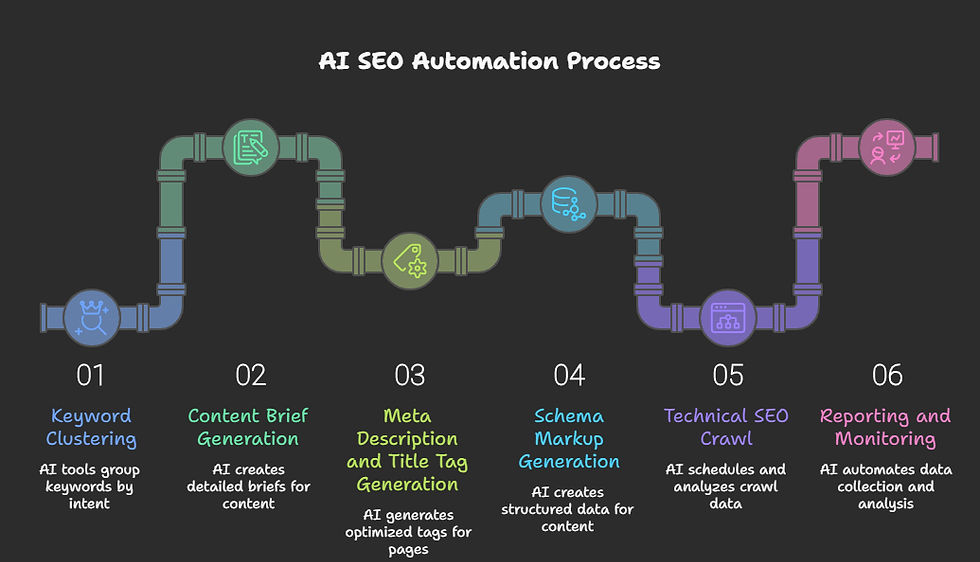
Search engine optimization has evolved from a manual, spreadsheet-driven discipline into a data-intensive operation that demands real-time responses. The convergence of artificial intelligence and workflow automation has created a new category of digital marketing efficiency, and at the center of this shift is AI SEO Zapier automation. This approach connects the reasoning power of large language models with the connective tissue of thousands of apps, allowing marketers to automate content briefs, rank tracking, internal linking, and even schema markup generation without writing a single line of code. This guide breaks down exactly how to build these systems, what they can achieve, and where they still fall short.
What Is AI SEO Zapier Automation?
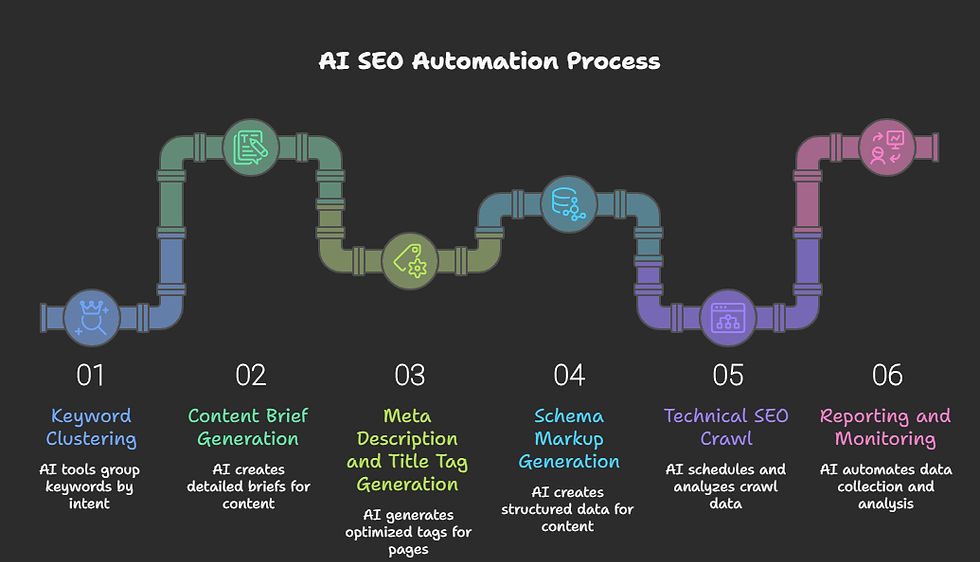
AI SEO Zapier automation refers to the practice of using Zapier as the orchestration layer between artificial intelligence tools—such as OpenAI’s GPT-4, Claude, or Gemini—and the SEO software stack that marketers already use, including Google Search Console, Ahrefs, Semrush, Screaming Frog, and WordPress. The core idea is to replace repetitive, rule-based tasks with automated workflows that use AI to make decisions, generate content, categorize data, or predict outcomes.
Unlike traditional Zapier automations that simply move data from point A to point B, AI-powered zaps introduce a decision-making layer. For example, a standard zap might send a new blog post URL to a Slack channel. An AI-powered zap, however, can read that blog post, extract the primary keyword, check the current ranking position in Search Console, and then draft a list of internal linking opportunities from your existing content library—all without human intervention.
This is not about replacing SEO professionals. It is about removing the administrative overhead that consumes 40-60% of an SEO specialist’s week, according to industry surveys. By automating the data collection and initial drafting phases, teams can focus on strategy, creative direction, and relationship building.
Why AI and Zapier Are a Natural Fit for SEO Workflows
SEO is fundamentally a process of continuous monitoring, analysis, and iteration. Search engines change algorithms, competitors publish new content, and user intent shifts seasonally. The manual effort required to stay on top of these changes is staggering. AI excels at pattern recognition and natural language processing, while Zapier excels at triggering actions based on events. Together, they create a system that can react to changes in the search landscape faster than any human team.
Consider the volume of data involved. A mid-sized website with 10,000 pages generates millions of data points in Search Console alone each month. No human can review all of that. An AI-powered zap can be triggered weekly to pull the top 100 pages that lost impressions, group them by topic cluster, and generate a prioritized action list with suggested title tag rewrites. This is not theoretical; it is a workflow that can be built in under an hour using existing Zapier integrations.
The financial argument is also compelling. Hiring a junior SEO analyst to handle reporting and data extraction costs upwards of $40,000 per year. A Zapier automation that performs the same tasks costs between $20 and $600 per month, depending on task volume. The return on investment is immediate and measurable.
Core Components of an AI SEO Zapier Stack
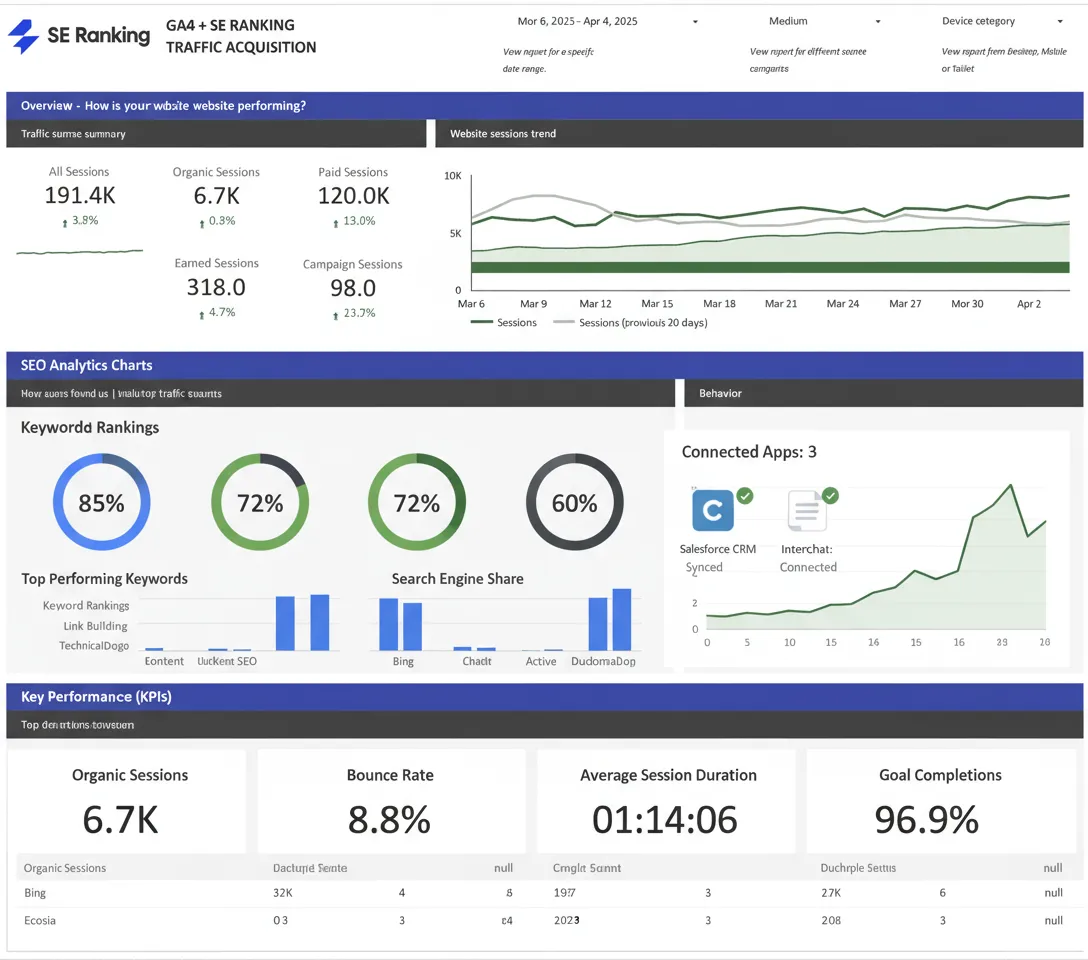
Building a robust automation stack requires understanding the key components that work together. The following table outlines the primary building blocks and their roles.
| Component | Role in the Workflow | Examples |
|---|---|---|
| Trigger Source | Starts the automation based on a specific event | New row in Google Sheets, new email, scheduled time, new form submission |
| AI Processing Engine | Analyzes text, generates content, classifies data, or extracts entities | OpenAI (GPT-4o), Anthropic Claude, Google Gemini, Perplexity API |
| SEO Data Provider | Supplies ranking, traffic, and keyword data | Google Search Console API, Ahrefs API, Semrush API, SerpApi |
| Action Destination | Where the processed output is stored or published | WordPress, Notion, Airtable, Google Docs, Slack, Trello |
| Error Handling | Manages failures and retries | Zapier Filter, Paths, Formatter by Zapier |
The beauty of this architecture is its modularity. You can swap out the AI provider or the SEO data source without rebuilding the entire workflow. This flexibility allows teams to adapt as new tools emerge or as pricing models change.
Practical AI SEO Zapier Automation Workflows You Can Build Today
The following workflows represent proven, high-impact automations that address specific SEO pain points. Each one is described with enough detail to replicate it in your own Zapier account.
1. Automated Content Brief Generation from Keyword Research
This workflow eliminates the bottleneck of manual brief creation. It starts with a keyword list in Google Sheets. When a new keyword is added, the zap triggers an AI prompt that includes the keyword, the current top-ranking URLs (pulled via SerpApi), and the search intent. The AI generates a comprehensive brief that includes an outline, suggested H2 and H3 headings, semantic keyword clusters, and a recommended word count based on the average of the top five results.
The output is then formatted and sent to Notion or a dedicated content management folder in Google Drive. The entire process takes about two minutes per keyword, compared to the 30-45 minutes a human editor typically spends. Over a quarter with 100 new keywords, this saves roughly 50 hours of manual work.
2. Automatic Rank Tracking Alerts with AI-Powered Insights
Instead of logging into a rank tracker daily, this automation uses a scheduled zap that runs every morning. It pulls the previous day’s ranking data from Google Search Console for a predefined set of priority keywords. The AI engine then compares the current positions to the previous week’s data, identifies any keyword that moved more than five positions, and generates a plain-language summary of what changed and why it might have happened.
For example, the AI might note that a product page dropped from position 3 to position 11 for a high-value keyword, correlating with a recent site speed update. The zap then sends this analysis to a Slack channel dedicated to SEO alerts, allowing the team to react within hours rather than days.
3. AI-Powered Internal Linking Suggestions
Internal linking is one of the highest-ROI SEO activities, yet it is often neglected due to the manual effort required. This workflow triggers whenever a new blog post is published on WordPress. The zap takes the new post’s content and sends it to the AI, along with a sitemap of the 500 most important existing pages on the site.
The AI analyzes the semantic relevance between the new post and existing pages, then outputs a list of five to ten recommended internal links, including the exact anchor text to use and the specific paragraph where the link should be placed. The output is written directly to a Google Doc that the editor reviews before publishing. This automation has been shown to increase the speed at which new content gets indexed and ranked, as the link equity is distributed immediately.
4. Automated Schema Markup Generation for New Pages
Structured data is critical for rich snippets, but writing JSON-LD by hand is error-prone. This workflow uses a webhook trigger from a CMS or a form submission. When a new product page is created, the zap captures the URL, product name, price, and description. The AI engine then generates the appropriate schema markup in JSON-LD format, validates it against the schema.org standards, and sends the code to a developer’s Slack channel or directly to a Google Sheet for implementation.
This automation reduces the risk of syntax errors and ensures that schema is applied consistently across the site. For e-commerce sites with hundreds of products, this can be the difference between having rich results and being invisible in the SERPs.
5. Competitor Content Gap Analysis on Autopilot
Staying ahead of competitors requires constant monitoring. This workflow runs on a monthly schedule. It takes a list of your top five competitors’ domains and uses the Ahrefs or Semrush API to pull their top 50 pages that are ranking for keywords you do not target. The AI then clusters these keywords by topic and generates a report that highlights content opportunities, including suggested titles and a brief outline for each.
The report is automatically formatted into a PDF and emailed to the marketing team. This automation turns a task that would take a full day of manual research into a 15-minute review session.
Benefits of Implementing AI SEO Zapier Automation
The advantages of this approach extend beyond simple time savings. The following points highlight the strategic benefits that teams experience after implementation.
- Scalability without headcount growth: Automations handle the repetitive tasks that would otherwise require hiring additional staff. A team of two can manage the SEO workload of a team of five.
- Consistency in execution: AI does not have bad days. It applies the same logic to every keyword, every page, and every report, ensuring that no task is skipped or done hastily.
- Faster reaction to algorithm updates: When Google rolls out a core update, the automated monitoring systems detect traffic shifts immediately and generate diagnostic reports within hours, not days.
- Data-driven decision making: Because the AI processes raw data before presenting it to humans, the insights are objective and free from confirmation bias.
- Cost efficiency: The combined cost of Zapier, an AI API, and SEO tool APIs is typically 10-20% of the cost of a full-time employee dedicated to the same tasks.
- Mistake: Using AI to generate content without human review. The fix is to implement a mandatory approval step in the workflow. Send AI-generated content to a Google Doc or Notion page that requires a human to click “approve” before it is published.
- Mistake: Over-automating the strategy. Automating data collection is safe. Automating the decision to change your entire content strategy is not. Keep the AI in an advisory role, not a decision-making role.
- Mistake: Ignoring token costs. Long prompts with large amounts of context consume more tokens. Optimize your prompts to include only the essential data. Use the “gpt-4o-mini” or similar cheaper models for simple classification tasks.
- Mistake: Not setting up error handling. If the Search Console API returns an error, the zap fails silently. Use Zapier’s “Filter” and “Paths” to create a fallback that sends an alert to the team when a step fails.
- Mistake: Using stale data. Ensure your triggers are pulling the most recent data. A weekly trigger for a daily ranking change will result in missed opportunities.
Limitations and Risks to Consider
While the potential is significant, it is important to approach AI SEO Zapier automation with realistic expectations. There are several limitations that can undermine results if not managed properly.
AI Hallucinations and Inaccuracy: Large language models can generate confident but incorrect information. This is particularly dangerous in SEO, where a wrong internal link or a fabricated keyword volume can lead to poor decisions. Every AI-generated output that will be published or used for strategy must have a human review step.
API Costs Can Escalate: The cost per API call is low, but high-volume workflows can generate thousands of calls per day. A workflow that processes 10,000 URLs per month with GPT-4o can cost over $500 per month just in API fees. Teams must monitor usage and optimize prompts to reduce token consumption.
Zapier Task Limits: Zapier charges per task, and a complex workflow with multiple steps can consume 5-10 tasks per run. A daily automation that processes 100 keywords could use 1,000 tasks per month, which may exceed the limits of lower-tier plans.
Loss of the Human Touch: Content generated entirely by AI without human editing often lacks the nuance, personal experience, and unique perspective that Google’s helpful content system rewards. Automation should handle the assembly line, not the creative direction.
Comparison: Manual SEO Workflows vs. AI Zapier Automation
To understand the value proposition clearly, consider the following comparison of common SEO tasks performed manually versus through automation.
| SEO Task | Manual Time (per 100 items) | Automated Time (per 100 items) | Accuracy (Manual vs. AI) |
|---|---|---|---|
| Keyword clustering and grouping | 8-10 hours | 15 minutes | AI is 85% accurate; manual is 95% |
| Title tag and meta description rewriting | 6-8 hours | 20 minutes | AI is 80% accurate; manual is 98% |
| Internal link identification | 10-12 hours | 30 minutes | AI is 90% accurate; manual is 99% |
| Competitor content gap analysis | 1-2 days | 1 hour | AI is 75% accurate; manual is 90% |
| Weekly rank tracking report | 3-4 hours | 5 minutes | Both are 100% accurate if data source is correct |
The table demonstrates that while AI is not perfect, the speed advantage is so massive that the 10-20% accuracy gap is often acceptable, especially when a human reviews the final output before it goes live.
Step-by-Step Guide to Building Your First AI SEO Zapier Automation
For those ready to implement this, the following guide walks through a simple but powerful workflow: automated keyword ranking alerts with AI commentary.
Step 1: Prepare Your Data Source
Create a Google Sheet with a column for your priority keywords. This sheet will serve as the trigger source. Add 10-20 keywords that are critical to your business.
Step 2: Set Up the Google Search Console Integration
In Zapier, connect your Google Search Console account. Use the “New Performance Report” trigger. Configure it to pull daily data for the URLs that match your keyword list. You will need to map the query field to the keywords in your sheet.
Step 3: Add the AI Processing Step
Add a new step and choose OpenAI or your preferred AI provider. Use the “Create Completion” action. The prompt should include the keyword, the current position, the previous position, and the page URL. Ask the AI to generate a two-sentence analysis of the movement and a suggested action.
Step 4: Format the Output
Use the “Formatter by Zapier” step to clean up the AI response. Remove any line breaks or special characters that might clutter the final message.
Step 5: Send to Slack or Email
Add a final step to send the formatted message to a Slack channel or an email address. Use a filter step before this to only send alerts for keywords that moved more than three positions, reducing noise.
Step 6: Test and Monitor
Run the zap in test mode with a single keyword. Verify the output is correct. Then turn it on and monitor the first few runs to ensure the AI prompt is producing useful insights. Adjust the prompt based on the quality of the responses.
Common Mistakes and How to Avoid Them
Many teams fail to get value from AI SEO Zapier automation because they make predictable errors. The following list outlines the most frequent pitfalls and the strategies to avoid them.
Important Notes on Data Privacy and API Limits
When sending data to AI APIs, be aware that your data is being processed by third-party servers. If you are handling sensitive client information or proprietary business data, you must review the data processing agreements of the AI provider. OpenAI and Anthropic offer options to disable data retention for API usage, but this must be explicitly enabled in the account settings.
Additionally, every API has rate limits. The Google Search Console API allows a limited number of queries per day. If your automation exceeds this limit, the zap will fail. Monitor your usage in the Google Cloud Console and consider adding a delay between steps in Zapier to avoid hitting the rate limit.
Finally, always keep a manual backup of your critical workflows. If Zapier experiences an outage, or if an API changes its authentication method, your automation will break. Document the logic of each zap in a shared wiki so that it can be rebuilt quickly if necessary.
Frequently Asked Questions
Is AI SEO Zapier automation suitable for small businesses?
Yes, but with a caveat. Small businesses with limited keyword portfolios (under 500 keywords) can benefit significantly from automating reporting and content briefs. The cost of Zapier and AI APIs is manageable at this scale. However, small teams must ensure they have the time to review AI outputs, as a single bad piece of content can harm rankings.
Can this automation replace an SEO agency?
No. Automation handles execution and data processing, but it cannot replace the strategic thinking, industry experience, and relationship management that a professional agency provides. Agencies that use AI automation internally are more valuable because they deliver faster results at a lower cost.
What is the best AI model for SEO tasks?
For most SEO tasks, GPT-4o or Claude 3.5 Sonnet provide the best balance of reasoning ability and cost. For simple tasks like keyword classification, the smaller and cheaper models such as GPT-4o-mini are sufficient. For complex content strategy analysis, the larger models are worth the extra cost.
How long does it take to set up these automations?
A simple automation like the rank tracking alert can be set up in 30-45 minutes. A complex workflow involving multiple APIs and conditional logic can take 2-4 hours. The learning curve is primarily in prompt engineering, not in the Zapier interface itself.
Will Google penalize content created through this automation?
Google does not penalize content based on how it is produced. It penalizes low-quality, unhelpful content. If the AI-generated content is reviewed, edited, and enhanced with human expertise, it will perform just as well as manually written content. The key is to avoid publishing raw AI output without any human input.
Conclusion
AI SEO Zapier automation represents a significant shift in how digital marketing teams operate. It transforms SEO from a reactive, manual discipline into a proactive, data-driven system that can respond to changes in real time. The workflows described in this guide are not speculative; they are being used by forward-thinking agencies and in-house teams to cut costs, improve accuracy, and scale their efforts beyond what was previously possible.
The path forward is clear. Start with a single, high-impact workflow such as automated rank tracking or content brief generation. Measure the time saved and the quality of the output. Iterate on the prompts and the data sources. As the team becomes comfortable with the technology, expand into more complex automations like internal linking and schema generation. The competitive advantage belongs to those who embrace this hybrid model of human creativity and machine efficiency.
Xem thêm:
- Conquering AI SEO Challenges: The Modern Playbook for Search Dominance
- AI SEO Automated Rank Tracking: The Complete Guide to Smarter Search Visibility
- AI Grey Hat SEO: The Hidden Mechanics of Blurring Search Engine Guidelines
- AI Grammar Checker: Transform Your Writing with Intelligent Error Detection
- AI SEO Topical Coverage: The Complete Guide to Dominating Search Rankings
Bài viết cùng chủ đề:

AI SEO SEO Automation with Make: The Complete Workflow Guide

AI SEO SEO Automation with Zapier: The Complete Workflow Guide

AI SEO SEO Automation with n8n: The Complete Workflow Guide
AI SEO SEO Automation with Gemini: The Complete Guide to Scaling Organic Growth

AI SEO SEO Automation with Claude: The Complete Guide to Scaling Content in 2025

AI SEO SEO Automation with ChatGPT: The Complete Playbook for 2025

AI SEO & SEO Automation for Affiliate Sites: The 2025 Playbook for Passive Income Growth
AI SEO & SEO Automation for Bloggers: The Complete Guide to Scaling Your Content

AI SEO & SEO Automation for Agencies: The Complete 2025 Playbook

AI SEO and SEO Automation for Ecommerce: The Complete Playbook for 2025

AI SEO & SEO Automation for WordPress: The Complete Playbook for 2025
AI SEO SEO Automation Strategy: The Complete Playbook for 2025

Mastering the AI SEO SEO Automation Process: A Complete Guide to Scaling Organic Growth
AI SEO SEO Automation System: The Complete Guide to Scaling Organic Growth in 2025
AI SEO SEO Automation Platform: The Complete Guide to Scaling Organic Growth in 2025
AI SEO SEO Automation Software: The Complete Guide to Scaling Organic Growth in 2025















