
No products in the cart.
WP Trove AI Automation: The Complete Guide to Streamlining Your WordPress Workflow
31
Jul
Jul
Managing a WordPress website involves countless repetitive tasks, from content scheduling to plugin updates and SEO optimization. WP Trove AI Automation has emerged as a powerful solution that combines artificial intelligence with workflow automation to handle these burdens. This guide explores how this technology transforms website management, saving time and reducing human error. Whether you run a small blog or a large e-commerce operation, understanding this automation approach can significantly improve your productivity and site performance.
What Is WP Trove AI Automation?
WP Trove AI Automation refers to the integration of artificial intelligence tools within the WordPress ecosystem to automate routine administrative, content, and technical tasks. Unlike traditional plugins that require manual configuration for every action, this system uses machine learning algorithms to make decisions, generate content, and execute workflows based on predefined rules and real-time data.
The core concept revolves around creating a self-sustaining website environment. The AI component analyzes user behavior, site performance metrics, and content patterns. The automation component then executes actions such as publishing posts, optimizing images, updating meta descriptions, and even responding to common customer queries without human intervention.
How WP Trove AI Automation Works
The underlying architecture of WP Trove AI Automation combines several technologies. Natural Language Processing (NLP) enables the system to understand and generate human-like text. Predictive analytics help forecast traffic patterns and user preferences. Robotic Process Automation (RPA) handles rule-based tasks like database cleaning and form submissions.
When you install an AI automation plugin, it typically connects to your WordPress database and external AI APIs. The system learns from your historical content and user interactions. Over time, it refines its algorithms to better match your brand voice and audience expectations. The automation triggers can be time-based, event-based, or condition-based, giving you granular control over what happens and when.
Key Components of the System
- AI Content Generator: Produces drafts, headlines, and product descriptions based on your input parameters
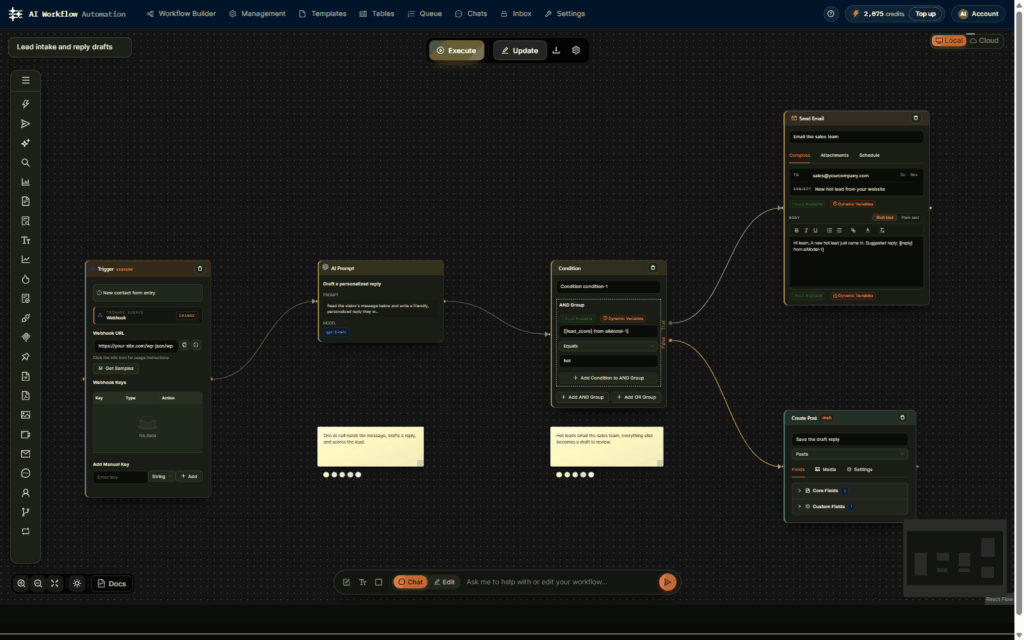
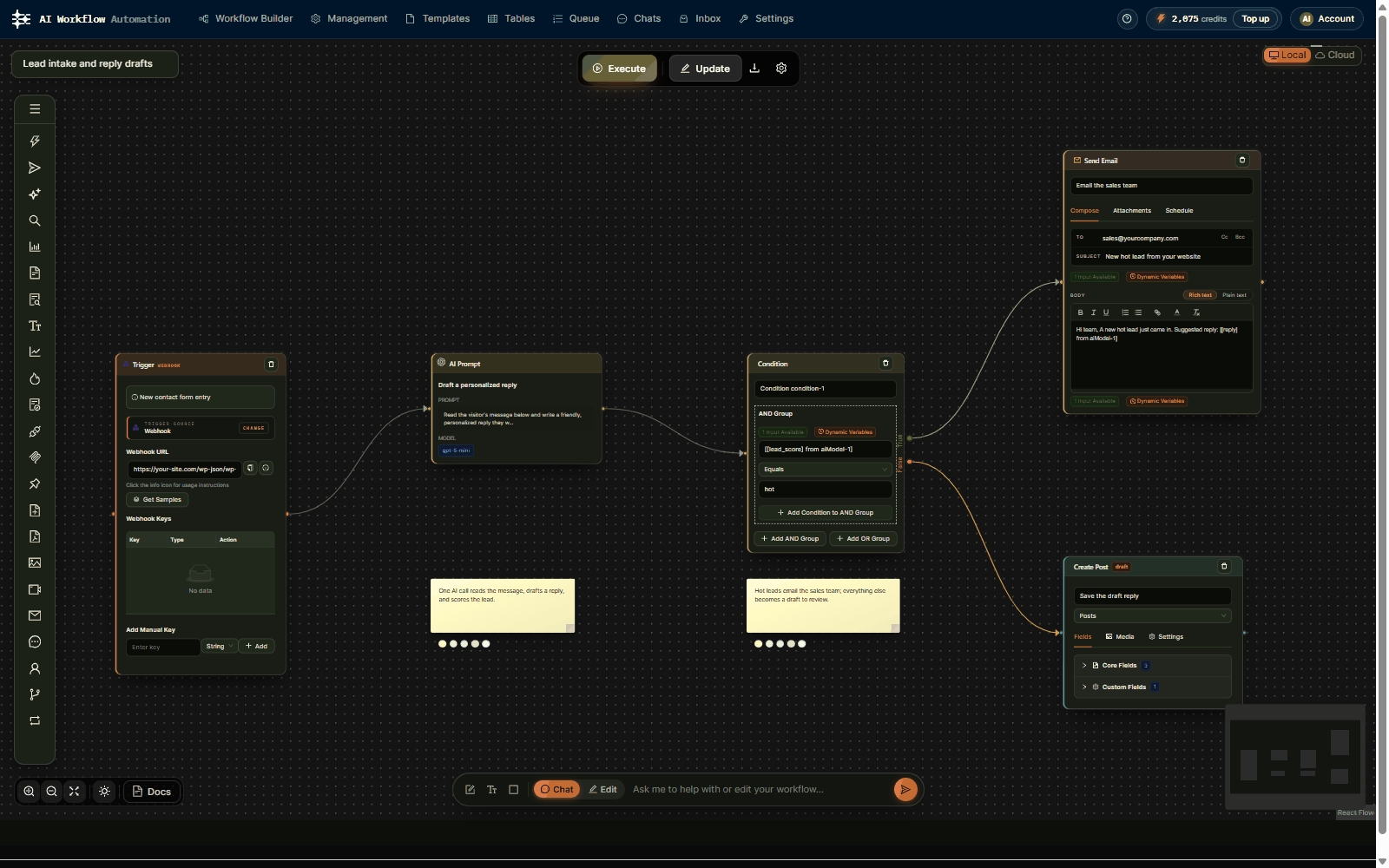
- Workflow Builder: Visual interface to create conditional logic for task sequences
- Integration Hub: Connects with third-party services like Mailchimp, Slack, and Google Analytics
- Performance Monitor: Tracks site speed, uptime, and user engagement to trigger optimization tasks
- Security Scanner: Automatically blocks malicious traffic and updates security patches
- Audit Your Workflows: List all weekly tasks and categorize them by frequency and complexity
- Select the Right Tools: Choose automation plugins that integrate well with your existing stack
- Define Triggers and Actions: Map out the exact conditions that start each automated process
- Start Small: Pilot the automation on one workflow, such as social media posting
- Monitor and Refine: Review performance metrics weekly and adjust parameters
- Scale Gradually: Add more workflows once you see positive results
Core Benefits of Implementing AI Automation in WordPress
Adopting WP Trove AI Automation delivers measurable improvements across multiple operational areas. The most immediate benefit is time savings. Tasks that previously took hours, such as resizing images or formatting blog posts, now happen in seconds. This efficiency allows website owners to focus on strategic growth rather than mundane maintenance.
Consistency is another major advantage. Human workers inevitably make errors, especially when performing repetitive actions. AI systems maintain the same quality standard every time. For example, an automated SEO checker will always verify that every post has a meta description, proper heading structure, and keyword density within the optimal range.
Scalability becomes easier with automation. When your site grows from 100 to 10,000 pages, the workload multiplies. Manual management becomes impossible. AI automation scales effortlessly, handling increased data volumes and more complex workflows without additional staffing costs.
Cost Reduction and ROI
Businesses that implement comprehensive AI automation typically see a 30-40% reduction in operational costs related to content management and site maintenance. The return on investment is often realized within the first three months. Consider the cost of hiring a virtual assistant versus the annual subscription for an automation suite. The automation tool pays for itself quickly.
Types of WP Trove AI Automation Tools
The market offers various automation solutions, each specializing in different aspects of WordPress management. Understanding the categories helps you choose the right combination for your needs.
Content Creation and Curation Tools
These tools generate blog posts, social media updates, and email newsletters. They use GPT-based models to produce original text that matches your style guide. Some advanced versions can also create images using generative AI. Content curation tools scan RSS feeds and industry news to suggest relevant articles for your audience.
SEO and Marketing Automation
These platforms handle keyword research, on-page optimization, and rank tracking. They automatically update title tags, alt text, and internal links. Marketing automation tools segment your audience and send personalized email campaigns based on user behavior triggers, such as cart abandonment or content downloads.
Technical Maintenance Bots
These utilities monitor your site for broken links, plugin conflicts, and database bloat. They schedule automatic backups and test restore processes. Some bots can even perform A/B testing on landing pages and automatically apply the winning version to improve conversion rates.
Customer Support Chatbots
AI-powered chatbots integrated with WordPress handle common customer inquiries. They access your knowledge base and product information to provide instant answers. When the bot cannot resolve an issue, it escalates the conversation to a human agent with full context, ensuring a smooth handoff.
Comparison: WP Trove AI Automation vs. Traditional Plugins

| Feature | AI Automation | Traditional Plugins |
|---|---|---|
| Learning Capability | Adapts to user behavior over time | Static rules, no learning |
| Content Generation | Creates original, context-aware text | Limited to templates |
| Error Handling | Self-corrects based on feedback loops | Requires manual debugging |
| Integration Complexity | Seamless API connections | Often requires custom code |
| Maintenance Effort | Low, self-updating algorithms | High, frequent manual updates |
| Cost | Higher upfront, lower long-term | Lower upfront, higher labor costs |
Practical Implementation Guide for WP Trove AI Automation
Implementing AI automation requires a structured approach to avoid common pitfalls. Start with a clear audit of your current workflows. Identify tasks that are repetitive, time-consuming, and rule-based. These are prime candidates for automation. Do not automate creative tasks that require human judgment, such as brand strategy or complex customer negotiations.
Step-by-Step Setup Process
For content automation, begin by using AI to generate outlines and first drafts. You can then edit and publish. This hybrid approach maintains quality while saving time. For technical automation, start with automatic image compression and database optimization. These are low-risk tasks that yield immediate performance gains.
Common Mistakes and How to Avoid Them
Many website owners make critical errors when adopting AI automation. The most frequent mistake is over-automation. Trying to automate every aspect of the site leads to generic content and a loss of personal touch. The solution is to maintain a human review process for customer-facing communications and high-level strategic content.
Another mistake is neglecting data privacy. AI systems collect user data to personalize experiences. Ensure your automation tools comply with GDPR and CCPA regulations. Use anonymization techniques and obtain explicit consent where required. Failing to do so can result in hefty fines and loss of customer trust.
Ignoring the learning curve is also problematic. AI tools require training data and time to calibrate. Do not expect perfect results on day one. Allocate a two-week adjustment period where you closely supervise the automation outputs. Provide feedback to the system to improve accuracy.
Technical Pitfalls in Integration
Plugin conflicts are common when adding AI tools to an existing WordPress site. Always test new automation plugins on a staging environment first. Check compatibility with your theme and other plugins. Use a reliable hosting provider that can handle the additional API calls and processing power required by AI algorithms.
Important Notes on Security and Performance
AI automation introduces new security considerations. The API keys used to connect to external AI services must be stored securely. Use environment variables instead of hardcoding them in your configuration files. Regularly rotate these keys to prevent unauthorized access.
Performance impact is another concern. Some AI plugins are resource-intensive and can slow down your site. Optimize by using caching mechanisms and offloading heavy processing to cloud servers. Monitor your site speed after implementation. If you notice degradation, consider using a lighter automation tool or upgrading your hosting plan.
Data backup becomes even more critical with automation. Since the system makes changes automatically, you need robust version control. Schedule daily backups and keep at least 30 days of history. This allows you to roll back any unwanted changes quickly.
Future Trends in WP Trove AI Automation
The landscape of WordPress automation is evolving rapidly. Voice search optimization is becoming a key feature, with AI systems adapting content for voice assistants like Siri and Alexa. Predictive personalization is another trend, where the system anticipates user needs before they even search, presenting tailored content and product recommendations.
Multilingual automation is also gaining traction. AI translation tools now produce high-quality content in multiple languages, allowing site owners to expand their global reach without hiring translators. The integration of augmented reality and virtual reality elements is on the horizon, with AI automating the creation of immersive product experiences.
Frequently Asked Questions
Is WP Trove AI Automation suitable for small websites?
Yes, small websites benefit significantly from automation. It reduces the time spent on routine tasks, allowing the owner to focus on content quality and audience engagement. Many tools offer scaled pricing plans for small operations, making it cost-effective.
Will AI automation replace human content writers?
AI automation assists writers but does not fully replace them. The technology handles research, outlines, and first drafts. Human writers add creativity, emotional depth, and brand personality that AI cannot replicate. The best results come from a collaborative approach.
How much does WP Trove AI Automation cost?
Pricing varies widely based on features and usage. Basic automation plugins start around $10 per month. Comprehensive suites with advanced AI capabilities range from $50 to $300 per month. Enterprise solutions with custom integrations can cost more. Most providers offer free trials to test functionality.
Can I automate my WooCommerce store with this technology?
Absolutely. WooCommerce automation includes inventory management, price optimization, customer segmentation, and personalized email follow-ups. AI can predict demand for products and automatically adjust stock levels. It also handles order status updates and shipping notifications.
What are the risks of using AI automation?
The main risks include data privacy breaches, over-reliance leading to generic content, and technical failures causing downtime. Mitigate these risks by choosing reputable providers, maintaining human oversight, and implementing comprehensive security protocols.
Conclusion
WP Trove AI Automation represents a significant leap forward in website management efficiency. By leveraging artificial intelligence to handle repetitive tasks, site owners can reclaim valuable time, reduce errors, and scale their operations effectively. The technology is accessible to businesses of all sizes, with tools available for every budget and requirement.
The key to success lies in strategic implementation. Start with a clear plan, choose the right tools, and maintain a balance between automation and human touch. Monitor performance regularly and be willing to adjust your approach. As AI technology continues to advance, the possibilities for WordPress automation will only expand, offering even greater opportunities for growth and innovation.
Embracing this technology now positions your website for future success. The competitive advantage gained through efficient operations and personalized user experiences is substantial. Take the time to explore the available options and implement a system that works for your unique needs. The investment in time and resources will pay dividends in the form of a more productive, profitable, and sustainable online presence.
Xem thêm:
- AI SEO Content Decay: The Hidden Threat to Your Search Rankings and How to Fix It
- AI SEO Mangools: The Complete Guide to Smarter Keyword Research and Rank Tracking
- AI SEO Content Scaling: The Complete Playbook for 2025 and Beyond
- AI SEO Ranking Factors: The Complete Guide to Ranking in the Age of Machine Learning
- AI SEO Microsoft Copilot SEO: The Complete Guide to Ranking in the New Search Era
Bài viết cùng chủ đề:

AI SEO SEO Automation with Make: The Complete Workflow Guide

AI SEO SEO Automation with Zapier: The Complete Workflow Guide

AI SEO SEO Automation with n8n: The Complete Workflow Guide
AI SEO SEO Automation with Gemini: The Complete Guide to Scaling Organic Growth

AI SEO SEO Automation with Claude: The Complete Guide to Scaling Content in 2025

AI SEO SEO Automation with ChatGPT: The Complete Playbook for 2025

AI SEO & SEO Automation for Affiliate Sites: The 2025 Playbook for Passive Income Growth
AI SEO & SEO Automation for Bloggers: The Complete Guide to Scaling Your Content

AI SEO & SEO Automation for Agencies: The Complete 2025 Playbook

AI SEO and SEO Automation for Ecommerce: The Complete Playbook for 2025

AI SEO & SEO Automation for WordPress: The Complete Playbook for 2025
AI SEO SEO Automation Strategy: The Complete Playbook for 2025

Mastering the AI SEO SEO Automation Process: A Complete Guide to Scaling Organic Growth
AI SEO SEO Automation System: The Complete Guide to Scaling Organic Growth in 2025
AI SEO SEO Automation Platform: The Complete Guide to Scaling Organic Growth in 2025
AI SEO SEO Automation Software: The Complete Guide to Scaling Organic Growth in 2025















