
No products in the cart.
WP Trove Keyword Research: The Complete Guide to Finding High-Value WordPress Niche Keywords

31
Jul
Jul
WP Trove keyword research is a systematic approach to discovering profitable keywords specifically tailored for WordPress-based websites, plugins, themes, and niche content sites. Unlike generic keyword tools that focus on broad search terms, WP Trove keyword research digs deeper into the WordPress ecosystem, uncovering terms that users actually type when looking for solutions related to WordPress development, customization, performance, security, and monetization. This guide breaks down the entire process, from understanding the core concepts to executing a full keyword strategy that drives targeted traffic and conversions.
What Is WP Trove Keyword Research?
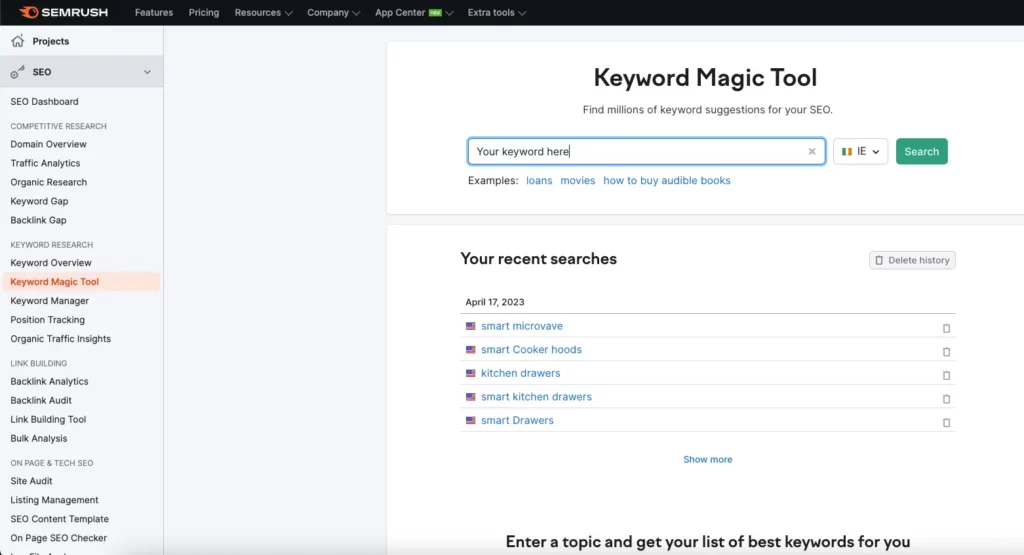
WP Trove keyword research refers to the practice of identifying and analyzing search queries that are relevant to the WordPress platform and its vast ecosystem. The term “trove” implies a collection of valuable items, and in this context, it means unearthing a rich repository of keywords that competitors often overlook. These keywords can range from high-volume terms like “best WordPress plugins” to long-tail phrases such as “how to fix WordPress white screen of death without plugin.”
The core objective is to find keywords with a realistic chance of ranking, sufficient search volume, and clear user intent. For WordPress developers, theme authors, plugin creators, and content marketers, this research forms the backbone of any SEO strategy. Without it, you are essentially publishing content into a void, hoping that search engines will magically find it. WP Trove keyword research eliminates that guesswork by providing data-driven insights into what your target audience is actively searching for.
Why Standard Keyword Research Falls Short for WordPress Niches
Generic keyword research tools often fail to capture the nuances of the WordPress market. A tool like Google Keyword Planner might show you the volume for “WordPress themes,” but it won’t tell you that a significant portion of those searches come from users looking for free themes, while another segment wants premium multipurpose themes, and yet another group is searching for block-based theme development. Standard tools also miss the seasonal spikes and the rapid shifts in demand that occur when WordPress releases a major update.
Moreover, the WordPress ecosystem is heavily driven by problem-solving queries. Users search for “fix plugin conflict,” “speed up WooCommerce,” or “secure WordPress login page.” These are highly specific, high-intent keywords that generic tools often lump together or ignore entirely. WP Trove keyword research addresses this gap by focusing on the semantic relationships between WordPress-related terms, the forums where users ask questions, and the support threads that reveal common pain points.
The Core Components of WP Trove Keyword Research

To execute WP Trove keyword research effectively, you need to understand its four fundamental components. Each component plays a distinct role in building a comprehensive keyword portfolio.
1. Seed Keyword Identification
Seed keywords are the starting points of your research. These are broad terms related to your niche, such as “WordPress security,” “WooCommerce shipping,” or “Gutenberg blocks.” For WP Trove research, your seeds should come from your own experience with WordPress, your product offerings, and the categories you see on popular WordPress blogs and marketplaces like ThemeForest or the WordPress.org plugin directory.
To expand your seed list, use the autocomplete feature on Google, the “People Also Ask” boxes, and the related searches at the bottom of the search results page. Additionally, mining WordPress-specific forums like the official support forums, Reddit’s r/WordPress, and Stack Exchange can reveal the exact phrasing users employ when describing their issues.
2. Search Volume and Trend Analysis
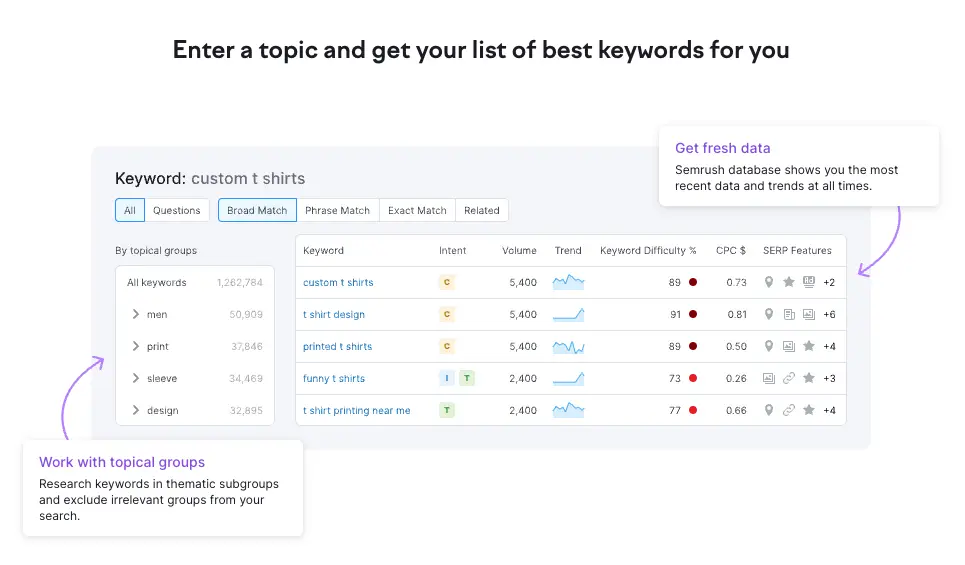
Once you have a list of seed keywords, you need to analyze their search volume and trends. Tools like Ahrefs, SEMrush, or even Google Trends can provide this data. For WP Trove keyword research, pay special attention to trend lines. A keyword like “WordPress page builder” might have steady volume, but “WordPress AI plugin” is likely on an upward trajectory. Identifying these trends early allows you to create content that captures traffic before the competition saturates the market.
It is also crucial to look at the geographical distribution of search volume. If you are selling a localized service, such as WordPress maintenance for small businesses in Germany, you need to know the volume for German-language keywords. WP Trove research is not just about English terms; it encompasses the global WordPress community.
3. Keyword Difficulty and Competition Assessment
Keyword difficulty (KD) is a metric that estimates how hard it is to rank for a specific term. For WP Trove keyword research, you must assess not only the domain authority of the current top-ranking pages but also the content quality and the number of backlinks pointing to them. A keyword like “WordPress” has a near-impossible KD, but “WordPress maintenance checklist for agencies” is far more attainable.
Competition assessment also involves looking at the search engine results page (SERP) features. If the top results are dominated by forums, YouTube videos, or product pages, you might need to adjust your content format. For example, if a keyword triggers a “Featured Snippet” for a list, you should structure your content to target that snippet directly.
4. User Intent Classification
User intent is the “why” behind a search query. In WP Trove keyword research, you classify keywords into four main categories: informational, navigational, commercial, and transactional. Informational keywords are searches like “what is a WordPress child theme.” Navigational keywords include “WordPress.org login.” Commercial keywords are phrases like “best WordPress backup plugin 2025.” Transactional keywords are high-intent searches like “buy WordPress hosting with free domain.”
Your content strategy must align with these intents. Writing a product review for an informational keyword will fail, just as writing a tutorial for a transactional keyword will not convert. WP Trove research ensures that you match the right content format to the right intent.
The WP Trove Keyword Research Process: A Step-by-Step Guide
Executing WP Trove keyword research is a repeatable process. Follow these steps to build a robust keyword database for your WordPress project.
Step 1: Build Your Seed List from Multiple Sources
Start by listing 20 to 30 broad topics related to your WordPress niche. If you run a plugin for booking appointments, your seeds might include “appointment scheduling,” “booking calendar,” “client management,” and “online payments.” Then, visit the WordPress.org plugin directory and note the tags and categories used by your competitors. Also, browse the WordPress Codex and the official developer handbook to find technical terms that users might not know but are searching for.
Step 2: Expand Seeds Using Keyword Tools and Forums
Input your seeds into a keyword research tool and use the “broad match” or “phrase match” filters to generate hundreds of variations. For WP Trove keyword research, do not stop at the tool’s suggestions. Go to the WordPress support forums and search for your seed terms. Look at the titles of the threads. Users often write long, descriptive titles that are goldmines for long-tail keywords. For example, a thread titled “Plugin updates break my site after PHP 8.1 upgrade” reveals the keyword “WordPress plugin update PHP 8.1 error.”
Step 3: Filter for Relevance and Intent
You will likely have a list of thousands of keywords at this point. Filter them down by removing any that are not directly related to your product or content strategy. For WP Trove keyword research, relevance is more important than volume. A keyword with 100 searches per month that perfectly matches your plugin’s feature is worth more than a keyword with 10,000 searches that is only tangentially related.
Next, classify each keyword by intent. Create separate lists for “informational,” “commercial,” and “transactional” keywords. This will help you plan your content calendar later.
Step 4: Analyze the SERP for Each Shortlisted Keyword
For your top 50 to 100 keywords, manually analyze the current search results. Look at the domain authority of the ranking pages. If the top results are from WordPress.org, large blogs like WPBeginner, or established companies, you need to assess whether you can compete. For WP Trove keyword research, look for gaps. If the top results are outdated (e.g., articles from 2021 about Gutenberg), you can create a fresh, more comprehensive piece to outrank them.
Step 5: Map Keywords to Content and Product Features
Create a spreadsheet that maps each keyword to a specific piece of content or a product feature. For example, the keyword “WooCommerce shipping calculator plugin” should map to a comparison post or a product landing page. This mapping ensures that your keyword research directly influences your development roadmap and content strategy.
Benefits of WP Trove Keyword Research
The advantages of conducting WP Trove keyword research are substantial and directly impact your bottom line.
- Higher Conversion Rates: By targeting keywords with clear commercial intent, you attract visitors who are already looking for a solution, making them more likely to purchase your plugin, theme, or service.
- Lower Competition: The WordPress niche is vast, but many content creators chase the same high-volume head terms. WP Trove research uncovers long-tail keywords with minimal competition, allowing you to rank faster.
- Better Content Relevance: When you base your content on actual user queries, your articles and product pages become more relevant to your audience, reducing bounce rates and increasing dwell time.
- Product Development Insights: The research reveals what features users are actively seeking. If you see a surge in searches for “WordPress dark mode plugin,” you have a clear signal for your next product update.
- Cost-Effective Traffic: Organic traffic from well-researched keywords costs nothing per click, unlike paid advertising. Over time, this compounds into significant savings.
- “Figma to Gutenberg plugin” (commercial intent)
- “How to convert Figma to WordPress without coding” (informational)
- “Best Figma to WordPress tools 2025” (commercial)
- “Gutenberg block plugin development tutorial” (informational)
- “Figma to WordPress free plugin” (transactional)
Limitations and Challenges of WP Trove Keyword Research
While powerful, this research method is not without its challenges. Being aware of these limitations helps you avoid common pitfalls.
First, the WordPress ecosystem changes rapidly. A keyword that is relevant today might be obsolete tomorrow due to a core update or a shift in user preferences. For instance, keywords related to “classic editor” have declined significantly since the block editor became the default. This means your research must be an ongoing process, not a one-time task.
Second, search volume data for highly specific WordPress terms is often sparse. Tools like Google Keyword Planner may show “0” searches for a very long-tail keyword, even though it receives traffic. This forces you to rely on your own analytics and judgment rather than purely on tool data.
Third, the competition from large WordPress media companies is fierce. Sites like WPBeginner, Kinsta, and Hostinger have massive domain authority. Outranking them for broad terms is nearly impossible for a new site. WP Trove research must therefore focus on niche sub-topics where these giants have not published in-depth content.
WP Trove Keyword Research vs. Traditional SEO Keyword Research
Understanding the difference between WP Trove keyword research and traditional SEO research is crucial for setting your strategy. The table below highlights the key distinctions.
| Aspect | WP Trove Keyword Research | Traditional SEO Keyword Research |
|---|---|---|
| Focus | WordPress-specific terms, plugins, themes, and code | General topics across all industries |
| Data Sources | WordPress.org forums, GitHub repos, plugin directories | Google autocomplete, general web scraping |
| User Intent | Heavy emphasis on troubleshooting and technical solutions | Broad mix of informational and commercial intent |
| Keyword Volume | Often lower volume but higher specificity | Higher volume with more generic terms |
| Competition | Competes with WordPress blogs and developer sites | Competes with all types of websites |
| Content Format | Tutorials, code snippets, plugin comparisons | Blog posts, product pages, listicles |
Traditional research might tell you that “website speed” is a popular topic. WP Trove research goes further to tell you that “WordPress speed optimization for shared hosting” is a specific, underserved query with a clear audience of budget-conscious site owners.
Practical Application: A Real-World Example
Consider a scenario where you are developing a WordPress plugin that converts Figma designs into Gutenberg blocks. Your WP Trove keyword research would start with seeds like “Figma to WordPress,” “Gutenberg block development,” and “design to code.”
Expanding these seeds, you might find keywords such as:
Analyzing the SERP for “Figma to Gutenberg plugin,” you notice that the top results are either outdated or from small blogs with low authority. This is your opportunity. You can create a comprehensive comparison post, a detailed tutorial, and a product landing page, all targeting different facets of this keyword cluster. By doing so, you capture users at every stage of their journey, from initial research to final download.
Common Mistakes in WP Trove Keyword Research and How to Avoid Them
Many WordPress site owners and developers make avoidable errors during their keyword research. Here are the most frequent mistakes and the strategies to overcome them.
Mistake 1: Ignoring Long-Tail Keywords
Focusing only on high-volume keywords like “WordPress themes” is a losing battle. The solution is to embrace long-tail keywords. They have lower volume but much higher conversion rates. A visitor searching for “WordPress theme for a photography portfolio with dark background” knows exactly what they want.
Mistake 2: Not Analyzing the SERP Features
Many researchers look only at the organic results and ignore the “People Also Ask” boxes, video carousels, and featured snippets. For WP Trove keyword research, these features are opportunities. If a keyword triggers a video carousel, you should consider creating a YouTube tutorial. If it triggers a featured snippet, structure your content with clear headings and lists to claim that spot.
Mistake 3: Copying Competitor Keywords Without Adding Value
Seeing that a competitor ranks for “best WordPress caching plugin” and targeting the same keyword is not a strategy. You need to add a unique angle. Perhaps you can focus on “best WordPress caching plugin for low-end hosting” or “best free caching plugin with CDN.” This differentiation is the essence of WP Trove research.
Mistake 4: Forgetting About Seasonal Trends
WordPress-related searches spike around major releases, such as the annual State of the Word or the launch of a new default theme. If you do not account for these seasonal trends, you might miss a huge traffic opportunity. Use Google Trends to identify these peaks and plan your content calendar accordingly.
Mistake 5: Neglecting International Audiences
The WordPress community is global. If you only research English keywords, you are ignoring a massive portion of the market. Use tools like Ahrefs to check keyword volumes in other languages, especially Spanish, German, and Portuguese, which have large WordPress user bases.
Important Notes for Successful WP Trove Keyword Research
To maximize the effectiveness of your research, keep these critical notes in mind.
First, always prioritize user experience over search engines. Google’s algorithms are sophisticated enough to detect content that is written solely for ranking. Your keyword research should inform your content, but the final output must be genuinely helpful to a WordPress user.
Second, maintain a dynamic keyword database. Your research is never finished. Set aside time each month to review your rankings, discover new keywords from your site’s search console data, and update your content to reflect the latest WordPress trends.
Third, integrate your keyword research with your technical SEO. Finding the right keywords is only half the battle. You must also ensure your site has proper schema markup, fast loading times, and a logical internal linking structure to give your content the best chance of ranking.
Fourth, leverage your own site’s analytics. The search queries that lead users to your site are a goldmine for WP Trove keyword research. If you see a query that you are not explicitly targeting, create a dedicated piece of content for it.
Frequently Asked Questions (FAQ)
What is the difference between a seed keyword and a long-tail keyword in WP Trove research?
A seed keyword is a broad, general term like “WordPress security.” A long-tail keyword is a more specific phrase like “WordPress security plugin for membership sites.” Seed keywords are used to generate ideas, while long-tail keywords are the actual targets for your content because they have lower competition and higher conversion potential.
How often should I conduct WP Trove keyword research?
You should conduct a deep dive at least once per quarter. However, you should also perform a quick review every month to check for new trends, algorithm updates, and emerging topics in the WordPress ecosystem. The landscape changes quickly, and staying current is essential.
Can I use free tools for WP Trove keyword research?
Yes, you can start with free tools like Google Keyword Planner, Google Trends, and the autocomplete feature on Google and YouTube. Additionally, the WordPress.org support forums are a free and invaluable source of real user queries. However, for deeper analysis of keyword difficulty and competitor backlinks, a paid tool like Ahrefs or SEMrush is highly recommended.
How do I know if a keyword is too competitive for my new WordPress blog?
Look at the domain authority of the top 10 ranking pages. If they are all above 70 and are from major publications, it is too competitive for a new blog. Instead, look for keywords where the top results are from smaller blogs, forums, or pages with low authority. These are your opportunities.
Should I target keywords with high search volume or high conversion rate?
For WP Trove keyword research, prioritize conversion rate over raw search volume. A keyword with 500 monthly searches that leads to a product purchase is far more valuable than a keyword with 5,000 searches that only attracts casual readers. Focus on commercial and transactional intent keywords for your money pages.
Conclusion
WP Trove keyword research is an indispensable practice for anyone serious about building a successful WordPress-related business or content site. It goes beyond simple volume metrics to uncover the specific, high-intent queries that define the WordPress user experience. By following the structured process outlined in this guide, you can build a keyword portfolio that drives targeted traffic, reduces competition, and ultimately increases your revenue.
The key is to remain agile. The WordPress ecosystem is dynamic, and your keyword research must evolve with it. Regularly revisit your data, listen to your audience on forums and social media, and never stop refining your approach. When executed correctly, WP Trove keyword research transforms your SEO from a guessing game into a precise, data-driven strategy that delivers measurable results.
Xem thêm:
- AI SEO Blog Outline Generator: The Complete Guide to Faster, Smarter Content Planning
- AI SEO Redirect Chains: The Complete Guide to Automated Redirect Management
- AI SEO Heading Generator: The Complete Guide to Higher Rankings in 2025
- AI SEO FAQ Generator: The Complete Guide to Automating Content That Ranks
- AI SEO Topical Depth: The Complete Guide to Dominating Search Rankings
Bài viết cùng chủ đề:

AI SEO SEO Automation with Make: The Complete Workflow Guide

AI SEO SEO Automation with Zapier: The Complete Workflow Guide

AI SEO SEO Automation with n8n: The Complete Workflow Guide
AI SEO SEO Automation with Gemini: The Complete Guide to Scaling Organic Growth

AI SEO SEO Automation with Claude: The Complete Guide to Scaling Content in 2025

AI SEO SEO Automation with ChatGPT: The Complete Playbook for 2025

AI SEO & SEO Automation for Affiliate Sites: The 2025 Playbook for Passive Income Growth
AI SEO & SEO Automation for Bloggers: The Complete Guide to Scaling Your Content

AI SEO & SEO Automation for Agencies: The Complete 2025 Playbook

AI SEO and SEO Automation for Ecommerce: The Complete Playbook for 2025

AI SEO & SEO Automation for WordPress: The Complete Playbook for 2025
AI SEO SEO Automation Strategy: The Complete Playbook for 2025

Mastering the AI SEO SEO Automation Process: A Complete Guide to Scaling Organic Growth
AI SEO SEO Automation System: The Complete Guide to Scaling Organic Growth in 2025
AI SEO SEO Automation Platform: The Complete Guide to Scaling Organic Growth in 2025
AI SEO SEO Automation Software: The Complete Guide to Scaling Organic Growth in 2025















