
No products in the cart.
AI Robots.txt: The Complete Guide to Controlling AI Crawlers on Your Website
29
Jul
Jul
The landscape of web crawling has shifted dramatically. For decades, robots.txt served as a polite signal to search engines, telling them which pages to index and which to skip. Today, the rise of large language models and generative AI has introduced a new class of crawlers that scrape content not for search rankings but for training massive neural networks. The AI robots.txt file is no longer a niche configuration—it is a frontline defense for website owners who want to decide how their intellectual property is used in the age of artificial intelligence.
Whether you run a personal blog, a news outlet, or an e‑commerce giant, understanding how to block, allow, or negotiate with AI bots through your robots.txt is now a critical part of digital sovereignty. This guide covers every aspect, from the basic syntax to the most effective strategies for keeping your content out of training datasets you never consented to.
Understanding the Robots.txt Protocol in the Age of AI

The Robots Exclusion Protocol, commonly known as robots.txt, has been a pillar of web governance since 1994. A simple text file placed at the root of a domain, it instructs automated crawlers—also called bots or spiders—which parts of a site they may access. The original specification was purely advisory, meaning a well‑behaved bot would respect it, but nothing physically prevented a malicious actor from ignoring the rules.
In the traditional search era, the primary bots of concern were Googlebot, Bingbot, and Yahoo Slurp. They crawled pages to build search indexes, and in return, they sent visitors. The implicit social contract was clear: you allow indexing, you get traffic. With the explosion of generative AI, a new generation of crawlers has emerged. These bots collect text, images, and other media not to guide users to your site but to fuel models like ChatGPT, Google Gemini, Claude, and Stable Diffusion. The original robots.txt standard never anticipated this use case, leading to intense debate and a flurry of activity around the AI robots.txt concept.
The file itself uses a plain‑text format with directives such as User‑agent, Disallow, Allow, and Sitemap. A typical entry might list a bot’s name and then the paths it cannot access. Over the past year, new user‑agent tokens have been introduced specifically to identify AI crawlers, making it possible to separate search indexing from training data collection.
Why AI Robots.txt Matters Now More Than Ever
The stakes have risen because AI models are notoriously hungry for data. Training a state‑of‑the‑art language model requires trillions of tokens, often scraped from the public web without explicit permission. Many website owners and content creators discovered their work appearing in datasets like Common Crawl, which underpins numerous open‑source AI projects. Outrage grew when it became clear that even paywalled or copyrighted material sometimes found its way into these collections.
Beyond copyright concerns, AI crawlers can impose significant server loads. Unlike a search bot that might visit your site once every few days, some AI scrapers make repeated, high‑frequency requests. This can degrade performance for human visitors and inflate hosting costs. A carefully crafted AI robots.txt file gives you a mechanism to push back, at least against crawlers that choose to obey the protocol.
Regulatory pressure is also mounting. The European Union’s AI Act and various national privacy laws are forcing AI companies to document their data sources. As a result, some companies have publicly committed to honoring robots.txt exclusions for their AI crawlers. Google, OpenAI, and Anthropic have all published documentation on how to block their respective bots. This makes the robots.txt file more powerful than ever before—a recognized opt‑out signal that may have legal weight in future disputes.
Key AI Crawlers and User Agents You Need to Know

Before editing your file, it is essential to know exactly which bots you are dealing with. The following table summarizes the most common AI crawlers, their official user‑agent tokens, and the companies behind them.
| AI Crawler | Company | Primary Purpose | User‑agent Token |
|---|---|---|---|
| GPTBot | OpenAI | Training ChatGPT and other foundational models | GPTBot |
| ChatGPT‑User | OpenAI | Real‑time browsing by ChatGPT Plus users | ChatGPT-User |
| Google‑Extended | Training Gemini, Cloud AI, and related products | Google-Extended | |
| CCBot | Common Crawl | Web‑scale crawl for open datasets used by many AI projects | CCBot |
| anthropic‑ai | Anthropic | Training Claude models | anthropic-ai |
| FacebookBot | Meta | Training and improving AI systems (Llama, etc.) | FacebookBot |
| PerplexityBot | Perplexity AI | Crawling for real‑time answer generation | PerplexityBot |
| Bytespider | ByteDance | Training models for TikTok, Douyin, and other platforms | Bytespider |
There are dozens more crawlers emerging monthly. Tools like the “Robots.txt AI Bot List” maintained by the open‑source community can help you stay updated. Each of these bots works slightly differently. For example, ChatGPT‑User is a browser plug‑in that fetches pages on behalf of a human user, so blocking it might prevent your site from being cited in real‑time queries. GPTBot, on the other hand, operates purely for offline training. Understanding these distinctions is the foundation of an effective AI robots.txt policy.
How to Configure Your Robots.txt for AI Bots – Step-by-Step
The steps are straightforward, but small mistakes can accidentally block legitimate search traffic or leave training crawlers unblocked. Always start by locating your current robots.txt file at https://yourdomain.com/robots.txt. If none exists, create a new plain‑text file and upload it to the site’s root directory.
1. Block a Single AI Crawler Completely
To disallow GPTBot from accessing any part of your website, add the following lines to robots.txt:
User-agent: GPTBot
Disallow: /
2. Allow a Specific AI Bot but Restrict It on Sensitive Paths
If you want to permit Common Crawl for general use but keep it out of your private assets, you could write:
User-agent: CCBot
Disallow: /data/
Disallow: /scripts/
Allow: /
3. Block All Known AI Crawlers in One Section
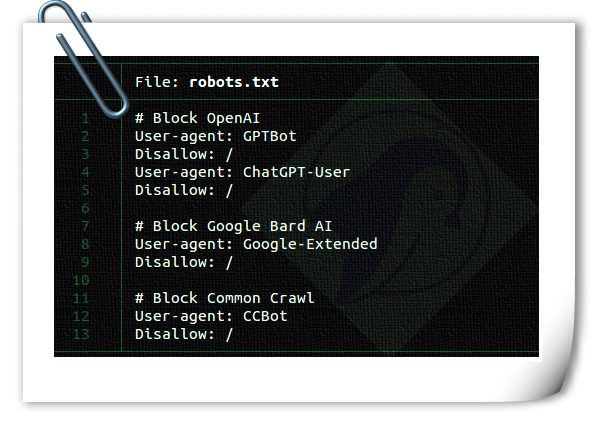
Although robots.txt does not support grouping wildcards, you can list multiple user‑agent blocks sequentially. A comprehensive AI robots.txt section might look like this (each block works independently):
User-agent: GPTBot
Disallow: /
User-agent: Google-Extended
Disallow: /
User-agent: CCBot
Disallow: /
User-agent: anthropic-ai
Disallow: /
4. Differentiate Between Search and AI Bot Rules
A common requirement is to let Googlebot index content while blocking Google‑Extended. Because robots.txt assigns rules per user‑agent, this is easy. Keep the Googlebot section as is and add a separate block for Google‑Extended. Googlebot will still index your site normally; Google‑Extended will not be able to use your pages for training.
After making changes, validate your file using any online robots.txt tester or Google Search Console’s robots.txt tester. Also, monitor your server logs to verify that the targeted AI crawlers are indeed receiving 403 or “disallowed” responses.
Benefits and Limitations of Using AI Robots.txt
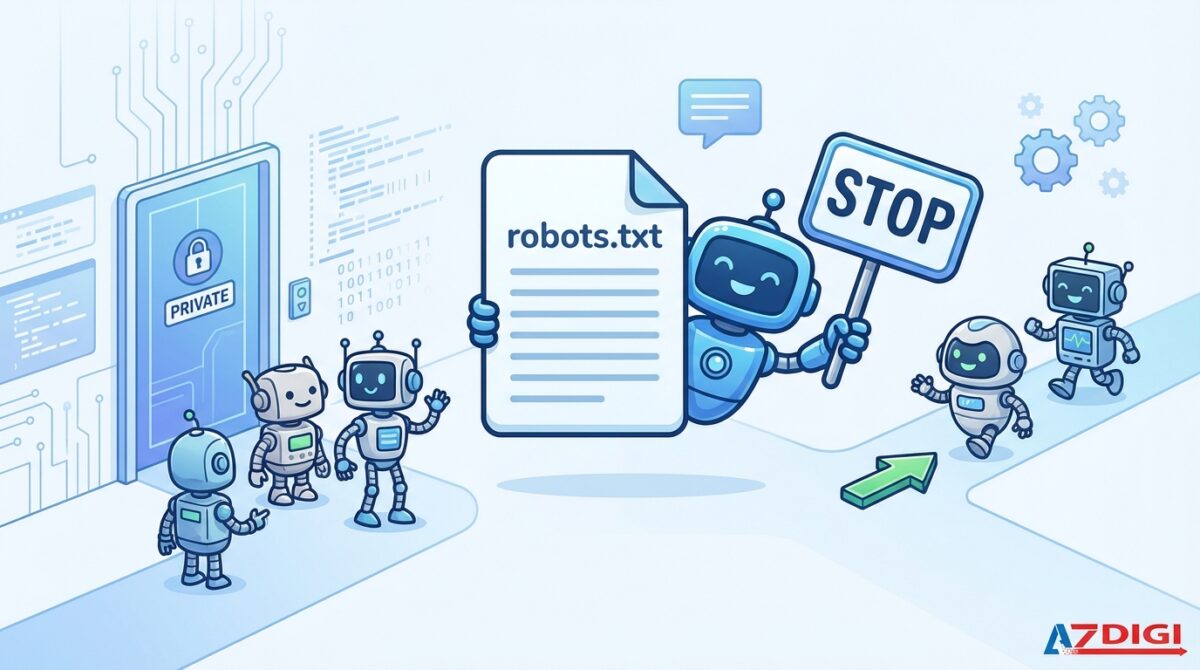
Adopting an AI‑aware robots.txt strategy offers several concrete benefits. It serves as a clear opt‑out signal that the largest AI developers now claim to honor. For content creators, this is a direct way to assert control over how their work is used. It also helps manage server resources by reducing the frequency of aggressive crawls. In the event of a legal challenge, a well‑documented robots.txt file can demonstrate that you explicitly withheld consent for AI data collection, strengthening your position under copyright law.
Nevertheless, relying solely on robots.txt has profound limitations. The protocol remains voluntary; t Bad actors or under‑researched AI startups may simply disregard the file. Even reputable companies have faced accusations of circumventing blocks by using different user‑agent strings or routing traffic through residential proxies. Moreover, robots.txt cannot retroactively remove content that was scraped before the block was implemented. It also provides no protection against cached copies that may already circulate in training datasets.
Comparing Traditional Search Crawlers and AI Crawlers
The distinction between classic search bots and modern AI crawlers is crucial for any webmaster. While both ultimately download page content, their motivations, behavior, and reward to website owners differ starkly.
| Feature | Traditional Search Crawler (e.g., Googlebot) | AI Training Crawler (e.g., GPTBot) |
|---|---|---|
| Primary goal | Index pages to provide links in search results | Collect data to train language or vision models |
| Value to website | Sends organic traffic and potential customers | None directly; content feeds an AI that may summarize it without attribution |
| Robots.txt compliance | Generally full compliance | Major companies claim compliance; many smaller actors do not |
| Crawl frequency | Depends on site authority and freshness; typically moderate | Can be extremely aggressive, especially during model training sprints |
| Typical user‑agent | Googlebot, Bingbot, Slurp, DuckDuckBot | GPTBot, Google-Extended, CCBot, anthropic-ai |
| Respect for noindex meta tags | Yes | Often not, as they rarely execute JavaScript or parse full HTML metadata |
Understanding these differences clarifies why a one‑size‑fits‑all robots.txt no longer works. Website operators need a split strategy: open doors for SEO crawlers while selectively locking out AI training bots.
Common Mistakes When Managing AI Robots.txt
Even experienced developers make errors that undermine their AI blocking efforts. Avoiding these pitfalls is just as important as knowing the syntax.
- Blocking Googlebot by accident: When creating a wildcard rule or copying a broad “Disallow: /” pattern, it is easy to inadvertently block all user‑agents, including the ones that bring you traffic. Always keep your search bot directives separate and explicitly allowed.
- Using robots.txt as a legal shield after the fact: Many site owners rushed to update their files only after it was revealed their content had been used in a high‑profile model. This does nothing to remove data already ingested. Prevention must be proactive.
- Neglecting to update as new AI bots appear: The AI crawler landscape evolves weekly. A file that blocked GPTBot last year may be completely missing new entrants from Amazon, Cohere, or Mistral. Schedule regular reviews, perhaps quarterly, using community‑maintained lists.
- Assuming all AI companies respect robots.txt: Some AI firms, especially those operating in jurisdictions with lax enforcement, may ignore the file entirely. Relying exclusively on robots.txt without additional measures such as IP blocking or CAPTCHAs can leave your content exposed.
- Misconfiguring Allow and Disallow order: In robots.txt, the most specific rule wins. If you write “Disallow: /private/” but later add “Allow: /” under the same user‑agent, the crawler will see only the permissive rule. The correct approach is to place the most restrictive paths first and use multiple blocks if needed.
Important Notes for Webmasters and Content Creators
An effective AI robots.txt strategy goes far beyond editing a text file. Consider the file as one layer in a multi‑layered defense. Implement additional signals such as the X‑Robots‑Tag HTTP header with a value of “noai” (increasingly recognized by some crawlers) or the more established “noindex” and “nofollow” directives. Use server‑side techniques to identify and block suspicious user‑agent strings before they even hit your application. Analyze your access logs for unknown bots with high bandwidth consumption and check their IP ranges against known AI crawler lists.
The robots.txt file is a public declaration of your wishes. Legal precedent around AI and copyright is still evolving, but a consistently maintained robots.txt can support claims that you did not consent to the use of your work for training. It is also worth noting that some news organizations and publishers are negotiating separate licensing agreements with AI companies. For them, robots.txt becomes a bargaining chip: block by default, then grant access in exchange for compensation.
Lastly, keep your robots.txt lean and well‑documented. Large files with hundreds of obscure rules are difficult to audit. Use comments—lines beginning with “#”—to explain why a particular bot is blocked. This makes future maintenance smoother and helps your team make informed decisions.
Frequently Asked Questions (FAQ)
What exactly is an AI robots.txt file?
An AI robots.txt file is a standard robots.txt that includes explicit rules for AI‑related crawlers such as GPTBot, Google‑Extended, and CCBot. It tells these bots which parts of a website they are not allowed to access, primarily to prevent content from being used in training artificial intelligence models.
How do I block OpenAI’s GPTBot from crawling my site?
Add the following lines to your robots.txt:
User-agent: GPTBot
Disallow: /
This completely blocks GPTBot. For the ChatGPT browsing feature, you may also want to add a block for ChatGPT-User if you do not wish your live content to be surfaced.
Does the Google‑Extended crawler honor robots.txt?
Yes, Google has stated publicly that the Google‑Extended user‑agent respects robots.txt directives. If you disallow it with the same syntax as above, Google will not use your content to train its generative AI models, including Bard and Gemini.
Can I block all AI bots at once with a single rule?
Not with a single wildcard because robots.txt rules are applied per user‑agent and the protocol does not support combining multiple identities under one wildcard. The best approach is to list each AI crawler individually in separate user‑agent blocks, even if the disallow paths are identical.
What happens if my website does not have an AI robots.txt?
If no rules for AI crawlers are specified, most large AI bots will assume they have permission to crawl your site. This means your text, images, and other resources may be scraped and used in training datasets without any explicit opt‑out signal on your part.
Are there legal consequences if I block AI crawlers?
Blocking AI crawlers through robots.txt is entirely legal. You are simply asserting your right to control access to your own server. Conversely, if an AI company ignores your robots.txt, they may be violating computer fraud laws or terms of service, though this area of law is still being tested in court.
How can I verify that my AI robots.txt block is working?
Check your server access logs for requests from the blocked user‑agent. After the block is implemented, you should see status code 200 or 403 depending on your server configuration, but the bot should no longer download actual page content. You can also use tools that simulate crawler requests with specific user‑agent strings to confirm the disallow path is correctly processed.
Conclusion
The age of generative AI has transformed a 30‑year‑old text file into a battleground for digital rights. An intelligently crafted AI robots.txt strategy is no longer optional for anyone who cares about content sovereignty. By understanding the new wave of crawlers, implementing precise blocking rules, and avoiding common pitfalls, you can significantly reduce the chance that your work fuels models without your consent.
As AI technology continues to advance, the conversation around robots.txt will evolve. Browser extensions, licensing APIs, and legal frameworks will add new tools to the toolbox. For now, a thorough, regularly updated robots.txt file remains the most accessible and widely recognized method to draw a line in the digital sand. Start today: audit your site, add the necessary directives, and monitor the logs regularly. Your content deserves protection, and the robots.txt file is the first line of defense.
Xem thêm:
- AI SEO Content Promotion: The Complete Guide to Scaling Your Reach in 2025
- AI SEO Image Alt Text: The Complete Guide to Automated Accessibility and Rankings
- AI Title Generator: Craft Click-Worthy Headlines That Drive Traffic and Engagement
- AI SEO for Hotels: The Complete Guide to Dominating Search in 2025
- AI Keyword Generator: Transform Your SEO Strategy with Smart Automation
Bài viết cùng chủ đề:

AI SEO SEO Automation with Make: The Complete Workflow Guide

AI SEO SEO Automation with Zapier: The Complete Workflow Guide

AI SEO SEO Automation with n8n: The Complete Workflow Guide
AI SEO SEO Automation with Gemini: The Complete Guide to Scaling Organic Growth

AI SEO SEO Automation with Claude: The Complete Guide to Scaling Content in 2025

AI SEO SEO Automation with ChatGPT: The Complete Playbook for 2025

AI SEO & SEO Automation for Affiliate Sites: The 2025 Playbook for Passive Income Growth
AI SEO & SEO Automation for Bloggers: The Complete Guide to Scaling Your Content

AI SEO & SEO Automation for Agencies: The Complete 2025 Playbook

AI SEO and SEO Automation for Ecommerce: The Complete Playbook for 2025

AI SEO & SEO Automation for WordPress: The Complete Playbook for 2025
AI SEO SEO Automation Strategy: The Complete Playbook for 2025

Mastering the AI SEO SEO Automation Process: A Complete Guide to Scaling Organic Growth
AI SEO SEO Automation System: The Complete Guide to Scaling Organic Growth in 2025
AI SEO SEO Automation Platform: The Complete Guide to Scaling Organic Growth in 2025
AI SEO SEO Automation Software: The Complete Guide to Scaling Organic Growth in 2025















