
No products in the cart.
AI SEO Log File Analysis: The Complete Guide to Unlocking Crawl Insights
31
Jul
Jul
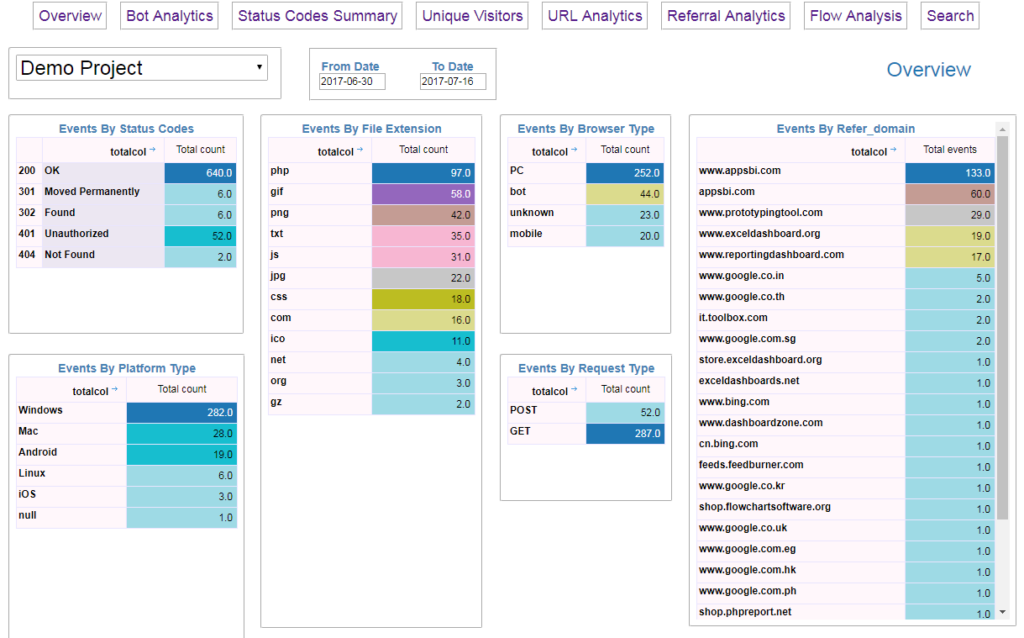
Search engine optimization has evolved far beyond keyword density and meta descriptions. Modern technical SEO demands a deep understanding of how search engine bots interact with your website. AI SEO log file analysis is the process of using machine learning and artificial intelligence to parse, interpret, and act upon the massive datasets generated by your server logs. These logs record every request made by Googlebot, Bingbot, and other crawlers, revealing exactly which pages are crawled, how often, and with what status codes. By applying AI to this data, you move from manual, sample-based analysis to comprehensive, real-time insights that drive significant organic traffic growth.
What is Log File Analysis in SEO?

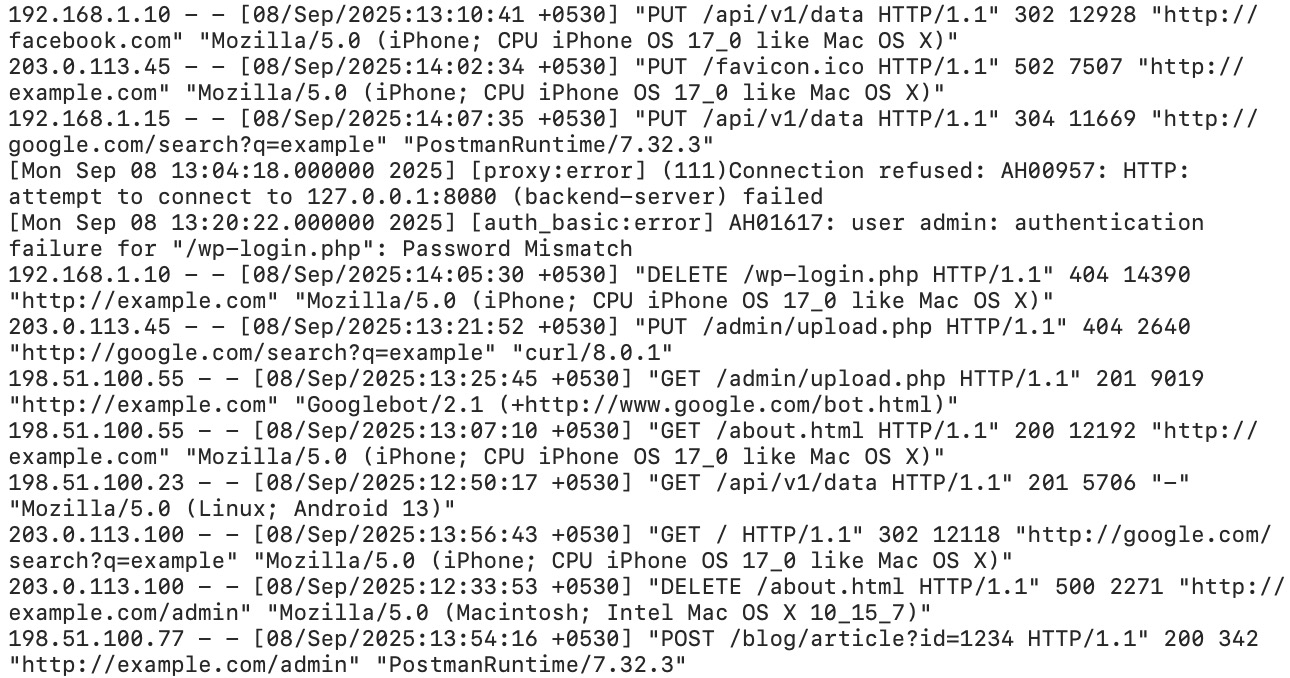
Log file analysis involves examining the raw server logs that record all interactions with your website. Every time a search engine crawler requests a URL, your server logs that event. This data includes the crawler’s IP address, the user agent (identifying which bot is crawling), the requested URL, the HTTP status code returned, the timestamp, and the response size. Traditional log file analysis required exporting these files, cleaning the data, and manually sorting through thousands of lines of text. This process was time-consuming and often limited to a small sample of data due to file size constraints.
The core value lies in understanding the difference between what you think Google is crawling and what it actually crawls. Many SEO professionals rely on Google Search Console data, which provides a limited view of crawl activity. Log files offer the ground truth. They show you the exact crawl budget allocation, identify crawl anomalies, and reveal patterns that are invisible in other analytics tools. For large websites with thousands or millions of pages, this distinction is critical for ensuring that important pages are discovered and indexed efficiently.
How AI Transforms Traditional Log File Analysis
Artificial intelligence changes the game by automating the heavy lifting. Traditional analysis might involve filtering logs for a specific user agent or looking for 404 errors. AI SEO log file analysis goes several steps further. Machine learning algorithms can detect patterns in crawl behavior that humans would miss. For example, AI can identify sudden spikes in crawl frequency for a specific section of your site, correlate those spikes with algorithm updates, and predict which pages are losing crawl priority.
AI also enables predictive analysis. Instead of just reporting what happened yesterday, AI models can forecast future crawl behavior based on historical trends. This allows you to proactively fix issues before they impact rankings. Natural language processing (NLP) can categorize URLs based on their content, helping you understand which content types receive the most crawl attention. Clustering algorithms group similar pages together, revealing whether your thin content is wasting crawl budget while your cornerstone content is being ignored.
The Role of Machine Learning in Crawl Pattern Recognition
Machine learning models excel at identifying non-linear relationships in data. In the context of log files, these models can analyze thousands of variables simultaneously. They can determine whether a page’s crawl frequency is more influenced by internal linking, page speed, or content freshness. This level of analysis is impossible to achieve manually. The models continuously learn from new log data, improving their accuracy over time. For instance, an AI system might learn that pages with a specific URL structure tend to receive more frequent crawls after a site migration, allowing you to replicate that structure elsewhere.
Why You Need AI SEO Log File Analysis for Technical SEO
Crawl budget optimization is the primary driver for adopting this technology. Google allocates a specific crawl budget to each website, which is the number of requests Googlebot makes to your server within a given timeframe. This budget is not infinite. If your server wastes resources on low-value pages, high-priority pages may be crawled less frequently. AI log file analysis helps you audit your crawl budget by showing you exactly where the budget is being spent. You can see if Googlebot is spending 80% of its time on your blog archives and only 20% on your product pages, which is a common issue for e-commerce sites.
Beyond crawl budget, this analysis uncovers indexing issues. You might discover that Googlebot is crawling pages that return a 404 status code, which wastes resources and signals poor site health. Or you might find that important pages are returning a 200 status code but are not being indexed due to a robots.txt directive or a noindex tag. AI can cross-reference log data with index data to identify these discrepancies automatically. This saves hours of manual investigation and provides a clear action plan for fixing technical issues.
Key Metrics to Track in AI Log File Analysis
Understanding which metrics matter is essential for effective analysis. The following table outlines the most critical data points you should extract from your log files using AI tools.
| Metric | Description | Why It Matters |
|---|---|---|
| Crawl Frequency | Number of times a specific URL is crawled per day or week | Identifies which pages are prioritized and which are neglected |
| Crawl Depth | Number of clicks from the homepage to reach a page | Deep pages are often crawled less frequently; AI helps find shortcuts |
| Status Code Distribution | Percentage of 200, 301, 404, 500 responses | High 404 rates indicate broken internal links or misconfigured redirects |
| Hits per URL | Total number of requests for a single URL | Distinguishes between essential pages and crawl waste |
| Response Time | Server response time for each request | Slow responses reduce crawl rate and can impact rankings |
| Bot Type | Which specific crawler (Googlebot, Bingbot, etc.) is hitting the site | Different bots have different behaviors and requirements |
Understanding Crawl Frequency Trends
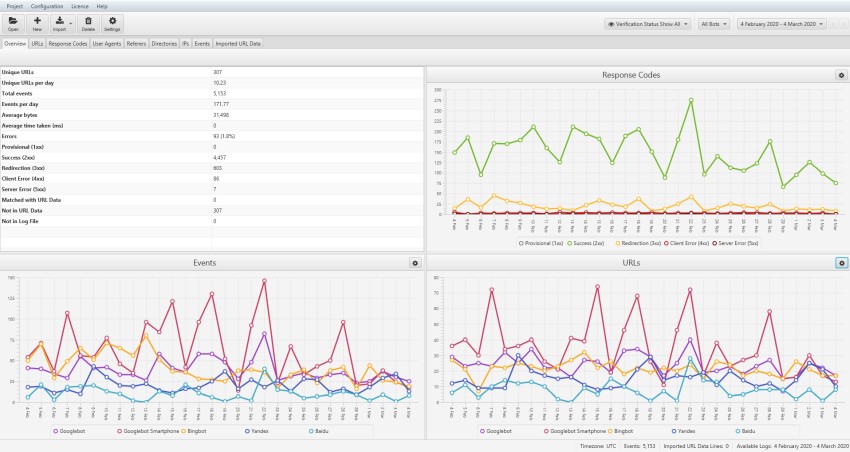
Monitoring crawl frequency over time reveals the health of your site. A sudden drop in crawl frequency for your money pages could indicate a penalty or a technical issue like a server outage. Conversely, a spike in crawl frequency might occur after you publish new content or build high-quality backlinks. AI tools can set baselines for normal crawl behavior and alert you when deviations occur. This proactive monitoring is far more effective than waiting for a ranking drop to notice a problem.
Benefits of Using AI for Log File Analysis
The advantages of applying AI to this discipline extend beyond simple time savings. The depth of insight provided by machine learning is unmatched by manual methods. Here are the primary benefits you will experience.
- Scalability: AI processes terabytes of log data in minutes, making it feasible for enterprise-level websites with millions of URLs.
- Accuracy: Algorithms eliminate human error in data sorting and pattern recognition, providing reliable insights.
- Real-time Monitoring: AI systems can analyze logs continuously, offering up-to-the-minute visibility into crawl behavior.
- Actionable Recommendations: Instead of raw data, AI provides specific recommendations like “remove these 500 orphan pages” or “add internal links to these 10 key pages.”
- Correlation with Rankings: AI can correlate crawl patterns with keyword rankings to show the direct impact of crawl changes on visibility.
- Ignoring Non-Google Bots: Focusing only on Googlebot ignores insights from Bing and other search engines. While Google dominates, Bing’s crawler behavior can reveal accessibility issues that affect all bots.
- Analyzing a Single Day of Data: Crawl behavior varies significantly day-to-day. A single day’s log might reflect a temporary server issue or a one-time crawl spike. Always analyze data over a period of at least 7 to 14 days to establish reliable patterns.
- Not Filtering Out Internal Requests: Your own team’s requests or monitoring tools can pollute the data. Ensure your AI tool filters out known internal IP addresses and non-crawler user agents.
- Overlooking Pagination and Faceted Navigation: These URL patterns can consume massive crawl budget. AI tools should specifically flag these areas for review, but you must also manually check if your site has infinite crawl traps.
- Failing to Act on the Data: The most common mistake is collecting insights and then doing nothing. Log file analysis is only valuable if it leads to changes in your technical SEO strategy.
Limitations and Challenges of AI Log File Analysis
While powerful, this approach is not without its challenges. Understanding these limitations helps you set realistic expectations and avoid common pitfalls. The first challenge is data access. Many websites use content delivery networks (CDNs) or cloud hosting that do not provide raw server logs by default. You may need to configure your hosting environment to enable logging, which requires technical expertise. Some CDNs offer log export features, but they often come with additional costs.
Another limitation is the learning curve. AI tools generate complex outputs that require a solid understanding of technical SEO to interpret correctly. A marketing manager without technical knowledge might misinterpret a crawl spike as a positive sign when it actually indicates a bot trap. Additionally, AI models are only as good as the data they are trained on. If your logs are incomplete or contain errors, the AI’s conclusions will be flawed. Regular data validation is necessary to maintain accuracy.
AI Log File Analysis vs. Google Search Console
Many SEO professionals wonder if they need log file analysis when they have Google Search Console (GSC). The two tools serve different purposes and complement each other. GSC provides aggregated data about crawl requests, but it does not show you the full picture. GSC only shows data for URLs that Google has decided to crawl and index, and it aggregates data over time. Log files show every single request, including those from other search engines and those that result in errors.
The table below highlights the key differences between these two data sources.
| Feature | Google Search Console | AI Log File Analysis |
|---|---|---|
| Data Source | Google’s internal data | Your server’s raw logs |
| Granularity | Aggregated, sampled | Every single request |
| Bot Coverage | Googlebot only | All bots (Google, Bing, etc.) |
| Status Codes | Limited (Page Indexing report) | All HTTP status codes |
| Real-time Data | Delayed by days | Immediate |
| Customization | Limited filters | Unlimited segmentation |
Using both tools together provides the most comprehensive view. GSC offers insights into how Google perceives your site’s overall health, while log files give you the raw, unfiltered truth about crawler behavior. AI enhances the log file data by providing predictive insights that GSC cannot offer.
How to Perform AI SEO Log File Analysis: A Step-by-Step Guide
Implementing this process involves several stages, from data collection to action. The following guide outlines a practical workflow that you can adapt to your specific needs.
Step 1: Enable and Collect Server Logs
First, you need access to your raw server logs. If you use Apache or Nginx, logs are typically stored in a directory like /var/log/. For cloud-hosted sites, check your provider’s documentation for log export options. AWS, for example, offers S3 access logs, while Cloudflare provides log push to services like Sumo Logic or Google Cloud Storage. Ensure that your logs include the user agent, IP address, timestamp, requested URL, and status code. Without these fields, the analysis will be incomplete.
Step 2: Choose an AI-Powered Log Analysis Tool
Several tools specialize in AI-driven log file analysis. Options include commercial platforms like Botify, Lumar (formerly DeepCrawl), and OnCrawl, as well as open-source solutions that integrate with machine learning libraries. When selecting a tool, consider factors like ease of integration, the sophistication of the AI models, and the quality of the reporting interface. Many tools offer free trials, allowing you to test them with a sample of your data before committing.
Step 3: Clean and Preprocess the Data
Raw logs are messy. They contain requests from malicious bots, irrelevant user agents, and static file requests (images, CSS, JavaScript). The AI tool should filter out non-HTML requests and identify legitimate search engine bots. This preprocessing step is crucial for accurate analysis. You should also normalize URLs to avoid duplicate entries caused by tracking parameters or URL fragments.
Step 4: Run the AI Analysis
Once the data is clean, the AI algorithms can begin their work. The tool will segment URLs into clusters, identify crawl anomalies, and generate a prioritized list of issues. For example, the AI might flag a group of pages that are receiving high crawl frequency but have low organic traffic, suggesting that the crawl budget is being wasted. It might also identify pages that are not being crawled at all, indicating a discovery problem.
Step 5: Interpret the Results and Prioritize Actions
The final step is turning insights into action. Create a prioritized action plan based on the AI’s recommendations. High-priority actions typically include fixing 404 errors on important pages, removing noindex tags from valuable content, and improving internal linking to orphaned pages. Track the impact of your changes by re-running the analysis after implementation. This iterative process ensures continuous improvement.
Common Mistakes in AI Log File Analysis and How to Avoid Them
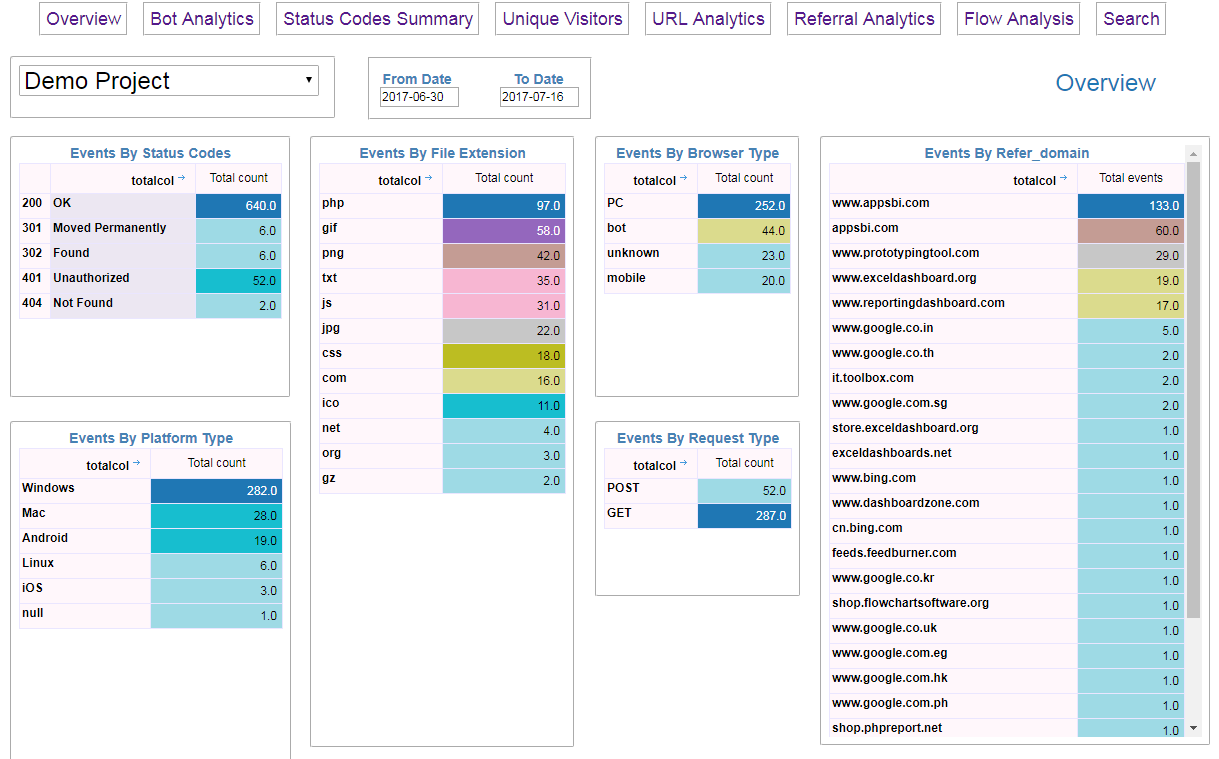
Even with advanced AI tools, mistakes happen. Being aware of these common errors will save you time and prevent misguided SEO decisions.
Important Notes for Implementing AI Log File Analysis
Before you dive into this process, consider a few practical notes. First, ensure you comply with data privacy regulations. Server logs contain IP addresses, which may be considered personal data under GDPR. You may need to anonymize IP addresses or limit data retention periods. Second, log file analysis is not a one-time project. It requires ongoing monitoring to be effective. Set up automated weekly or monthly reports to track changes in crawl behavior.
Third, integrate log file data with other SEO data sources. Combining log data with Google Analytics, Search Console, and backlink data provides a holistic view of your site’s performance. AI tools that offer integrations with these platforms will save you significant manual effort. Finally, remember that log file analysis is a diagnostic tool, not a ranking factor itself. The value comes from the actions you take based on the insights.
Frequently Asked Questions
What is the difference between log file analysis and crawl budget analysis?
Log file analysis is the broader process of examining all server requests from search engine bots. Crawl budget analysis is a specific application of log file analysis that focuses on how efficiently Googlebot uses its allocated crawl resources. Log file analysis provides the raw data, while crawl budget analysis interprets that data to optimize resource allocation.
How often should I perform AI log file analysis?
For most websites, a weekly analysis is sufficient to catch major issues. Large enterprise sites with frequent content updates or ongoing technical changes may benefit from daily analysis. The key is to establish a regular cadence and stick to it, rather than analyzing logs sporadically.
Can AI log file analysis detect manual penalties?
AI can identify patterns that are consistent with manual penalties, such as a sudden and sustained drop in crawl frequency for a specific section of your site. However, log file analysis cannot confirm a manual penalty. You must check Google Search Console for manual action notifications to confirm.
Do I need to be a data scientist to use AI log file analysis tools?
No. Modern AI log file analysis tools are designed for SEO professionals, not data scientists. They provide user-friendly dashboards and plain-language recommendations. However, a basic understanding of HTTP status codes and crawl mechanics is necessary to interpret the outputs correctly.
What is the cost of AI log file analysis tools?
Pricing varies widely. Open-source solutions can be free but require technical setup and maintenance. Commercial tools typically charge based on the number of URLs or the volume of log data processed. Monthly costs can range from a few hundred dollars for small sites to several thousand for enterprise-level platforms.
Conclusion
AI SEO log file analysis represents a significant leap forward in technical SEO. It transforms raw, unstructured server data into actionable intelligence that directly impacts your site’s crawl efficiency and search visibility. By moving beyond the limitations of manual analysis and aggregated tools like Google Search Console, you gain a precise understanding of how search engines interact with your website. The benefits of scalability, accuracy, and predictive insight make this approach essential for any serious SEO strategy, particularly for large or complex websites.
The implementation process requires careful planning, from enabling server logs to selecting the right AI tool and acting on the insights. Avoiding common mistakes like ignoring non-Google bots or failing to act on data ensures you maximize your return on investment. As search engines continue to evolve and crawl behavior becomes more sophisticated, the role of AI in log file analysis will only grow in importance. Start by auditing your current data access, test a few tools, and commit to a regular analysis schedule. The insights you uncover will reveal hidden opportunities to improve your site’s crawl health and, ultimately, your organic rankings.
Xem thêm:
- WP Trove AI Templates: The Complete Guide to Smarter WordPress Design
- AI Visual Search SEO: A Complete Guide to Ranking Images in the Visual Discovery Era
- AI B2C SEO: Mastering Consumer Search with Artificial Intelligence for Unmatched Growth
- AI SEO Contextual Search: The Complete Guide to Ranking in the New Search Era
- WP Trove AI Ecommerce: The Complete Guide to AI-Powered WooCommerce Stores
Bài viết cùng chủ đề:

AI SEO SEO Automation with Make: The Complete Workflow Guide

AI SEO SEO Automation with Zapier: The Complete Workflow Guide

AI SEO SEO Automation with n8n: The Complete Workflow Guide
AI SEO SEO Automation with Gemini: The Complete Guide to Scaling Organic Growth

AI SEO SEO Automation with Claude: The Complete Guide to Scaling Content in 2025

AI SEO SEO Automation with ChatGPT: The Complete Playbook for 2025

AI SEO & SEO Automation for Affiliate Sites: The 2025 Playbook for Passive Income Growth
AI SEO & SEO Automation for Bloggers: The Complete Guide to Scaling Your Content

AI SEO & SEO Automation for Agencies: The Complete 2025 Playbook

AI SEO and SEO Automation for Ecommerce: The Complete Playbook for 2025

AI SEO & SEO Automation for WordPress: The Complete Playbook for 2025
AI SEO SEO Automation Strategy: The Complete Playbook for 2025

Mastering the AI SEO SEO Automation Process: A Complete Guide to Scaling Organic Growth
AI SEO SEO Automation System: The Complete Guide to Scaling Organic Growth in 2025
AI SEO SEO Automation Platform: The Complete Guide to Scaling Organic Growth in 2025
AI SEO SEO Automation Software: The Complete Guide to Scaling Organic Growth in 2025















