
No products in the cart.
AI SEO Looker Studio: The Complete Guide to Automated Reporting
31
Jul
Jul
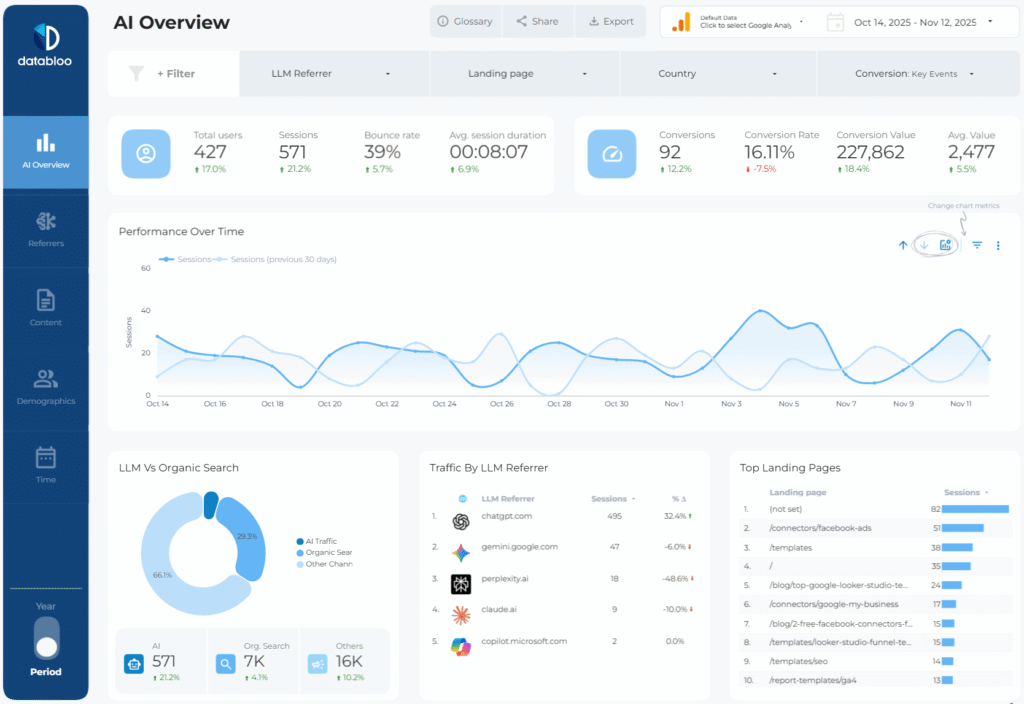
AI SEO Looker Studio represents the convergence of artificial intelligence and data visualization for search engine optimization professionals. This powerful combination transforms raw SEO data into actionable insights without requiring manual dashboard construction. Marketing teams increasingly adopt this approach to streamline reporting workflows and uncover patterns that traditional analytics miss. The integration of machine learning algorithms within Looker Studio enables automatic anomaly detection, trend forecasting, and natural language explanations of performance shifts. This guide examines how AI-powered Looker Studio dashboards revolutionize SEO reporting, from setup to advanced implementation strategies.
Understanding AI SEO Looker Studio
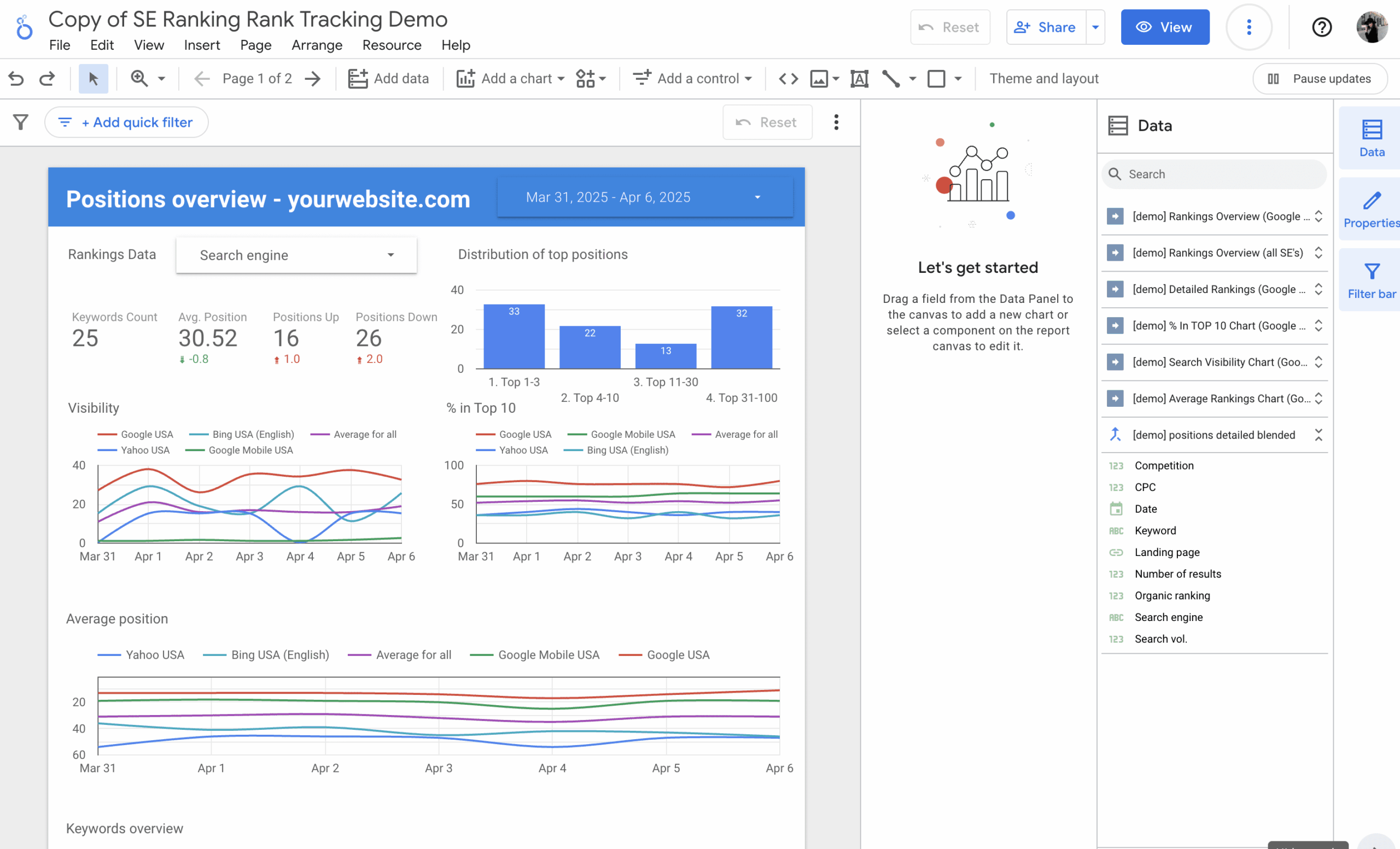
AI SEO Looker Studio refers to the practice of using Google’s free data visualization platform alongside artificial intelligence tools and techniques to analyze, monitor, and report on search engine optimization performance. The platform, formerly known as Google Data Studio, connects to various SEO data sources including Google Search Console, Google Analytics, Ahrefs, SEMrush, and custom databases. When augmented with AI capabilities, these dashboards move beyond static reporting into predictive and prescriptive analytics.
The core value proposition lies in automation. Traditional SEO reporting requires manual data extraction, spreadsheet manipulation, and chart creation. AI-enhanced Looker Studio dashboards automate these processes while adding layers of intelligence. Machine learning models can identify which keywords are trending upward, flag sudden traffic drops, and even suggest content optimization opportunities based on historical performance patterns.
How AI Enhances Looker Studio for SEO
Artificial intelligence integration into Looker Studio occurs through several mechanisms. Google’s built-in machine learning capabilities, such as anomaly detection in Google Analytics, feed directly into Looker Studio reports. Third-party connectors like Supermetrics or Porter Metrics bring AI-powered insights from platforms like BrightEdge or Conductor. Additionally, custom solutions using Google Cloud’s Vertex AI or BigQuery ML can process SEO data and output predictions that Looker Studio visualizes.
Natural language processing (NLP) plays a significant role in modern AI SEO dashboards. Tools like Looker Studio’s community visualizations can generate text summaries of performance data, explaining in plain English why organic traffic increased or decreased. This feature proves invaluable for presenting complex SEO data to non-technical stakeholders who need clear narratives rather than raw numbers.
Core Components of an AI-Powered SEO Dashboard
Building an effective AI SEO Looker Studio dashboard requires understanding its fundamental building blocks. Each component serves a specific purpose in the reporting ecosystem, and when combined with AI, they create a comprehensive monitoring system.
Data Sources and Connectors
The foundation of any SEO dashboard is reliable data. Looker Studio supports native connectors for Google Search Console, Google Analytics 4, Google Ads, and Google Sheets. For comprehensive SEO analysis, third-party connectors expand capabilities to include backlink data from Ahrefs, keyword rankings from SEMrush, and technical SEO crawls from Screaming Frog or Sitebulb.
AI integration often requires exporting data to BigQuery, Google’s cloud data warehouse. This enables running machine learning models on historical SEO data. For example, you can train a model to predict future organic traffic based on keyword rankings, content freshness, and backlink velocity. The predictions then appear in Looker Studio alongside actual performance metrics.
AI-Powered Metrics and KPIs
Standard SEO metrics include organic sessions, keyword rankings, click-through rates, and conversion rates. AI-enhanced dashboards add predictive metrics such as forecasted traffic for the next 30 days, probability of ranking drops, and content decay scores. These advanced metrics require machine learning models trained on historical data.
Anomaly detection represents one of the most valuable AI features. Instead of manually reviewing daily traffic charts, the dashboard automatically highlights statistically significant deviations from expected patterns. This allows SEO teams to respond quickly to algorithm updates, technical issues, or competitor actions that impact visibility.
Benefits of Using AI in Looker Studio for SEO Reporting
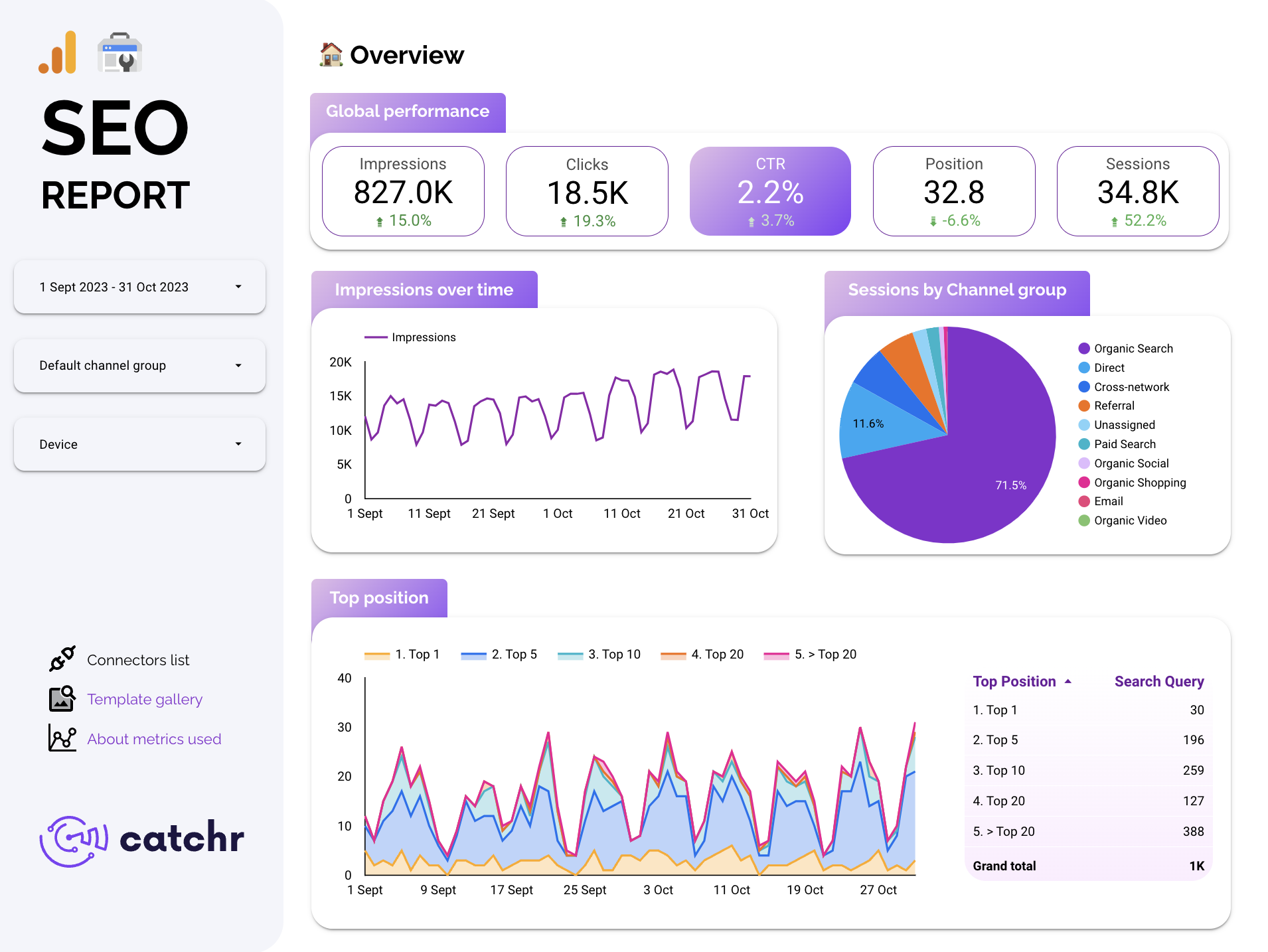
The advantages of combining AI with Looker Studio extend beyond time savings. Organizations gain deeper insights, improved accuracy, and better communication with stakeholders. Understanding these benefits helps justify the investment in tools and training required for implementation.
Time Efficiency and Automation
Manual reporting consumes hours of valuable time each week. AI-powered dashboards update automatically, pulling fresh data from connected sources and refreshing visualizations without human intervention. This automation frees SEO specialists to focus on strategy and execution rather than data manipulation. Reports that previously took three hours to compile now generate in minutes with consistent formatting and accuracy.
Enhanced Data Interpretation
AI algorithms excel at identifying patterns that humans might overlook. For instance, machine learning can detect that pages with certain word counts and internal link structures consistently outperform others. The dashboard surfaces these correlations, enabling data-driven content strategies. Predictive analytics also help prioritize efforts by showing which optimization activities will likely yield the highest returns.
Improved Stakeholder Communication
Executives and clients often struggle with complex SEO data. AI-generated narrative summaries translate numbers into understandable insights. A dashboard might display a chart showing a 15% traffic increase, accompanied by text explaining that the growth stems from featured snippet acquisitions and improved page speed. This clarity builds trust and demonstrates SEO value effectively.
Limitations and Challenges
Despite its power, AI SEO Looker Studio implementation comes with challenges. Recognizing these limitations prevents unrealistic expectations and ensures successful adoption.
Data Quality Dependencies
AI models are only as good as the data they process. Inconsistent tracking, missing historical data, or incorrect URL parameters lead to flawed predictions and misleading insights. Organizations must establish robust data governance practices before implementing AI-enhanced dashboards. Regular audits of tracking implementations and data pipelines remain essential.
Learning Curve and Technical Requirements
Building custom AI integrations requires familiarity with SQL, machine learning concepts, and Google Cloud Platform. While pre-built connectors offer simpler solutions, they may not provide the level of customization needed for advanced analysis. Teams without technical expertise might struggle to implement sophisticated AI features, necessitating training or hiring specialized talent.
Cost Considerations
While Looker Studio itself is free, AI capabilities often incur costs. BigQuery charges for data storage and query processing. Third-party connectors require subscription fees. Custom machine learning model development involves engineering time. Organizations must weigh these expenses against the value derived from enhanced reporting and insights.
Comparison: Traditional SEO Reporting vs. AI-Powered Looker Studio
Understanding the differences between conventional reporting methods and AI-enhanced dashboards clarifies the value proposition. The following table highlights key distinctions across several dimensions.
| Aspect | Traditional SEO Reporting | AI SEO Looker Studio |
|---|---|---|
| Data Processing | Manual extraction and spreadsheet manipulation | Automated pipelines with real-time updates |
| Insight Generation | Human analysis of charts and tables | Machine learning identifies patterns and anomalies |
| Forecasting | Simple trend lines based on historical averages | Predictive models accounting for multiple variables |
| Reporting Frequency | Weekly or monthly manual compilation | Continuous updates with on-demand access |
| Stakeholder Communication | Static PDFs and slide decks | Interactive dashboards with narrative explanations |
| Scalability | Limited by human capacity | Handles large datasets and multiple properties easily |
Practical Guide: Building an AI SEO Looker Studio Dashboard
Implementing an AI-powered SEO dashboard involves several steps, from planning to deployment. This practical guide outlines the process for creating a functional system that delivers actionable insights.
Step 1: Define Objectives and KPIs
Start by identifying the key questions the dashboard must answer. Common objectives include monitoring organic traffic trends, tracking keyword performance, measuring content effectiveness, and identifying technical issues. Select KPIs that align with business goals. For e-commerce sites, focus on conversions and revenue from organic search. For content publishers, prioritize engagement metrics and page views.
Step 2: Connect Data Sources
Establish connections to all relevant data sources within Looker Studio. Begin with native connectors for Google Search Console and Google Analytics 4. Add third-party connectors for specialized SEO tools. If using AI features, export data to BigQuery and connect Looker Studio to the warehouse. Ensure data freshness settings align with reporting needs, balancing real-time updates against query costs.
Step 3: Implement AI Capabilities
Several approaches exist for adding AI to your dashboard. For anomaly detection, use Google Analytics 4’s built-in insights and bring them into Looker Studio. For predictive analytics, create BigQuery ML models that forecast traffic or keyword rankings. For natural language summaries, explore community visualizations or custom solutions using Google Cloud’s Natural Language API.
A practical example involves creating a traffic forecasting model. Using historical daily sessions data, you can train a linear regression or time series model in BigQuery ML. The model considers day of week, seasonality, and recent trends. The resulting predictions appear in Looker Studio as a separate chart alongside actual data, allowing easy comparison.
Step 4: Design the Dashboard Layout
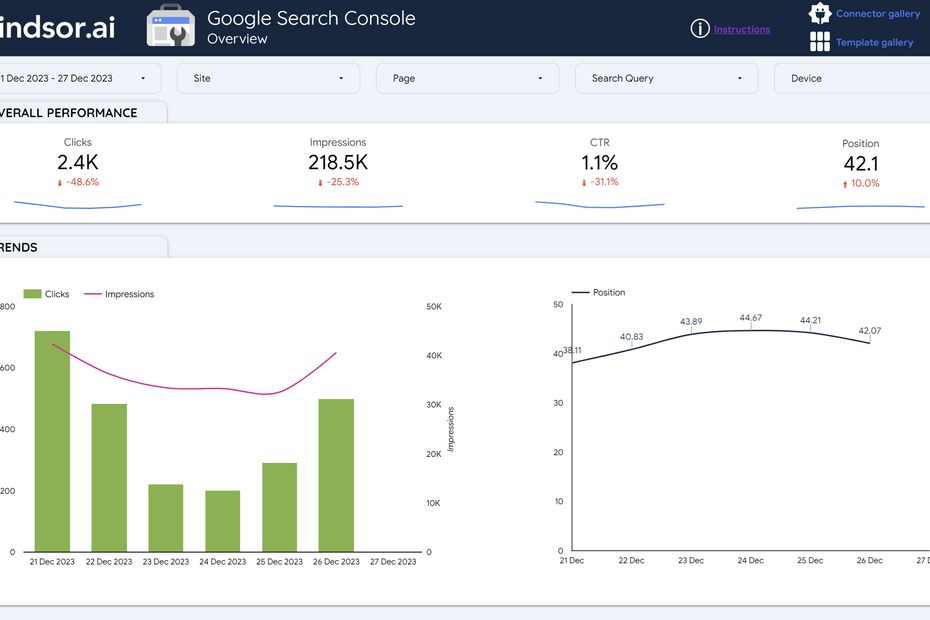
Organize the dashboard logically, grouping related metrics together. Start with an executive summary section showing high-level KPIs and AI-generated insights. Follow with detailed sections for organic traffic, keyword rankings, backlinks, and technical health. Use scorecards for key numbers, line charts for trends, bar charts for comparisons, and tables for granular data.
Incorporate interactive elements like date range controls and filter dropdowns. These allow users to explore data dynamically without modifying the underlying report structure. Ensure the dashboard works well on both desktop and mobile devices, as stakeholders increasingly access reports on various screens.
Step 5: Test and Iterate
Before rolling out the dashboard widely, test it with a small group of users. Gather feedback on usability, clarity, and relevance of the displayed metrics. Verify that AI-generated insights are accurate and actionable. Iterate on the design based on feedback, refining visualizations and adding or removing metrics as needed.
Common Mistakes and How to Avoid Them

Many organizations encounter pitfalls when implementing AI SEO Looker Studio dashboards. Awareness of these common errors helps ensure successful deployment and sustained value.
Overcomplicating the Dashboard
Including too many metrics and charts overwhelms users and obscures key insights. Focus on the most important KPIs that drive decisions. A clean, focused dashboard with 10-15 well-chosen metrics outperforms a cluttered one with 50 metrics. Prioritize actionable data over comprehensive but useless information.
Ignoring Data Accuracy
AI insights derived from inaccurate data mislead rather than inform. Regularly audit tracking implementations, verify that all pages are properly tagged, and reconcile discrepancies between different data sources. Establish data quality checks within the dashboard itself, flagging potential issues for review.
Neglecting User Training
Even the most sophisticated dashboard provides little value if stakeholders cannot use it effectively. Invest time in training sessions that teach users how to navigate the dashboard, interpret AI-generated insights, and apply findings to their work. Create documentation and video tutorials for reference.
Failing to Update AI Models
Machine learning models degrade over time as underlying patterns change. Regularly retrain models with fresh data to maintain accuracy. Set up automated retraining schedules or trigger retraining when model performance metrics indicate drift. Monitor prediction accuracy against actual outcomes to identify when updates are necessary.
Important Notes for Implementation
Several considerations ensure smooth implementation and ongoing operation of AI-enhanced SEO dashboards.
Data Privacy and Compliance
Ensure compliance with data protection regulations like GDPR and CCPA when processing SEO data. Anonymize personal data where necessary and restrict access to sensitive information. Review Google Cloud’s data processing terms and ensure your usage aligns with contractual obligations.
Integration with Existing Workflows
The dashboard should complement, not replace, existing SEO workflows. Integrate insights into weekly team meetings, monthly client reports, and strategic planning sessions. Use automated alerts to notify team members of significant changes, enabling rapid response to emerging issues.
Scalability Planning
Design the dashboard architecture with future growth in mind. As your website expands or you manage multiple client accounts, the dashboard should accommodate additional data sources and increased data volumes. Choose connectors and data storage solutions that scale cost-effectively.
Frequently Asked Questions
What is AI SEO Looker Studio?
AI SEO Looker Studio combines Google’s Looker Studio data visualization platform with artificial intelligence capabilities to automate and enhance SEO reporting. It connects to various SEO data sources, applies machine learning for pattern detection and forecasting, and presents insights through interactive dashboards with natural language explanations.
How does AI improve SEO reporting in Looker Studio?
AI improves SEO reporting by automating data analysis, detecting anomalies that humans might miss, forecasting future performance, and generating narrative summaries of data changes. This reduces manual effort, increases insight depth, and makes reports more accessible to non-technical stakeholders.
Do I need coding skills to build an AI SEO dashboard?
Basic dashboards using pre-built connectors require no coding skills. However, implementing custom AI features like predictive models or natural language generation typically requires familiarity with SQL, Google Cloud Platform, and machine learning concepts. Alternatively, third-party tools offer AI-enhanced connectors that simplify the process.
What are the best data sources for AI SEO analysis?
Essential data sources include Google Search Console for query and page performance, Google Analytics 4 for user behavior and conversions, and backlink tools like Ahrefs or Majestic for link analysis. For advanced AI modeling, exporting data to BigQuery enables comprehensive analysis across all sources.
How much does an AI-powered Looker Studio dashboard cost?
Looker Studio itself is free. Costs arise from data storage and processing in BigQuery, third-party connector subscriptions, and potential development time for custom AI features. Small implementations might cost under $100 per month, while enterprise solutions with extensive data processing and custom models can run into thousands of dollars monthly.
Can AI predict SEO rankings accurately?
AI models can provide probabilistic forecasts of keyword rankings based on historical patterns, competitor activity, and content metrics. While not perfectly accurate, these predictions help prioritize SEO efforts and set realistic expectations. Accuracy improves with more historical data and well-defined model parameters.
Conclusion
AI SEO Looker Studio represents a significant advancement in how organizations monitor and optimize their search presence. By combining automated data visualization with machine learning capabilities, teams gain deeper insights, save substantial time, and communicate results more effectively. The technology transforms raw data into strategic intelligence that drives better decision-making.
Successful implementation requires careful planning, quality data management, and ongoing refinement. Organizations that invest in proper setup and user training realize substantial returns through improved SEO performance and stakeholder satisfaction. As AI capabilities continue evolving, the potential for even more sophisticated analysis and automation grows, making this an exciting area for ongoing investment and innovation.
Start small with essential metrics and one or two AI features, then expand as you gain confidence and demonstrate value. The journey toward AI-powered SEO reporting delivers immediate benefits while building a foundation for future advancements in search analytics.
Xem thêm:
- AI SEO Content Planning: The Complete Guide to Smarter Content Strategies
- How to Use Claude for SEO: A Complete Guide to Ranking Higher with AI Assistance
- AI SEO AI Assistants: The Complete Guide to Automating Your Search Rankings in 2025
- AI SEO Search Behavior: The Complete Guide to Optimizing for AI-Driven Discovery
- AI SEO Informational Intent: The Complete Guide to Winning Search Visibility
Bài viết cùng chủ đề:

AI SEO SEO Automation with Make: The Complete Workflow Guide

AI SEO SEO Automation with Zapier: The Complete Workflow Guide

AI SEO SEO Automation with n8n: The Complete Workflow Guide
AI SEO SEO Automation with Gemini: The Complete Guide to Scaling Organic Growth

AI SEO SEO Automation with Claude: The Complete Guide to Scaling Content in 2025

AI SEO SEO Automation with ChatGPT: The Complete Playbook for 2025

AI SEO & SEO Automation for Affiliate Sites: The 2025 Playbook for Passive Income Growth
AI SEO & SEO Automation for Bloggers: The Complete Guide to Scaling Your Content

AI SEO & SEO Automation for Agencies: The Complete 2025 Playbook

AI SEO and SEO Automation for Ecommerce: The Complete Playbook for 2025

AI SEO & SEO Automation for WordPress: The Complete Playbook for 2025
AI SEO SEO Automation Strategy: The Complete Playbook for 2025

Mastering the AI SEO SEO Automation Process: A Complete Guide to Scaling Organic Growth
AI SEO SEO Automation System: The Complete Guide to Scaling Organic Growth in 2025
AI SEO SEO Automation Platform: The Complete Guide to Scaling Organic Growth in 2025
AI SEO SEO Automation Software: The Complete Guide to Scaling Organic Growth in 2025















