
No products in the cart.
WP Trove AI Prompts: The Complete Guide to Unlocking WordPress Automation

31
Jul
Jul
WP Trove AI Prompts have emerged as a powerful tool for WordPress users who want to streamline their content creation, website management, and development workflows. These prompts serve as structured instructions that help artificial intelligence tools generate precise, context-aware outputs tailored specifically for WordPress environments. Whether you are a blogger, developer, or agency owner, understanding how to craft and use these prompts effectively can save hours of manual work and elevate the quality of your digital presence.
What Are WP Trove AI Prompts?
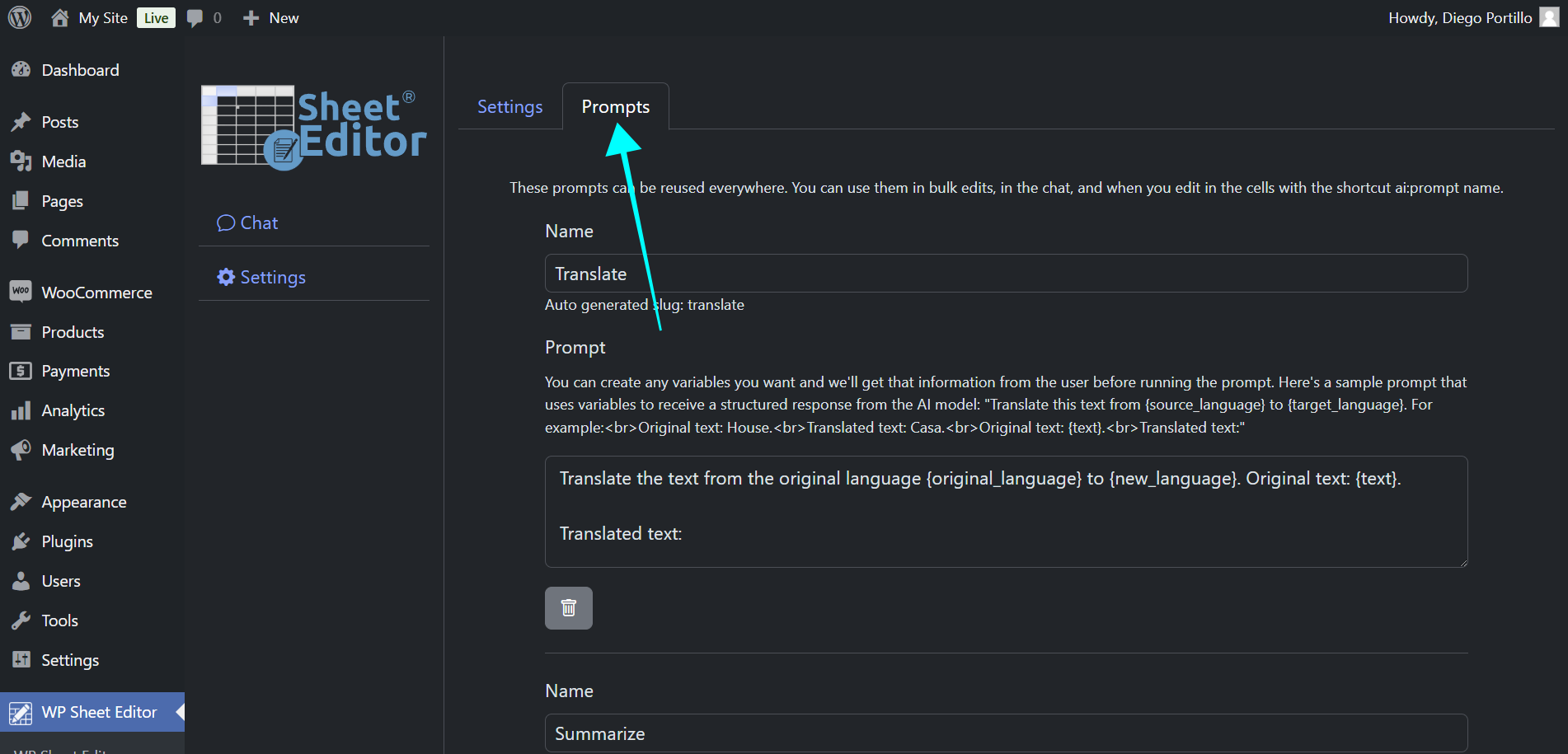
WP Trove AI Prompts are pre-designed or custom-built instruction sets that guide AI models to perform tasks related to WordPress. These tasks range from generating SEO-optimized blog posts and product descriptions to writing custom PHP snippets, debugging code, and creating CSS styling for themes. The term “Trove” implies a collection or repository, suggesting that these prompts are often curated libraries of tested, effective commands that produce consistent results.
The core value of these prompts lies in their specificity. A generic AI prompt might produce vague or generic content, but a well-structured WP Trove AI Prompt includes context about the WordPress platform, the target audience, the desired tone, and the technical constraints. This precision transforms a simple chatbot interaction into a specialized virtual assistant that understands the nuances of WordPress development and content strategy.
Why WP Trove AI Prompts Matter for WordPress Users
The WordPress ecosystem is vast, with over 43% of all websites running on the platform. This popularity creates a high demand for efficient workflows. WP Trove AI Prompts bridge the gap between general-purpose AI capabilities and the specific needs of WordPress site owners. Instead of spending hours researching code syntax or brainstorming content angles, users can deploy a prompt that instantly delivers a structured draft, a functional code block, or a strategic outline.
For developers, these prompts reduce the cognitive load of remembering every function and hook. For content creators, they provide a framework for maintaining consistency in tone and style across multiple posts. For agencies, they enable rapid scaling of client deliverables without sacrificing quality. The result is a more productive, less stressful approach to managing WordPress projects.
Core Components of an Effective WP Trove AI Prompt
Understanding the anatomy of a high-performing prompt is essential for getting the most out of AI tools. A robust WP Trove AI Prompt typically includes several key elements that work together to produce accurate and useful output.
Role Assignment
Every effective prompt starts by defining the role of the AI. For example, instructing the AI to act as a “Senior WordPress Developer” or an “SEO Content Strategist” sets the tone and depth of the response. This role assignment ensures the AI draws on relevant knowledge and uses appropriate terminology.
Context and Background
Providing context about your specific project is crucial. This includes details about your website’s niche, the target audience, the existing design style, and the goal of the task. For instance, a prompt for a vegan food blog will differ significantly from one for a corporate law firm. The more context you provide, the more tailored the output.
Specific Task Description
The task itself must be described with absolute clarity. Instead of saying “write a blog post,” a strong prompt says “write a 1,500-word blog post about the benefits of using renewable energy in urban planning, targeting city officials and including three case studies.” This specificity eliminates ambiguity and guides the AI toward a focused response.
Format and Structure Requirements
Specifying the desired format is vital. Do you need a list, a table, a step-by-step guide, or a code snippet? For code, specify the language (PHP, JavaScript, CSS) and whether you need comments in the code. For content, specify the use of headings, bullet points, and the inclusion of a meta description.
Constraints and Exclusions
Equally important is telling the AI what to avoid. This could include avoiding certain jargon, not using passive voice, excluding specific topics, or adhering to a strict word count. Constraints help refine the output and prevent the AI from going off on tangents.
Categories of WP Trove AI Prompts
The versatility of WP Trove AI Prompts means they can be categorized based on the type of task they are designed to accomplish. Understanding these categories helps users quickly select the right prompt for their immediate need.
Content Creation Prompts
These prompts focus on generating written material. They can produce full articles, product reviews, landing page copy, email newsletters, and social media posts. Advanced content prompts also include instructions for SEO optimization, such as incorporating specific keywords, generating meta titles, and suggesting internal linking structures.
Code Generation and Debugging Prompts
For developers, these prompts are invaluable. They can generate custom WordPress loops, create shortcodes, write functions for theme customization, or debug existing code. A well-crafted prompt might ask the AI to “write a PHP function that filters out products below a certain price from the WooCommerce shop page” and then explain how the code works.
Design and Styling Prompts
These prompts help with the visual aspects of a WordPress site. They can generate CSS to adjust spacing, create responsive design rules, or style specific elements like buttons and forms. Some prompts even assist with generating SVG graphics or suggesting color palettes based on a brand’s identity.
SEO and Performance Prompts
These prompts are designed to improve a site’s search engine ranking and loading speed. They can generate schema markup, create optimized alt text for images, suggest improvements for Core Web Vitals, or draft a robots.txt file. They are essential for technical SEO audits and ongoing site maintenance.
Plugin and Theme Development Prompts
For those building products for the WordPress marketplace, these prompts assist in scaffolding plugin structures, writing readme files, generating translation files, and creating unit tests. They help ensure that code adheres to WordPress coding standards and best practices.
Benefits of Using WP Trove AI Prompts
The adoption of WP Trove AI Prompts brings a multitude of advantages that impact both the quality of work and the efficiency of the workflow. These benefits are tangible and measurable across different user roles.
- Time Efficiency: Tasks that typically take hours, such as writing a 2,000-word article or debugging a complex script, can be completed in minutes. This allows users to focus on strategy and higher-level decision-making.
- Consistency: Using the same prompt template for recurring tasks ensures a uniform style and structure. This is particularly beneficial for multi-author blogs or agencies managing multiple client sites.
- Learning Tool: For beginners, examining the output of a well-structured prompt can be educational. It provides examples of clean code, proper content structure, and effective SEO practices.
- Cost Reduction: By automating routine tasks, businesses can reduce their reliance on freelancers or additional staff for content generation and basic development work.
- Scalability: Whether you need 10 blog posts or 50 custom code snippets, prompts allow you to scale your output without a proportional increase in effort or cost.
- Act as a [Role]
- Your task is to [Specific Task]
- The context is [Background Information]
- The output must be in [Format]
- Include [Key Elements]
- Avoid [Exclusions]
- The tone should be [Tone]
Limitations and Challenges
While the benefits are compelling, it is equally important to acknowledge the limitations of WP Trove AI Prompts. A balanced perspective prevents over-reliance and ensures users apply critical thinking to the AI’s output.
Lack of Nuance: AI models, despite their sophistication, can miss subtle cultural or emotional nuances in content. A prompt might generate technically correct text that feels robotic or fails to connect with a specific audience on an emotional level.
Code Inefficiency: Generated code often works but may not be optimized for performance. It might use excessive database queries or lack proper escaping for security. Always review and test generated code in a staging environment.
Context Limitations: AI models have a finite context window. If your prompt is too long or the task requires referencing a large codebase, the AI may lose track of earlier instructions or produce incomplete responses.
Dependency Risk: Over-reliance on prompts can stifle creativity and problem-solving skills. It is essential to understand the “why” behind the output, not just the “what.”
Comparison: WP Trove AI Prompts vs. Traditional Methods

To fully appreciate the value of these prompts, it helps to compare them against traditional methods of content creation and development. The table below highlights the key differences.
| Aspect | WP Trove AI Prompts | Traditional Methods |
|---|---|---|
| Speed | Near-instant generation of drafts and code | Hours or days for research, writing, and coding |
| Cost | Low marginal cost per use (subscription-based AI tools) | High cost for professional writers and developers |
| Consistency | High consistency when using the same prompt template | Variable quality depending on the individual’s skill and mood |
| Originality | Risk of generic output if prompts are not detailed | High potential for unique, human-driven creativity |
| Technical Accuracy | Good for standard tasks, but requires human review for edge cases | High accuracy from experienced professionals |
| Scalability | Extremely scalable with minimal additional effort | Scaling requires hiring more people or increasing hours |
This comparison shows that while AI prompts offer superior speed and cost-efficiency, traditional methods still hold an edge in tasks requiring deep creativity, emotional intelligence, and complex problem-solving.
Practical Application: How to Create Your Own WP Trove AI Prompts
Creating effective prompts is a skill that improves with practice. The following step-by-step guide provides a framework for building prompts that deliver exceptional results.
Step 1: Define the End Goal
Before writing anything, clearly state what you want the final output to be. Write it down in a single sentence. For example, “I need a 1,000-word comparison article on managed WordPress hosting vs. shared hosting for small business owners.”
Step 2: Gather Contextual Details
Collect all the information the AI needs to produce a relevant response. This includes your target audience’s demographics, the tone of your brand (professional, casual, witty), and any specific data or sources you want included.
Step 3: Write the Prompt Structure
Use the following template as a starting point:
Step 4: Test and Refine
Run the prompt and evaluate the output. Identify areas where the AI misunderstood your instructions. Adjust the prompt by adding more clarity or examples. Iterate until the output consistently meets your standards.
Step 5: Build a Personal Library
Once you have a prompt that works well, save it in a document or a tool like Notion. Categorize your prompts by function (content, code, design) and add notes on when to use them. This library becomes your personal WP Trove.
Common Mistakes and How to Avoid Them

Even experienced users make errors when working with AI prompts. Recognizing these pitfalls is the first step toward avoiding them and ensuring high-quality output.
Being Vague
Asking for “a blog post about marketing” will yield generic, useless content. The fix is to be hyper-specific. Include the target keyword, the word count, the primary audience, and the desired call to action.
Ignoring Platform-Specifics
WordPress has its own ecosystem of themes, plugins, and hooks. A prompt that ignores this context might generate code that conflicts with popular plugins or uses outdated functions. Always specify that the code should be compatible with the latest WordPress version and follow best practices.
Skipping the Review Process
Publishing AI-generated content or deploying AI-generated code without review is a recipe for disaster. Always fact-check statistics, verify code syntax, and test functionality in a sandbox environment.
Overloading the Prompt
Trying to accomplish too many tasks in a single prompt often leads to a muddled response. Break complex projects into smaller, focused prompts. For example, generate the outline first, then the introduction, then the body sections.
Not Providing Examples
AI models respond well to examples. If you want a specific style, provide a sample paragraph or a link to a reference article. This gives the AI a concrete target to emulate.
Important Notes for Maximizing Results
To truly master WP Trove AI Prompts, consider these advanced tips that go beyond the basics. These notes come from practical experience and can significantly enhance your output quality.
Use Prompt Chaining: Instead of asking for a full article in one go, break it into a chain. First, ask for an outline. Then, ask for a draft of each section based on that outline. This approach yields more coherent and detailed results.
Leverage Negative Prompts: Many AI tools allow you to specify what you do not want. Use this feature to exclude common filler phrases, passive voice, or overly complex vocabulary.
Incorporate Data and Statistics: When writing content, instruct the AI to include specific, verifiable data points. This adds authority and credibility to the output, aligning with E-E-A-T principles.
Stay Updated on AI Capabilities: AI models are constantly improving. A prompt that worked six months ago might be outdated now. Regularly test your prompt library and update it to leverage new features like image generation or web browsing capabilities.
Combine AI with Human Oversight: The best results come from a partnership. Use AI to generate the initial draft or code, then apply your human expertise to refine, personalize, and polish the final product.
Frequently Asked Questions (FAQ)
What exactly is a WP Trove AI Prompt?
A WP Trove AI Prompt is a structured instruction set designed to guide an AI model in performing a specific task related to WordPress. This can include generating content, writing code, creating design styles, or optimizing for SEO. The prompt provides context, constraints, and formatting requirements to ensure the AI produces accurate and useful output.
Are WP Trove AI Prompts free to use?
The prompts themselves are often shared for free within communities and blogs. However, using them requires access to an AI model, which may have associated costs. Some AI platforms offer free tiers with limited usage, while others operate on a subscription or pay-per-token basis.
Can WP Trove AI Prompts replace a human developer?
No. While these prompts can automate many routine tasks and speed up development, they cannot replace the critical thinking, architectural planning, and problem-solving skills of a human developer. AI is a tool that augments human capability, not a substitute for it.
How do I ensure the code generated by these prompts is secure?
Always review generated code for security vulnerabilities. Look for proper data sanitization, nonces for form submissions, and capability checks for user permissions. Test the code in a staging environment and consider using a security plugin to scan for common issues.
What is the best AI model for using WP Trove AI Prompts?
The best model depends on your specific needs. For complex code generation, models with strong programming capabilities are preferred. For creative writing, models known for their language fluency are better. Many users find that using a combination of models yields the best results across different task types.
Can I use these prompts for WooCommerce sites?
Absolutely. WP Trove AI Prompts can be tailored for WooCommerce tasks such as generating product descriptions, writing email templates for abandoned carts, creating discount coupon rules, or developing custom payment gateway integrations. The key is to include WooCommerce-specific context in your prompt.
Conclusion
WP Trove AI Prompts represent a significant shift in how WordPress users approach their daily tasks. By providing structured, context-rich instructions to AI models, users can unlock unprecedented levels of productivity and creativity. The key to success lies in understanding the components of a good prompt, recognizing the limitations of AI, and maintaining a rigorous review process.
Building a personal library of tested prompts is an investment that pays dividends over time. As AI technology continues to evolve, the potential for these prompts will only grow, offering even more sophisticated assistance for content creation, development, and design. The future of WordPress management is not about replacing human intelligence but about augmenting it with the speed and scalability of artificial intelligence. By mastering the art of the prompt, you position yourself at the forefront of this exciting evolution.
Xem thêm:
- AI SEO PAA Optimization: The Complete Guide to Winning People Also Ask Boxes in 2025
- AI Metadata Generator: The Ultimate Tool for Streamlining Digital Asset Management
- AI SEO Topic Ideas: The Complete Guide to Generating High-Ranking Content at Scale
- The Ultimate Guide to AI SEO Chrome Extensions: Work Smarter, Rank Higher
- AI SEO Looker Studio: The Complete Guide to Automated Reporting
Bài viết cùng chủ đề:

AI SEO SEO Automation with Make: The Complete Workflow Guide

AI SEO SEO Automation with Zapier: The Complete Workflow Guide

AI SEO SEO Automation with n8n: The Complete Workflow Guide
AI SEO SEO Automation with Gemini: The Complete Guide to Scaling Organic Growth

AI SEO SEO Automation with Claude: The Complete Guide to Scaling Content in 2025

AI SEO SEO Automation with ChatGPT: The Complete Playbook for 2025

AI SEO & SEO Automation for Affiliate Sites: The 2025 Playbook for Passive Income Growth
AI SEO & SEO Automation for Bloggers: The Complete Guide to Scaling Your Content

AI SEO & SEO Automation for Agencies: The Complete 2025 Playbook

AI SEO and SEO Automation for Ecommerce: The Complete Playbook for 2025

AI SEO & SEO Automation for WordPress: The Complete Playbook for 2025
AI SEO SEO Automation Strategy: The Complete Playbook for 2025

Mastering the AI SEO SEO Automation Process: A Complete Guide to Scaling Organic Growth
AI SEO SEO Automation System: The Complete Guide to Scaling Organic Growth in 2025
AI SEO SEO Automation Platform: The Complete Guide to Scaling Organic Growth in 2025
AI SEO SEO Automation Software: The Complete Guide to Scaling Organic Growth in 2025















