
No products in the cart.
WP Trove AI Writer Review: The Ultimate AI Content Tool for WordPress
31
Jul
Jul
The demand for high-quality, SEO-optimized content has never been greater, and tools like the WP Trove AI Writer are stepping in to bridge the gap between human creativity and machine efficiency. This platform is designed specifically for WordPress users, aiming to streamline the entire content creation process directly from the dashboard you already know. Whether you are a blogger, an e-commerce store owner, or a digital marketing agency, understanding what this tool offers can significantly alter your workflow. In this comprehensive guide, we will dissect every feature, benefit, and potential drawback of the WP Trove AI Writer, providing you with the insights needed to decide if it is the right investment for your content strategy.
What Exactly is the WP Trove AI Writer?
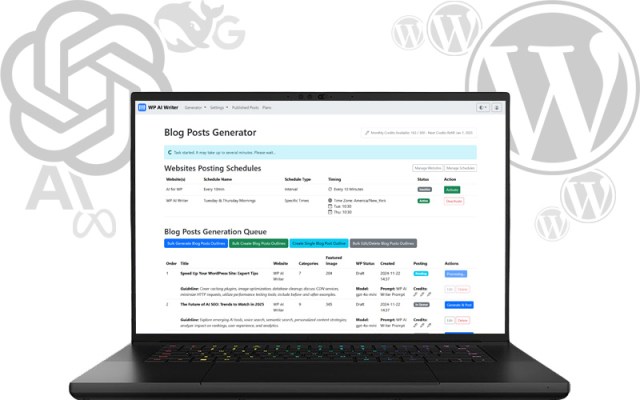
The WP Trove AI Writer is a native WordPress plugin that integrates artificial intelligence directly into your site’s backend. Unlike standalone AI writing tools that require you to copy and paste text between platforms, this solution operates where you publish. It leverages advanced language models to generate drafts, rewrite existing content, and even produce SEO-optimized briefs without leaving the WordPress editor. The core value proposition is convenience; it eliminates the friction of switching between tabs and formatting text manually. For site owners who produce daily content, this integration saves hours of administrative work, allowing more time for strategy and editing.
Core Features and Capabilities of the Plugin
To truly understand the utility of this tool, it is essential to break down its primary functions. The WP Trove AI Writer is not just a simple text generator; it is a suite of content tools tailored for the WordPress ecosystem.
Native Integration with Gutenberg and Classic Editor
The plugin works seamlessly with both the modern Gutenberg block editor and the classic editor. This dual compatibility ensures that users who have not migrated to the block-based system are not left behind. When you install the plugin, you gain access to a dedicated AI panel within the editor sidebar. From this panel, you can command the AI to generate a full article outline, write a specific section, or suggest a list of compelling headlines. The generated content appears directly in the editor, formatted with proper heading tags and paragraph breaks, ready for your review.
One-Click Article Generation
One of the standout features is the ability to generate a complete article from a simple title or keyword. The WP Trove AI Writer uses a multi-step process internally: it first creates an outline, then expands each section, and finally adds an introduction and conclusion. This automated workflow is particularly useful for covering evergreen topics quickly. For example, if you input “best running shoes for flat feet,” the tool will produce a structured article covering causes, top picks, and buying guides. While the initial output requires human editing to add personal experience and brand voice, the structural foundation is solid.
Content Rewriting and Paraphrasing Tools
Beyond generating new text, the plugin excels at refreshing old content. The rewrite feature allows you to select any block of text and ask the AI to rephrase it. This is invaluable for updating outdated statistics or removing duplicate content issues. The tool offers different tones, such as formal, conversational, or persuasive, giving you control over the final voice. This function also helps in creating variations of product descriptions for e-commerce sites, preventing the “thin content” penalty from search engines.
SEO Analysis and Keyword Optimization
The WP Trove AI Writer includes a built-in SEO analyzer that checks your content against your target keyword. It provides a real-time score based on keyword density, heading distribution, and readability. Unlike generic SEO plugins, this tool goes a step further by suggesting semantic keywords (LSI) that you can inject into the text with a single click. This ensures that your content is not just readable but also aligned with the search engine’s understanding of the topic. The integration with Yoast SEO and Rank Math is also present, allowing you to see both scores side-by-side.
How Does the WP Trove AI Writer Compare to Standalone Tools?

The market is flooded with AI writing assistants like Jasper, Copy.ai, and ChatGPT. To understand where the WP Trove AI Writer stands, a direct comparison is necessary. The primary difference lies in the workflow. Standalone tools require a “copy-paste” approach, which often leads to formatting errors and broken HTML when transferring to WordPress. The WP Trove AI Writer eliminates this entirely. | Feature | WP Trove AI Writer | Standalone AI Tools (e.g., Jasper) |
| — | — | — |
| Workflow | Directly inside WordPress editor | External dashboard required |
| Formatting | Automatic (H2, H3, paragraphs) | Manual (must copy/paste and style) |
| Content Storage | Auto-saved in WordPress drafts | Requires export/import |
| SEO Integration | Native analysis with suggestions | Requires third-party plugins |
| Learning Curve | Low (familiar WP interface) | Medium (new UI to learn) |
| Price Point | Typically subscription-based per site | Often higher, based on word count | For users who manage multiple sites, the standalone tools can become expensive due to word-count limits. The WP Trove AI Writer usually offers unlimited or high-volume word generation for a flat fee, making it a more predictable cost. However, standalone tools often have more advanced templates for specific use cases like Facebook ads or Google Ads copy. The WP Trove AI Writer focuses primarily on long-form content, which is the bread and butter of SEO.
Step-by-Step Guide to Using the WP Trove AI Writer
Getting started with this plugin is straightforward, but following a specific workflow will maximize the quality of the output.
Step 1: Installation and API Setup
First, purchase and install the plugin from the WordPress repository or the vendor’s website. After activation, navigate to the settings page. You will need to enter an API key, which is provided after subscription. This key connects the plugin to the AI engine. Ensure you have a stable internet connection during this process. The setup wizard will also ask for your content preferences, such as default language and tone.
Step 2: Generating the Initial Outline
Create a new post in WordPress. In the AI panel, enter your primary keyword. Select the “Generate Outline” option. The A Review these critically. The AI might miss a crucial point that your audience cares about. Add or remove headings manually before proceeding. This step is crucial because the outline dictates the entire structure of the article.
Step 3: Writing Section by Section
Instead of clicking “Generate Full Article,” which can sometimes produce generic fluff, write section by section. Click on the first H2 heading you want to fill. In the AI panel, select “Write Section.” The plugin will generate 2-3 paragraphs based on the heading context. This method allows you to maintain control over the narrative flow and inject your unique insights as you go. It also prevents the AI from going off-topic, which can happen with longer generation tasks.
Step 4: Optimizing with the SEO Panel
Once the draft is complete, run the SEO analysis. The WP Trove AI Writer will highlight areas where you have missed the keyword or where the readability is too complex. Use the “Suggest LSI Keywords” button to add related terms. For example, if your keyword is “keto diet,” the tool might suggest “low-carb recipes,” “ketosis,” and “macros.” Incorporate these naturally into the text. Finally, check the “Readability” score and adjust your sentences to be shorter if necessary.
Benefits of Using an Integrated AI Writer
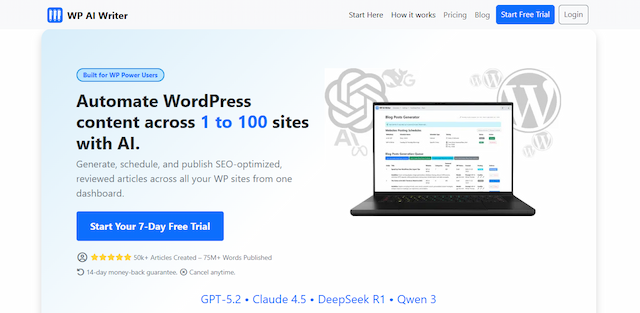
The advantages of using the WP Trove AI Writer extend beyond simple time savings. The integration offers strategic benefits for your website’s growth. – Consistent Publishing Schedule: With the ability to generate a first draft in under five minutes, you can maintain a daily posting schedule without burning out your writing team.
- Overcoming Writer’s Block: The AI acts as a brainstorming partner. If you are stuck on how to start a paragraph, the tool can provide three different variations, sparking your creativity.
- Scalability for Agencies: For agencies managing multiple client sites, this plugin allows you to scale content production without hiring additional writers. You can generate a base draft, then have a junior editor polish it, reducing the cost per article significantly.
- Improved On-Page SEO: The built-in analyzer ensures that every article meets basic SEO criteria before it is published. This reduces the need for post-publication edits and helps search engines crawl your content more effectively.
Limitations and Potential Drawbacks
No tool is perfect, and the WP Trove AI Writer has its limitations. Being aware of these will help you set realistic expectations. – Lack of Fact-Checking: The AI generates text based on patterns, not verified facts. It can confidently state incorrect information, especially regarding current events or niche technical details. You must verify all statistics and claims before publishing.
- Generic Voice: The default output tends to be neutral and sometimes bland. To stand out, you must heavily edit the text to inject personality, humor, or a unique perspective. The AI cannot replicate your personal experiences.
- Dependency on API: If the AI provider experiences downtime, your ability to generate content is halted. You are reliant on a third-party service for your core workflow.
- Learning Curve for Prompts: While the interface is simple, crafting effective prompts to get the desired output takes practice. Vague prompts yield vague results.
Common Mistakes to Avoid When Using the Plugin
Many users fail to get good results because they misuse the tool. Here are the most common pitfalls and how to avoid them.
Publishing Content Without Editing
The biggest mistake is publishing the raw AI output. Search engines are getting better at detecting unedited AI text, and users can smell it a mile away. Always rewrite the introduction and conclusion in your own words. Add real examples, screenshots, or case studies to add value that the AI cannot provide.
Ignoring the Outline Structure
Some users skip the outline step and go straight to full article generation. This often results in a wall of text with poor logical flow. Always review and customize the outline. A good outline is the difference between a coherent article and a rambling mess.
Keyword Stuffing via SEO Suggestions
The SEO panel suggests LSI keywords, but it does not force you to use them. Blindly adding every suggestion will make your content sound robotic. Use only the keywords that fit naturally into the context. If a suggestion feels forced, skip it.
Using the Tool for YMYL Topics
Avoid using the WP Trove AI Writer for “Your Money or Your Life” topics like medical advice, legal counsel, or financial planning. The AI lacks the nuance and liability awareness required for these fields. Publishing inaccurate advice in these niches can damage your credibility and potentially harm your readers.
Important Notes on Content Quality and E-E-A-T
Google’s algorithms prioritize Experience, Expertise, Authoritativeness, and Trustworthiness (E-E-A-T). The WP Trove AI Writer can help with the “Expertise” part by providing a well-structured base, but it cannot provide “Experience.” You must add your own insights, data from your business, or quotes from industry experts. For example, if you are writing a review of a plugin, include screenshots of your own dashboard and mention how long you have used it. This personal touch is what separates a high-ranking article from a generic AI-generated one. The tool is a facilitator, not a replacement for human judgment.
Pricing and Value for Money
The pricing structure for the WP Trove AI Writer varies depending on the plan. Typically, t When evaluating the cost, compare it to the hourly rate of a freelance writer. If a freelancer charges $50 per hour and takes two hours to write a 1500-word article, that is a $100 cost. The plugin, on the other hand, can produce that draft in minutes, leaving you with only editing time. For high-volume content operations, the plugin pays for itself quickly. However, for a hobby blogger who writes one article a month, the subscription might not be justifiable.
Frequently Asked Questions (FAQ)
Is the WP Trove AI Writer compatible with all WordPress themes?

Yes, the plugin operates on the backend and does not interfere with your theme’s frontend design. It works with any theme that uses the standard WordPress editor. The generated content is stored as standard HTML blocks, ensuring compatibility across all devices and browsers.
Can I use the WP Trove AI Writer to rewrite existing articles?
Absolutely. The plugin has a dedicated “Rewrite” feature. You can select a paragraph or an entire article and ask the AI to rephrase it. This is excellent for updating old content to improve freshness and remove outdated references. The tool will maintain the original meaning while changing the sentence structure.
Does the plugin support languages other than English?
Yes, the WP Trove AI Writer supports multiple languages, including Spanish, French, German, and Portuguese. You can set the default language in the plugin settings. However, the quality of the output in non-English languages may be slightly lower than in English due to the training data of the underlying AI model.
Will Google penalize me for using AI-generated content?
Google’s stance is that it penalizes spammy, low-quality content regardless of how it is produced. If you use the WP Trove AI Writer to create helpful, original content that is edited and fact-checked, you will not be penalized. The key is to add substantial value beyond what the AI provides.
What happens if I cancel my subscription?
If you cancel your subscription, you will lose access to the AI generation features. However, all content you have already generated and saved in WordPress will remain on your site. You will not lose any of your published posts or drafts.
Conclusion
The WP Trove AI Writer is a powerful asset for WordPress users who want to accelerate their content production without sacrificing quality. Its native integration sets it apart from generic AI tools, offering a streamlined workflow that saves time and reduces friction. While it is not a replacement for human creativity and fact-checking, it serves as an exceptional first-draft generator and SEO assistant. By understanding its limitations and following the best practices outlined in this guide, you can leverage this tool to scale your content strategy, improve your search rankings, and maintain a consistent publishing cadence. The future of content creation is a collaboration between human insight and artificial intelligence, and this plugin is a solid bridge between the two.
Xem thêm:
- AI SEO for Nonprofits: The Complete Guide to Boosting Visibility and Donations
- How to Use AI for SEO: A Complete Guide to Smarter Rankings
- AI SEO Mobile First Indexing: The Complete Guide to Future-Proofing Your Rankings
- AI SEO Claude Search Optimization: The Complete Guide to Ranking in the Age of Conversational AI
- AI SEO Keyword Cluster Generator: The Complete Guide to Smarter Content Planning
Bài viết cùng chủ đề:

AI SEO SEO Automation with Make: The Complete Workflow Guide

AI SEO SEO Automation with Zapier: The Complete Workflow Guide

AI SEO SEO Automation with n8n: The Complete Workflow Guide
AI SEO SEO Automation with Gemini: The Complete Guide to Scaling Organic Growth

AI SEO SEO Automation with Claude: The Complete Guide to Scaling Content in 2025

AI SEO SEO Automation with ChatGPT: The Complete Playbook for 2025

AI SEO & SEO Automation for Affiliate Sites: The 2025 Playbook for Passive Income Growth
AI SEO & SEO Automation for Bloggers: The Complete Guide to Scaling Your Content

AI SEO & SEO Automation for Agencies: The Complete 2025 Playbook

AI SEO and SEO Automation for Ecommerce: The Complete Playbook for 2025

AI SEO & SEO Automation for WordPress: The Complete Playbook for 2025
AI SEO SEO Automation Strategy: The Complete Playbook for 2025

Mastering the AI SEO SEO Automation Process: A Complete Guide to Scaling Organic Growth
AI SEO SEO Automation System: The Complete Guide to Scaling Organic Growth in 2025
AI SEO SEO Automation Platform: The Complete Guide to Scaling Organic Growth in 2025
AI SEO SEO Automation Software: The Complete Guide to Scaling Organic Growth in 2025















